ConfigLib
A lightweight config library for Fabric mods. Describe your options as plain Java objects and get a working in-game config screen, a /
Features
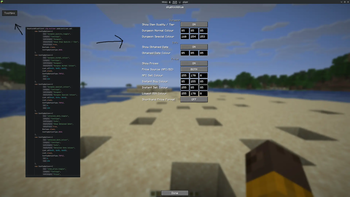
- In-game config screen: tabbed by category, with sub-category headings to group related options within a tab.
- Seven option types: BOOL, NUM (int and float unified), STR, ENUM (any Java enum), LIST, TUPLE, and BUTTON.
- LIST and TUPLE render as an expanding set of entry boxes rather than a single string field, and can be restricted to a specific element type. Min/max clamping applies per-entry (e.g. clamping each component of an RGB value to 0-255), not just to a single NUM.
- BUTTON runs a callback instead of holding a value, for actions that don't belong in the saved config.
- Auto-registered command: /
opens the screen, no extra setup needed. ConfigCommand.registerWithAlternativescan register additional command aliases that open the same screen. - JSON persistence: options round-trip to
/ .json. A corrupted or outdated file falls back to defaults instead of crashing the game. BUTTON options are skipped since they hold no value.
How to install
Add these to each section of file build.gradle
repositories {
	mavenCentral()
	maven { url = "https://raw.githubusercontent.com/a0fefd/ConfigLib/mvn-repo/" }
}
dependencies {
	implementation "com.a0fefd:configlib:<version>"
}
Replace <version> with your target version.
Usage
Config config = new Config("mymod", null);

config.builder.add(new ConfigOption<>(
        "example_toggle",
        "General",
        true,
        Boolean.class,
        ConfigOptionType.BOOL
));

config.load();
ConfigCommand.register(config);
That is enough to get a working /mymod command opening a config screen with one toggle in it. Add more ConfigOptions for more settings, and use the category and subCategory fields to organize a larger config into tabs and sections.
Requirements
- Minecraft 26.1.2
- Fabric Loader 0.19.3 or newer
- Fabric API
- Java 25 or newer