

AIHelper - Your Ultimate AI Assistant for Minecraft
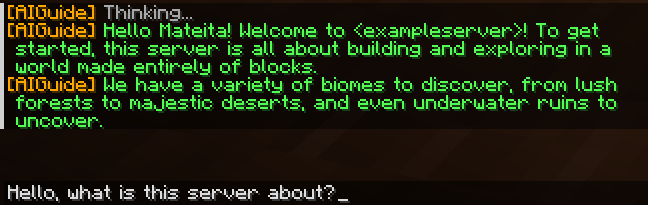
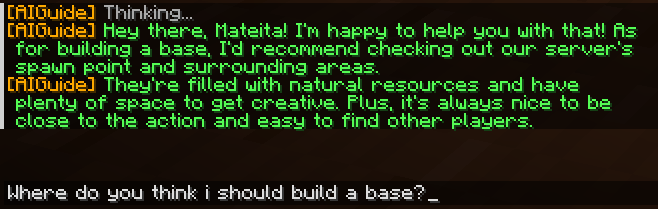
AIHelper is a powerful Minecraft plugin that integrates AI assistance directly into your game. Whether you're a server admin, developer, or casual player, AIHelper enhances your experience by providing intelligent responses, automated assistance, and game-related insights—all in real time!
Features:
✅ Smart AI Responses – Get players some instant help with commands, gameplay tips, and more.
✅ Multi-AI Support – Works with OpenAI, Claude, Hugging Face, and Ollama.
✅ Customizable Context – AI learns from server-specific information for personalized replies.
✅ Efficient Caching – Speeds up responses by remembering previous queries.
✅ Easy Integration – Plug and play with minimal setup required.
Enhance your Minecraft server with the power of AI—AIHelper is here to assist!
The config file:
# AI Guide Plugin Configuration

# AI Provider Selection
# Available options: "ollama", "groq", "anthropic" (claude) , "huggingface", "openai"
# Recommended is ollama as it runs locally
ai_provider: "ollama"

# Ollama Configuration (free, runs locally)
# You need to install Ollama on your server: https://ollama.com/download
# No API key required as it runs locally
# Default URL is for local installation
# Recommended! Free and local! No internet hassle.
# To check if ollama works use http://localhost:11434 also if running on alternate computer please install on that computer/server
# Also to install run in a cmd ollama pull <anymodel> (in the anymodel thing you can put llama3 as default) ( and before that run ollama serve if on linux )
ollama_url: "http://localhost:11434"
# Recommended models: llama3, gemma, mistral but you can put any!
ollama_model: "llama3"

# Groq Configuration (generous free tier)
# Get your free API key at: https://console.groq.com/keys
# Use this if you know what you are doing!
groq_api_key: "yourapikey"
# Recommended models: llama3-8b-8192, gemma-7b-it
groq_model: "llama3-8b-8192"

# Anthropic Claude Configuration (free trial credits)
# Use this if you know what you are doing! also
# Get a free API key:
# Go to https://console.anthropic.com/
# Sign up for an account (you get free credits to start) | but it is limited |
# Create an API key in the console
anthropic_api_key: "yourapikey"
# Recommended model: claude-3-haiku-20240307
anthropic_model: "claude-3-haiku-20240307"

# HuggingFace Configuration (as fallback)
# Use this if you know what you are doing!
# Also if you really want deepseek you can use this... Get a key here for free: https://huggingface.co/settings/tokens
huggingface_api_key: "api_key_here"
huggingface_model: "deepseek-ai/deepseek-coder-1.3b-base"

# OpenAI Configuration (as fallback)
# Use this if you know what you are doing! You also do require a paid API key
openai_api_key: "api_key_here"
openai_model: "gpt-3.5-turbo"

# System prompt for the AI | Basically start of conversation
system_prompt: "You are an AI assistant for a Minecraft server. Your role is to help players with server-specific information and answer general Minecraft questions. Be concise and friendly. Also you ONLY know about these commands: /giveinfo, /info, /listinfo, /deleteinfo, /aichat, /aireload. Do NOT mention or suggest any commands that aren't in this list unless THEY ARE SPECIFIED IN THE /giveinfo for example: we have a shop just say /shop but not assume /spawn or something only give commands that actually are either in the list or are said in the info"

# Cooldown between AI requests (in seconds)
# DO NOT MAKE IT UNDER 2 seconds! It may overload the ai!
cooldown_seconds: 3

# Enable chatbot functionality (respond to chat messages)
chatbot_enabled: true

# Chat prefix to trigger AI response in normal chat
chat_prefix: "?"

# Enable debug mode (for detailed error messages)
# Default: true - Leave this as so
debug_mode: true

# Run first-time setup wizard for server admin when plugin loads first time
run_setup_wizard: true

# Server-specific information will be stored here
# This if you do not want any hassle or AI and just want diffrent subjects people will do /info (subject) and they will see the stuff you write
info:
example: "This is an example topic. Replace with your server info. You can make some examples using /giveinfo (title) (content) or use config"
Starting: "Welcome to <exampleserver>! To get started, ....(complete this further, fellow admin)"
Commands and perms
commands:
giveinfo:
description: Add information to the AI database
usage: /giveinfo <topic> <information>
permission: aiguide.admin
info:
description: Get information from the custom written things made by the server owner for the AI
usage: /info <topic> [additional query]
permission: aiguide.use (but it will limit all the other)
listinfo:
description: List all available information topics
usage: /listinfo
permission: aiguide.use (but it will limit all the other)
deleteinfo:
description: Delete a topic from the AI database
usage: /deleteinfo <topic>
permission: aiguide.admin
aichat:
description: Toggle AI chat mode (all messages sent to AI)
usage: /aichat
permission: aiguide.use (but it will limit all the other)
aireload:
description: Reload the plugin configuration
usage: /aireload
permission: aiguide.admin

permissions:
aiguide.admin:
description: Allows administration of the AI Guide plugin
default: op
aiguide.use:
description: Allows use of the AI Guide plugin
default: true

| Version | Minecraft | Loader | Download |
|---|---|---|---|
|
Aihelper 1.1-4 1.1-4 |
1.21, 1.21.1, 1.21.2, 1.21.3, 1.21.4, 1.21.5, 1.21.6, 1.21.7, 1.21.8, 1.21.9, 1.21.10, 1.21.11, 26.1, 26.1.1, 26.1.2, 26.2, 26.3
|
bukkit, paper, spigot
|
Download |
|
Aihelper 1.1-3 1.1-3 |
1.21, 1.21.1, 1.21.2, 1.21.3, 1.21.4, 1.21.5, 1.21.6, 1.21.7, 1.21.8, 1.21.9, 1.21.10, 1.21.11, 26.1, 26.1.1, 26.1.2, 26.2
|
bukkit, paper, spigot
|
Download |
|
Aihelper 1.1-2 1.1-2 |
1.21, 1.21.1, 1.21.2, 1.21.3, 1.21.4, 1.21.5, 1.21.6, 1.21.7, 1.21.8, 1.21.9, 1.21.10, 1.21.11, 26.1
|
bukkit, paper, spigot
|
Download |
|
Aihelper 1.1-1 1.1-1 |
1.21, 1.21.1, 1.21.2, 1.21.3, 1.21.4, 1.21.5, 1.21.6, 1.21.7, 1.21.8, 1.21.9, 1.21.10, 1.21.11
|
bukkit, paper, spigot
|
Download |
|
Aihelper 1.1 1.1 |
1.21, 1.21.1, 1.21.2, 1.21.3, 1.21.4, 1.21.5, 1.21.6, 1.21.7, 1.21.8, 1.21.9
|
bukkit, paper, spigot
|
Download |
|
Aihelper 1.1-A-1 1.1-A-1 |
1.21, 1.21.1, 1.21.2, 1.21.3, 1.21.4, 1.21.5, 1.21.6, 1.21.7, 1.21.8
|
bukkit, paper, spigot
|
Download |
|
AIHelper 1.1-A 1.1-A |
1.21, 1.21.1, 1.21.2, 1.21.3, 1.21.4, 1.21.5, 1.21.6, 1.21.7
|
bukkit, paper, spigot
|
Download |
|
AIHelper 1.1-A 1.1-A |
1.20, 1.20.1, 1.20.2, 1.20.3, 1.20.4, 1.20.5, 1.20.6, 1.21, 1.21.1, 1.21.2, 1.21.3, 1.21.4, 1.21.5
|
bukkit, paper, spigot
|
Download |
|
AIHelper 1.0.1 1.0.1 |
1.20, 1.20.1, 1.20.2, 1.20.3, 1.20.4, 1.20.5, 1.20.6, 1.21, 1.21.1, 1.21.2, 1.21.3, 1.21.4, 1.21.5
|
bukkit, paper, spigot
|
Download |
|
1.0.0 AIHelper |
1.20, 1.20.1, 1.20.2, 1.20.3, 1.20.4, 1.20.5, 1.20.6, 1.21, 1.21.1, 1.21.2, 1.21.3, 1.21.4
|
bukkit, paper, spigot
|
Download |