

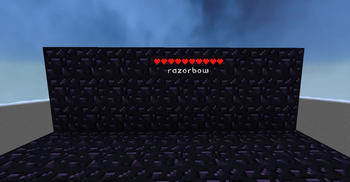
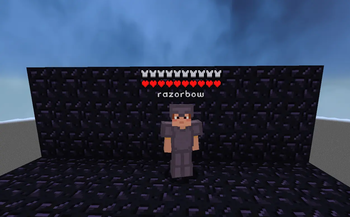
Its modified version of mod "Health Indicators" By AdyTech99 I changed a little setting that makes player health visible even when player invisible I'm not goot at coding so mod can have bugs
You can also adjust the: Size Offset Indicator Type (Hearts | Number) Percentage Based Health (True | False) Text Color
The indicator changes texture and appearance based on the effects the entity has, just like vanilla. The indicator will: Turn green if the entitiy is Poisoned, Black if they are Withering Display yellow hearts seperately for Absorption. Vibrate if the entity has Regeneration Change textures for Hardcore.
Keybinds: Note: These are all default keybinds. They can be modified like any other keybind: by going into Options > Controls > Keybinds
Enable Health Indicator: Left Arrow Increase Indicator Offset: Up Arrow Decrease Indicator Offset: Down Arrow Override Config Filtering: Right Arrow Enable Armor Indicator: Right Shift
| Version | Minecraft | Loader | Download |
|---|---|---|---|
|
AllPlayerHpIndicator 21.11.1 21.11.1 |
1.21.11, 26.1, 26.1.1, 26.1.2, 26.2
|
fabric, neoforge
|
Download |
|
AllPlayerHpIndicator 21.1.3 21.1.3 |
1.21, 1.21.1, 1.21.10, 1.21.11, 1.21.2, 1.21.3, 1.21.4, 1.21.5, 1.21.6, 1.21.7, 1.21.8, 1.21.9, 26.1, 26.1.1, 26.1.2, 26.2
|
fabric, neoforge
|
Download |