

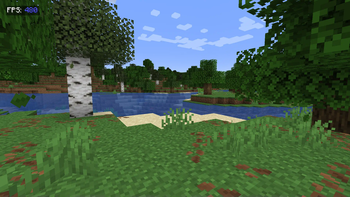
A clean, customizable FPS display that helps you monitor performance in style
Features
Color-coded FPS values:
🔵 Blue (90+ FPS) = Excellent
🟢 Green (60-89 FPS) = Smooth
🟡 Yellow (30-59 FPS) = Playable
🔴 Red (<30 FPS) = Needs optimization
Clean design:
"FPS:"label in crisp white- Semi-transparent background for readability
- Perfectly positioned at 10x10 pixels (top-left)
Lightweight:
- Only uses essential Fabric API modules
- Near-zero performance impact
Accurate measurement:
- Real frame-per-second calculation (not MC's smoothed F3 counter)
Perfect For
✔️ Benchmarking modpacks
✔️ Streamers who show performance
✔️ Troubleshooting lag spikes
✔️ Competitive players optimizing setups
Technical Info
🔹 Requires Fabric API + Mod Menu
🔹 Client-side only
🔹 Configurable position (edit in code)
"Because sometimes you need to see the numbers behind the magic"
| Version | Minecraft | Loader | Download |
|---|---|---|---|
|
Argonyte 3.0 [FABRIC] [26.2] 3.0 |
26.2
|
fabric
|
Download |
|
Argonyte 3.0 [NEOFORGE] [26.2] 3.0 |
26.2
|
neoforge
|
Download |
|
Argonyte 2.1 [NEOFORGE] [26.2] 2.1 |
26.2
|
neoforge
|
Download |
|
Argonyte 2.1 [FABRIC] [26.2] 2.1 |
26.2
|
fabric
|
Download |
|
Argonyte 2.1 [NEOFORGE] 2.1 |
1.21.10
|
neoforge
|
Download |
|
Argonyte 2.1 [FABRIC] 2.1 |
1.21.10
|
fabric
|
Download |
|
Argonyte 2.00 2.00 |
1.21, 1.21.1, 1.21.2, 1.21.3, 1.21.4, 1.21.5
|
fabric
|
Download |
|
Show FPS 1.01 1.01 |
1.21, 1.21.1, 1.21.2, 1.21.3, 1.21.4, 1.21.5
|
fabric
|
Download |
|
ShowFPS (NeoForge) [1.21.5] 1 |
1.21.5
|
neoforge
|
Download |
|
ShowFPS 1.21.5 (Fabric) 1 |
1.21.5
|
fabric
|
Download |