

Armor Indicator
Info
This client-side mod adds a simple armor indicator onto the screen so you do not have to access your inventory to view your armor durability.
To use this mod, download the mod it and move it to your .minecraft/mods folder. Additionally, you will need to install the Fabric API jar for this mod to work.
This mod requires ShadowHunter22's Config Library to be installed. This menu can be accessed through Mod Menu (optional) or opened by pressing RSHIFT, or reassigned to your liking through the game's keybind menu.
Features
-
Without messing with any configurations, this mod gives you a basic armor and item indicator overlay on the bottom right side of your screen.
-
With my config library, ShadowHunter22's Config Library, you are provided a number of options to customize this mod to your liking.
Dependencies
- [Optional] ShadowHunter22's Config Library
- [Optional] Mod Menu
Versions
This mod is Fabric ONLY. There is no plan to support Forge.
This mod is available for the following Minecraft versions:
1.19.2
1.19.3
1.19.4
Cloth Config API is an optional dependency for 1.19 versions.
As of April 16th, 2024, this mod will no longer be updated for 1.19 versions
1.20.x
1.21.x
26.1
26.1.1
26.1.2
26.2
26.3
Client and Server Support
This mod only needs to be on the client and will not work on the server.

Have the armor take up less space if, for example, the legging and helmet are not there.
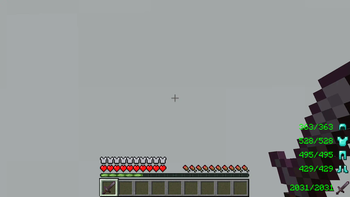
The default configuration for the mod without the use of the Cloth Config API
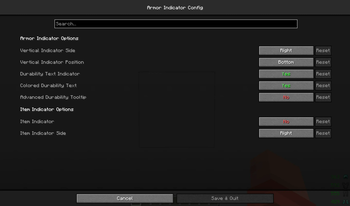
What the config screen looks like if the Modmenu and Cloth Config API mods are installed with this mod.
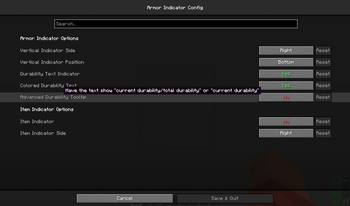
An example of one of the tooltips found in the config screen for configuring the mod.
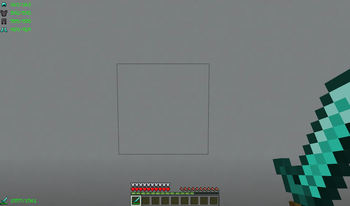
An example of what the UI can look like when the mod is configured using the Modmenu and Cloth Config API mods.
| Version | Minecraft | Loader | Download |
|---|---|---|---|
|
12.0.0+26.3 for 26.3 12.0.0+26.3 |
26.3
|
fabric
|
Download |
|
12.0.0-beta+26.3 for 26.3-snapshot-7 12.0.0-beta+26.3 |
26.3-snapshot-7
|
fabric
|
Download |
|
11.0.1+26.2 for 26.2 11.0.1+26.2 |
26.2
|
fabric
|
Download |
|
11.0.0+26.2 for 26.2 11.0.0+26.2 |
26.2
|
fabric
|
Download |
|
11.0.0-beta+26.2-rc.2 for 26.2-rc-2 11.0.0-beta+26.2-rc.2 |
26.2-rc-2
|
fabric
|
Download |
|
10.0.0+26.1 for 26.1 10.0.0+26.1 |
26.1
|
fabric
|
Download |
|
9.0.0+1.21.11 for 1.21.11 9.0.0+1.21.11 |
1.21.11
|
fabric
|
Download |
|
8.0.1+1.21.9 for 1.21.9-1.21.10 8.0.1+1.21.9 |
1.21.10, 1.21.9
|
fabric
|
Download |
|
8.0.0+1.21.9 for 1.21.9-1.21.10 8.0.0+1.21.9 |
1.21.10, 1.21.9
|
fabric
|
Download |
|
7.0.0+1.21.6 for 1.21.6-1.21.8 7.0.0+1.21.6 |
1.21.6, 1.21.7, 1.21.8
|
fabric
|
Download |
|
6.0.0+1.21.5 for 1.21.5 6.0.0+1.21.5 |
1.21.5
|
fabric
|
Download |
|
5.0.1+1.21.2 for 1.21.2-1.21.4 5.0.1+1.21.2 |
1.21.2, 1.21.3, 1.21.4
|
fabric
|
Download |
|
4.0.1+1.21 for 1.21-1.21.1 4.0.1+1.21 |
1.21, 1.21.1
|
fabric
|
Download |
|
3.0.1+1.20.5 for 1.20.5-1.20.6 3.0.1+1.20.5 |
1.20.5, 1.20.6
|
fabric
|
Download |
|
2.0.1+1.20.2 for 1.20.2-1.20.4 2.0.1+1.20.2 |
1.20.2, 1.20.3, 1.20.4
|
fabric
|
Download |
|
1.1.1+1.20 for 1.20-1.20.1 1.1.1+1.20 |
1.20, 1.20.1
|
fabric
|
Download |
|
5.0.0+1.21.2 for 1.21.2-1.21.4 5.0.0+1.21.2 |
1.21.2, 1.21.3, 1.21.4-pre1
|
fabric
|
Download |
|
5.0.0+1.21.2-pre1 for 1.21.2-pre1 5.0.0+1.21.2-pre1 |
1.21.2-pre1
|
fabric
|
Download |
|
[1.21-1.21.1] armor-indicator-4.1.0 4.1.0 |
1.21, 1.21.1
|
fabric
|
Download |
|
[1.20.5-1.20.6] armor-indicator-3.1.0 3.1.0 |
1.20.5, 1.20.6
|
fabric
|
Download |
|
[1.20.2-1.20.4] armor-indicator-2.0.0 2.0.0 |
1.20.2, 1.20.3, 1.20.4
|
fabric
|
Download |
|
[1.20-1.20.1] armor-indicator-1.1.0 1.1.0 |
1.20, 1.20.1
|
fabric
|
Download |
|
[1.21-1.21.1] armor-indicator-1.0.0 1.0.0 |
1.21, 1.21.1
|
fabric
|
Download |
|
[1.20.5-1.20.6] armor-indicator-1.0.0 1.0.0 |
1.20.5, 1.20.6
|
fabric
|
Download |
|
[1.20-1.20.4] armor-indicator-1.0.0 1.0.0 |
1.20, 1.20.1, 1.20.2, 1.20.3, 1.20.4
|
fabric
|
Download |
|
[1.20-1.20.4] armor-indicator-0.3.2 0.3.2 |
1.20, 1.20.1, 1.20.2, 1.20.3, 1.20.4
|
fabric
|
Download |
|
[1.20-1.20.4] armor-indicator-0.3.1 0.3.1 |
1.20, 1.20.1, 1.20.2, 1.20.3, 1.20.4
|
fabric
|
Download |
|
[1.19.4] armor-indicator-0.2.0 0.2.0 |
1.19.4
|
fabric
|
Download |
|
[1.19.2-1.19.3] armor-indicator-0.3.1 0.3.1 |
1.19.2, 1.19.3
|
fabric
|
Download |
|
[1.20-1.20.4] armor-indicator-0.2.9 0.2.9 |
1.20, 1.20.1, 1.20.2, 1.20.3, 1.20.4
|
fabric
|
Download |
|
[1.19.4] armor-indicator-0.1.1 0.1.1 |
1.19.4
|
fabric
|
Download |
|
[1.19.2-1.19.3] armor-indicator-0.2.1 0.2.1 |
1.19.2, 1.19.3
|
fabric
|
Download |
|
[1.19.4] armor-indicator-0.2.0 0.2.0 |
1.19.4
|
fabric
|
Download |
|
[1.19.2-1.19.3] armor-indicator-0.2.0 0.2.0 |
1.19.2, 1.19.3
|
fabric
|
Download |
|
[1.20-1.20.4] armor-indicator-0.2.8 0.2.8 |
1.20, 1.20.1, 1.20.2, 1.20.3, 1.20.4
|
fabric
|
Download |
|
[1.20-1.20.4] armor-indicator-0.2.7 0.2.7 |
1.20, 1.20.1, 1.20.2, 1.20.3, 1.20.4
|
fabric
|
Download |
|
[1.20-1.20.4] armor-indicator-0.2.6 0.2.6 |
1.20, 1.20.1, 1.20.2, 1.20.3, 1.20.4
|
fabric
|
Download |
|
[1.20.2] armor-indicator-0.2.4 0.2.4 |
1.20.2
|
fabric
|
Download |