

🎵 Custom Audio Disc
Transform your Minecraft music experience with custom audio discs! Upload any audio file from the internet directly to music discs and enjoy spatial audio playback through Simple Voice Chat.
❌Small bug:
You hear a vanilla record
✨ Features
🎧 Easy Audio Upload
- Upload audio from any URL with simple commands
- Support for MP3, OGG, WAV, M4A, WebM, and more
- Automatic format conversion using FFmpeg when needed
- Real-time progress tracking during downloads
🔊 Immersive Playback
- Spatial audio through Simple Voice Chat integration
- Perfect synchronization across all players
- Standard jukebox range (64 blocks)
- Works alongside vanilla music discs
🛠️ Smart Processing
- Automatic format detection and conversion
- File size validation (up to 50MB)
- Comprehensive error handling
- Persistent storage across server restarts
🎮 Player-Friendly
- Multilingual support (English, Russian, German, French, Spanish, Chinese)
- Rich tooltips showing audio metadata
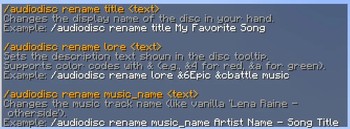
- Custom disc renaming
- Progress feedback during uploads
🔧 Developer API
- Event system for addon developers
- Audio modification hooks
- Playback state monitoring
- Comprehensive documentation
📋 Commands
| Command | Description |
|---|---|
/audiodisc upload <url> |
Upload audio from URL to held disc |
/audiodisc youtube <url> |
Download audio from YouTube (requires yt-dlp) |
/audiodisc rename <title> |
Rename your custom disc |
/audiodisc info |
Show audio information |
/audiodisc clear |
Remove audio from disc |
🚀 Quick Start
- Hold a music disc in your hand
- Run the command:
/audiodisc upload <audio_url> - Wait for processing (progress shown in chat)
- Place in jukebox and enjoy!
📦 Requirements
- Minecraft 1.21+ (Fabric)
- Fabric API
- Simple Voice Chat (for audio playback)
- yt-dlp (optional, for YouTube support)
- FFmpeg (optional, for format conversion)
🎯 Perfect For
- Music servers wanting custom soundtracks
- Creative builders adding ambiance to builds
- Event organizers playing custom audio
- Roleplay servers with immersive sound design
🔧 Technical Features
- Asynchronous processing - no server lag
- Memory efficient - smart caching system
- Network optimized - connection pooling and timeouts
- Security focused - URL validation and rate limiting
- Mixin-free design - maximum compatibility
🌍 Supported Formats
✅ Native Support
- MP3 - Most common format
- OGG - Minecraft's preferred format
- WAV - Uncompressed audio
🔄 Auto-Conversion (with FFmpeg)
- M4A - Apple audio format
- WebM - Web audio format
- AAC - Advanced audio codec
- FLAC - Lossless compression
🛡️ Safety & Security
- URL validation - only HTTP/HTTPS allowed
- File size limits - configurable maximum size
- Rate limiting - prevents spam uploads
- Content validation - ensures audio files only
- Permission system - admin control over features
📖 Documentation
Comprehensive documentation available including:
- Installation guide
- Configuration options
- API documentation for developers
- Troubleshooting guide
- Performance optimization tips
Transform your server's audio experience today! 🎵
Compatible with most Fabric mods and designed for maximum server performance.







| Version | Minecraft | Loader | Download |
|---|---|---|---|
|
Audio disc 1.4 1.4 |
1.21.10, 1.21.11, 1.21.6, 1.21.7, 1.21.8, 1.21.9
|
fabric
|
Download |
|
Audio disc 1.4 1.4 |
1.21.10, 1.21.6, 1.21.7, 1.21.8, 1.21.9
|
fabric
|
Download |
|
Audio disc 1.3 1.3 |
1.21.8
|
fabric
|
Download |
|
Audio disc 1.2 1.2 |
1.21.8
|
fabric
|
Download |
|
Audio disc 1.1 1.1 |
1.21.8
|
fabric
|
Download |
|
Audio disc 1.0 1.0 |
1.21.8
|
fabric
|
Download |