


🌟 Key Features
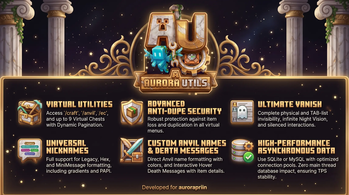
- Virtual Utility Commands: Access utilities from anywhere via commands:
/craft,/bigorna,/lixo,/ec(Ender Chest),/bau(Virtual Chests from 1 to 9). - Dupe-Proof Security:
- Rigorous prevention of item loss or duplication when closing virtual menus (Workbench, Anvil, and Virtual Chests).
- In the virtual chest, the pagination arrow (slot 53) is locked against dragging and repeated clicks, and is cleared before persisting to the database.
- A temporary
isSavinglock prevents players from reopening chests while their data is being saved asynchronously.
- Virtual Chest with Dynamic Pagination: Easily navigate through additional chest pages using an arrow button in the last slot (slot 53), eliminating extra arguments in commands.
- Status ActionBar: Displays continuous messages on the ActionBar for players in
/luz(night vision) and/vanishmode. - Complete Vanish Invisibility: The
/vanishcommand physically hides the player, grants infinite Night Vision, silences chest interactions and physical plates/tripwires, and removes them from the TAB list (Player List) for any player without theaurorautils.vanishpermission. - Colored Names in the Anvil: Colorized name formatting with
&codes directly in the Anvil (/bigorna) if the player has theaurorautils.anvil.colorpermission. - Custom Death Messages: Personalized PvP messages with interactive hover functionality, displaying the enchantments and details of the item used for the kill.
- Optimized
/repararCommand (Mending & XP): Limits repairs to items that have the Mending enchantment and consumes the player's XP proportionally to the item's damage (1 XP repairs 2 durability), supporting partial repairs if the player has limited XP (configurable inconfig.yml). - Customizable Spawn Alerts (Chat, Title, ActionBar): The
/spawncommand has a configurable countdown and success message viaconfig.yml. It is possible to display alerts and confirmations via traditional chat, on-screen title/subtitle, actionbar, or a combination of multiple channels. - Smart Configuration Updates: The plugin merges new keys from updates directly into the local server files (
config.yml,messages.yml, anddeathmessages.yml), keeping original comments and old customizations without requiring file deletions or resets. - Scheduled Automatic Restarts: Flexible scheduling for daily (
todos/ every day) or weekly (specific days) restarts, tolerant of spaces (e.g.," todos - 03:00 "), with periodic warning broadcasts in the chat. - Asynchronous Hybrid Persistence: Support for local SQLite or enterprise MySQL with an optimized connection pool (HikariCP). No database queries are performed on the server's main thread, keeping TPS stable.
- Dynamic Reload Command: Command
/aurorautils reloadto instantly reload message and configuration files. - Custom Nicknames (MiniMessage, Hex, & and §):
- The
/nickcommand offers simultaneous integrated formatting for legacy colors, hexadecimal, and MiniMessage tags/gradients. - Success and reset messages display the nickname perfectly formatted.
- PlaceholderAPI (PAPI) integration, registering placeholders
%aurorautils_nickname%(legacy§colors ready for the TAB plugin),%aurorautils_nickname_plain%, and%aurorautils_displayname%for instant display in TAB, Scoreboards, and chats.
- The
🛠️ Commands & Permissions
| Command | Description | Permission |
|---|---|---|
/aurorautils reload |
Reloads configurations and messages. | aurorautils.admin (OP Default) |
/craft |
Opens a portable workbench. | aurorautils.comando.craft |
/bigorna |
Opens a portable anvil. | aurorautils.comando.bigorna |
/lixo |
Opens a permanent item trash disposal menu. | aurorautils.comando.lixo |
/ec [player] |
Opens your virtual ender chest or another online player's ender chest (requires .others permission). |
aurorautils.comando.ec / aurorautils.comando.ec.others |
/bau [page] |
Opens a virtual chest persisted in the database. | aurorautils.comando.bau |
/back |
Teleports back to the location of the last death. | aurorautils.comando.back |
/reparar |
Repairs the item held in hand (requires Mending. If it has 3x3 Excavation, costs XP levels). | aurorautils.comando.reparar |
/esquentar |
Smelts the ore item in hand into its processed form. | aurorautils.comando.esquentar |
/luz |
Grants or removes the eternal night vision effect. | aurorautils.comando.luz |
/vanish |
Enables or disables complete invisibility mode. | aurorautils.comando.vanish |
/gm <mode> [player] |
Changes game mode (suggests options from 0 to 3; allows changing others' game mode). | aurorautils.comando.gm (self) / aurorautils.comando.gamemode.others (others) |
/speed [speed] |
Adjusts walking or flying speed. | aurorautils.comando.speed |
/efeito |
Displays, adds, or removes active effects on the player. | aurorautils.comando.efeito |
/itemedit |
Edits the item held in hand (name, lore, enchantment). | aurorautils.comando.itemedit |
/setspawn |
Defines the global server spawn location at the current position. | aurorautils.admin (OP Default) |
/spawn [player|all] |
Teleports you, another player, or all players (except OPs) to the global spawn. | aurorautils.comando.spawn / aurorautils.comando.spawn.others / aurorautils.comando.spawn.all |
/puxar <player|all> |
Teleports the player or all online players to you. | aurorautils.comando.puxar / aurorautils.comando.puxar.all |
/nick <nickname|off|reset> |
Changes or resets your own nickname (MiniMessage/Hex/Legacy). | aurorautils.comando.nick |
/nick admin <set|reset> <player> <nickname> |
Changes, removes others' nicknames, or looks up the real name with /nick nomereal <nick>. |
aurorautils.comando.nick.others |
/enchant [player] <enchantment> <level> |
Applies standard or unsafe enchantments. | aurorautils.comando.enchant (standard) / aurorautils.comando.enchant.unsafe (unsafe) |
- Anvil Color Permission:
aurorautils.anvil.color(allows renaming items in the anvil using&colors). - Extra Virtual Chests Permission:
aurorautils.bau.N(whereNranges from 1 to 9 to define the maximum number of pages the player can access). - Vanish Visibility Permission:
aurorautils.vanish(allows seeing players in/vanishand not being fooled by their absence in TAB). - Spawn Cooldown Bypass Permission:
aurorautils.spawn.cooldown.bypass(allows instant teleportation to spawn, bypassing cooldown). - Spawn for Others/All Permission:
aurorautils.comando.spawn.others/aurorautils.comando.spawn.all(allows sending other/all players to spawn). - Pull Players Permission:
aurorautils.comando.puxar/aurorautils.comando.puxar.all(allows pulling a specific player or all players). - Ender Chest of Others Permission:
aurorautils.comando.ec.others(allows opening the ender chest of other players with/ec <player>).
⚙️ Installation
- Insert the JAR file into the
/pluginsdirectory of your Paper or Spigot 1.21.x server. - Start or restart the server to load folders and generate default configuration files:
config.yml: Database definition, speed limits, auto-restart settings, vanish messages, and spawn sound/cooldown.messages.yml: All chat messages, restart warnings, action bars, and command alerts.deathmessages.yml: PvP, environmental, and mob-kill death messages.
| Version | Minecraft | Loader | Download |
|---|---|---|---|
|
AuroraUtils 1.1.9 1.1.9 |
1.21, 1.21.1, 1.21.2, 1.21.3, 1.21.4, 1.21.5, 1.21.6, 1.21.7, 1.21.8, 1.21.9, 1.21.10, 1.21.11
|
bukkit, paper, spigot
|
Download |
|
AuroraUtils 1.1.7 1.1.7 |
1.21, 1.21.1, 1.21.2, 1.21.3, 1.21.4, 1.21.5, 1.21.6, 1.21.7, 1.21.8, 1.21.9, 1.21.10, 1.21.11
|
bukkit, paper, spigot
|
Download |