

AutoCraftTomAddon adds practical improvements to Tom's Storage's crafting terminal to make crafting faster and more convenient.
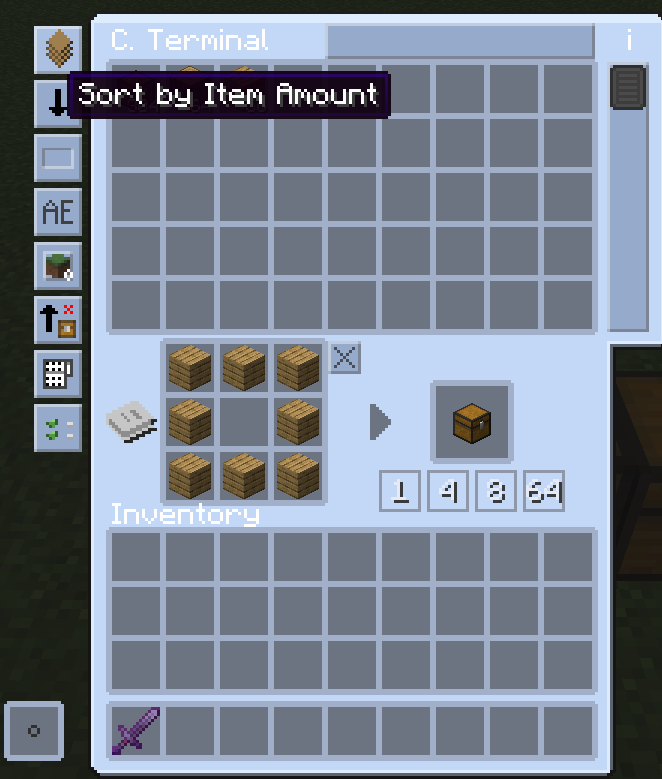
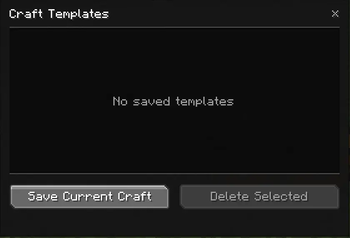
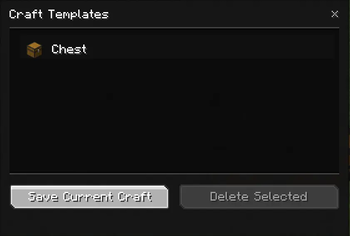
This version introduces a first crafting template system directly accessible from the terminal interface. You can save a craft, find it later in a dedicated list, and quickly load it again without having to place everything manually.
Features
- Bulk craft buttons directly below the terminal result slot.
- Save the current craft as a template.
- Template list accessible from a dedicated button.
- Quick template loading with a double-click.
- Template deletion with confirmation.
- Local client-side template storage.
Goal
The goal of this first version is simple: provide a clean, fast, and stable foundation without making the interface unnecessarily heavy.
| Version | Minecraft | Loader | Download |
|---|---|---|---|
|
Auto Craft Tom's Addon 1.7.2 1.7.2 |
1.21.1
|
fabric
|
Download |
|
Auto Craft Tom's Addon 1.7.1 1.7.1 |
1.21.1
|
fabric
|
Download |
|
Auto Craft Tom's Addon 1.7.0 1.7.0 |
1.21.1
|
fabric
|
Download |
|
Auto Craft Tom's Addon 1.6.0 1.6.0 |
1.21.1
|
fabric
|
Download |
|
Auto Craft Tom's Addon 1.5.0 1.5.0 |
1.21.1
|
fabric
|
Download |
|
Auto Craft Tom's Addon 1.4.0 1.4.0 |
1.21.1
|
fabric
|
Download |
|
Auto Craft Tom's Addon 1.3.0 1.3.0 |
1.21.1
|
fabric
|
Download |
|
Auto Craft Tom's Addon 1.2.0 1.2.0 |
1.21.1
|
fabric
|
Download |
|
Auto Craft Tom's Addon 1.1.0 1.1.0 |
1.21.1
|
fabric
|
Download |
|
Auto Craft Tom's Addon 1.0.0 1.0.0 |
1.21.1
|
fabric
|
Download |