

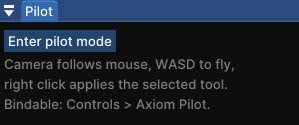
Pilot adds a toggleable first-person camera mode to the Axiom editor. Flip it on and the cursor is captured: the camera follows your mouse like vanilla Minecraft, WASD flies, and the crosshair becomes your cursor. No more holding a mouse button just to look around.
| Pilot off | Pilot on |
|---|---|
 |
 |
While piloting
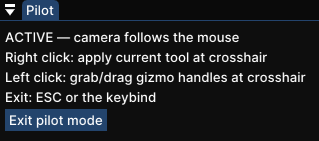
- 🎯 Right click applies your selected tool at the crosshair. Painting, sculpting and other brush tools work with full stroke preview
- 🕹️ Left click grabs and drags gizmo handles: path tool points, selection cuboid faces, and more
- ↩️ Undo/redo and Axiom keybinds keep working as usual
- 🚪 ESC or the keybind exits instantly
Axiom has this only as a hold (right click with no tool active). Pilot makes it a toggle, and your active tool stays usable the whole time.
<iframe width="560" height="315" src="https://www.youtube-nocookie.com/embed/UkdP4da_lOY" title="YouTube video player" frameborder="0" allow="accelerometer; autoplay; clipboard-write; encrypted-media; gyroscope; picture-in-picture; web-share" allowfullscreen></iframe>Toggle it
- Bind "Toggle Pilot Mode" in vanilla Controls (category "Axiom Pilot"), or
- Use the small Pilot window inside the editor. It never steals your toolbar selection

Support
Bug reports and suggestions: https://discord.gg/XpPFSMVF9Y.
No gallery available for this project.
| Version | Minecraft | Loader | Download |
|---|---|---|---|
|
Pilot 1.0.0 for MC 1.21.11 1.0.0 |
1.21.11
|
fabric
|
Download |