

:: BlueGeo ::
It is a bluemap map markers manager. Player can easily add and remove markers. Markers are sorted by categories. Players can create geocaching markers and caches.
Markers size may vary from 48px, 64px, 80px, 96px; depending on its category. To change Categories labels, edit values in bluegeo.config file.
When removing marker(s), it will need a bluemap reload to be effective. Bluegeo will reload bluemap automatically (reload light) on markers removals.
Markers have digit indexes, and caches have letters.
:: Dependencies::
- BlueMap
:: Installation ::
- copy paste the .jar to /plugins folder
- edit BlueGeo/config.yml.
- add permissions using your favorite method
:: Permissions ::
bluegeo.add -- can add markers
bluegeo.remove -- can remove markers
bluegeo.cache.add -- can add geocache
bluegeo.cache.remove -- can remove geocache
For geocaching, players needs to have markers permissions (bluegeo.add and bluegeo.remove) as player creates/removes markers for geocaching.
:: Commands::
/bluegeo help -- to open the help book and view categories.
/bluegeo <category> <marker-label> -- to add a marker
/bluegeo remove [marker-index] -- to remove a marker
/bluegeo cache craft -- to craft a cache chest
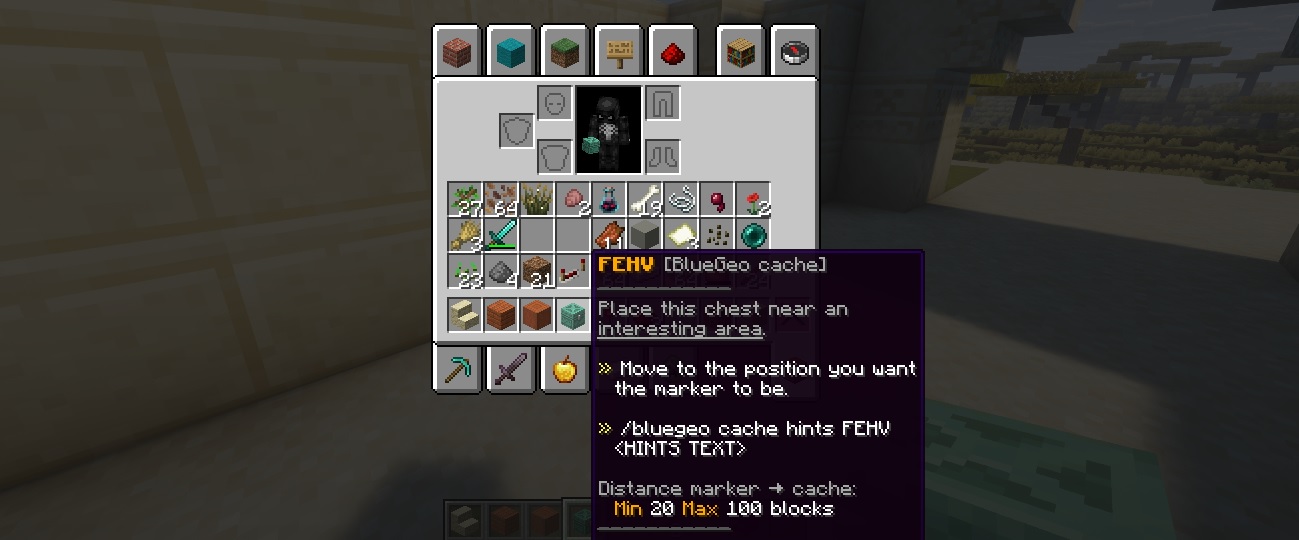
/bluegeo cache hints <INDEX> <HINTS TEXT> -- to place a cache marker with Hints text
examples:
- /bluegeo house framboise treehouse :: add a house category marker labelled "framboise treehouse"
- /bluegeo grow a little farm in the desert :: add a grow category marker labelled "a little farm in the desert"
- /bluegeo door a secret entrance :: add a door category marker labelled "a secret entrance"
- /bluegeo remove 409 :: remove a marker
- /bluegeo remove TTTM :: remove a geocache, chest and marker
- /bluegeo cache craft :: craft a cache to player's inventory
- /bluegeo add cache <HINTS TEXT> :: finalize the geocache by placing a marker with hints to find the geocache.
Categories are one word, to see the available list /bluegeo help.
Digit [marker-index] are visible in front of each marker name on bluemap webpage and shown on mouse hover the marker. As for letters index corresponding to a cache.
After removal, the marker(s) will disappear only once BlueMap plugin has been reloaded. Bluegeo will automatically reload bluemap (reload light) and its markers data.
:: Geocaching ::
:: Geocache creators ::
- /bluegeo cache craft -- to craft a cache.
- Note the letters index (shown in chat and title message to player, and in chest metadata visible in inventory.)
- move away from the geocache, to place a marker. It should be on a path or a nice point of view. (There are minimal and maximal distance. It can be set in blugeo.config. The value is in blocks).
- /bluegeo cache hints <INDEX> <HINTS TEXT>
- Eventually you can log its logbook.
:: HINTS TEXT (html format) ::
This text you have to type can be turned in so many ways, but try to use
in your text or any html tag to make it short and clear or enigmatic, crazy to find, but within a short text.
:: Geocache players::
- Find a geocache marker on the map
- hover it to check the cache informations
- click it to reveal the hints
- move to the marker location
- resolve the cache location
- open the chest
- open the logbook (it will ad your log)
- read the log
Geocacher experience and Travel Bugs will be implemented later. Depending on this script success. Start a conversation with me (spigotmc) for any issue or else
:: Notes ::
- Geocaches chests are protected from destruction
- there is an auto backup function for makers files (configurable)
:: Configuration ::
messages:
MESSAGE_NO_PERMISSION: "You do &Bnot&r have permission."
BLUEGEO_CHAT_PREFIX: "&B&k000&r[&BBlue&AGeo&r] "
MESSAGE_USAGE: "/bluegeo help to see instructions."
MESSAGE_GEOCACHE_NOT_OWNER: "You are not the owner of this cache. Remove cancelled."
MESSAGE_GEOCACHE_CHEST_REMOVED: "Chest for cache %s removed from world."
MESSAGE_GEOCACHE_DATA_NOT_FOUND: "Data to remove for this cache %s not found."
MESSAGE_GEOCACHE_ID_NOT_FOUND: "Cache id %s does not exist or is not placed."
MESSAGE_GEOCACHE_MARKER_ADDED: "Cache marker %s added to the map."
MESSAGE_GEOCACHE_INVENTORY_NOT_FREE: "You need at least one free inventory slot to create a cache chest."
MESSAGE_GEOCACHE_PLACE_BEFORE_ADD: "Place all your caches before adding a new cache."
MESSAGE_GEOCACHE_ID_ALREADY_USED: "This cache ID is already in data. You can not place a clone."
MESSAGE_GEOCACHE_MOVE_AWAY: "Move away from the cache and type command:\n/bluegeo cache hints %s <YOUR HINTS TEXT>."
MESSAGE_PLAYER_WORLD_NOT_FOUND: "Error on getting your world data."
MESSAGE_CACHE_CATEGORY_MARKER: "You can not create a cache this way. Check /bluegeo help."
MESSAGE_PLAYER_MARKER_ADDED: "Your marker has been added and saved."
MESSAGE_PLAYER_MARKER_ADD_ERROR: "Error on adding your marker."
MESSAGE_PLAYER_CACHE_ADD_ERROR: "Error on adding your cache."
MESSAGE_PLAYER_NO_MARKER_DATA: "No markers data found for this world."
MESSAGE_TITLE_CACHE_COMPLETED: "completed"
MESSAGE_SUBTITLE_CACHE_COMPLETED: "your cache is now fully active"
MESSAGE_PLAYER_COMMAND_NOT_FOUND: "Category not found, non existing command, or something is missing."
MESSAGE_BLUEMAP_IS_RELOADING: "BlueGeo is reloading data."
categories:
CATEGORY_BIGBLACK_LABEL: "Events Black"
CATEGORY_BIGBLUE_LABEL: "Events Blue"
CATEGORY_BIGGREEN_LABEL: "Events Green"
CATEGORY_BIGPURPLE_LABEL: "Events Purple"
CATEGORY_BIGRED_LABEL: "Events Red"
CATEGORY_BIGWHITE_LABEL: "Events White"
CATEGORY_BIGYELLOW_LABEL: "Events Yellow"
CATEGORY_BLACK_LABEL: "Black Marker"
CATEGORY_BLUE_LABEL: "Blue Marker"
CATEGORY_BLUECUBE_LABEL: "Blue Object"
CATEGORY_REDCUBE_LABEL: "Red Object"
CATEGORY_BIGCRAFT_LABEL: "Crafting Factories"
CATEGORY_BLUEMINE_LABEL: "Diamond Ressources"
CATEGORY_BOAT_LABEL: "Boats"
CATEGORY_BUILD_LABEL: "Build Here"
CATEGORY_CAT_LABEL: "Cats here"
CATEGORY_CAVE_LABEL: "Caves"
CATEGORY_CHEST_LABEL: "Chests"
CATEGORY_CHICKEN_LABEL: "Chicken Here"
CATEGORY_CITY_LABEL: "Cities"
CATEGORY_CRAFT_LABEL: "Crafting Tables"
CATEGORY_DOOR_LABEL: "Entrances"
CATEGORY_EMERALD_LABEL: "Emeralds"
CATEGORY_EXPLORE_LABEL: "Areas to explore"
CATEGORY_FIREWORK_LABEL: "Fireworks"
CATEGORY_FISH_LABEL: "Fishing Spots"
CATEGORY_FURNACE_LABEL: "Furnace Here"
CATEGORY_GREEN_LABEL: "Green marker"
CATEGORY_GROW_LABEL: "Growing Plants"
CATEGORY_HONEYBEES_LABEL: "Honeyhives and Honeynests"
CATEGORY_HOUSE_LABEL: "Homes houses"
CATEGORY_JUKEBOX_LABEL: "Jukeboxes"
CATEGORY_JUNGLECAVE_LABEL: "Caves with water and plants"
CATEGORY_LAVA_LABEL: "Lava area"
CATEGORY_MINE_LABEL: "Mining Ressources"
CATEGORY_MONUMENT_LABEL: "Monuments"
CATEGORY_MUSHROOM_LABEL: "Mushrooms here"
CATEGORY_NETHER_LABEL: "Nether Portals"
CATEGORY_OTHER_LABEL: "Miscellaneaous"
CATEGORY_PARK_LABEL: "Green Parks"
CATEGORY_PIG_LABEL: "Pigs"
CATEGORY_PILLAGERS_LABEL: "Pillagers"
CATEGORY_POI_LABEL: "POI"
CATEGORY_PURPLE_LABEL: "Purple Marker"
CATEGORY_PURPLEBOX_LABEL: "Purple Shulker Box"
CATEGORY_REDMINE_LABEL: "Redstone Ressources"
CATEGORY_RED_LABEL: "Red marker"
CATEGORY_REDSTONE_LABEL: "Redstone Mechanism"
CATEGORY_SHEEP_LABEL: "Sheeps Here"
CATEGORY_SMALLHOUSE_LABEL: "Tiny Houses"
CATEGORY_SMALLVILLAGE_LABEL: "Small Villages"
CATEGORY_SWORD_LABEL: "Weapons"
CATEGORY_TELEPORT_LABEL: "Teleporters"
CATEGORY_TRAIN_LABEL: "Train Stations"
CATEGORY_UNDERWATERCAVE_LABEL: "Underwater caves"
CATEGORY_VILLAGE_LABEL: "Players Villages"
CATEGORY_VILLAGERS_LABEL: "Villagers community"
CATEGORY_WATERFALL_LABEL: "Waterfalls"
CATEGORY_WHITE_LABEL: "White marker"
CATEGORY_YELLOW_LABEL: "Yellow marker"
CATEGORY_CACHE_LABEL: "Caches to find and log"
options:
MARKER_HTML_VIEWDISTANCE: 3000
DATA_MARKERS_FILEPATH: "bluegeo.markers"
LOAD_TEMPO_SECONDS: 5
BACKUP_MODE: true
BACKUP_EVERY_X_MARKERS: 10
BACKUP_PREFIX: "bluegeo_backup"
BACKUP_FOLDER: "bluegeo_backups/"
BACKUP_KEEP_FILES: 5
MARKER_BACKGROUND_COLOR: "rgba(52,52,52,0.85)"
MARKER_INDEX_COLOR: "#3ECE6A"
MARKER_TEXT_COLOR: "#ffffff"
MARKER_INDEX_SYMBOL: "☰"
MARKER_CATEGORY_COLOR: "#54DBFF"
MARKER_CATEGORY_SYMBOL: "✜"
profiles:
DATA_PROFILES_FILEPATH: "bluegeo.profiles"
XP_GAIN_LOG: 40
XP_GAIN_CREATE: 20
XP_GAIN_PLACE: 80
XP_LOSE_REMOVE: 120
geocache:
DATA_CACHES_FILEPATH: "bluegeo.caches"
CATEGORY_CACHE_LABEL: "Caches to find and log"
CACHE_GENERAL_INFO: "<b>Click to reveal the hints.</b>"
CACHE_GENERAL_INFO_OWNER: "owner: %s"
CACHE_GENERAL_INFO_DATE: "since: %s"
HINTS_TO_CACHE_MINDISTANCE: 20
HINTS_TO_CACHE_MAXDISTANCE: 100
LOGBOOK_MAX_ENTRIES: 60
CACHEMARKER_BACKGROUND_COLOR: "rgba(252,252,252,0.85)"
CACHEMARKER_INDEX_COLOR: "#00718F"
CACHEMARKER_TEXT_COLOR: "#154000"
CACHEMARKER_INDEX_SYMBOL: "☰"
CACHEMARKER_CATEGORY_SYMBOL: "❖"
CACHEMARKER_CATEGORY_COLOR: "#E26A23"
CACHEMARKER_HINT_SYMBOL: "☄"
CACHEMARKER_POPUP_TEXT_COLOR: "#ffffff"
CACHEMARKER_POPUP_BACKGROUND_COLOR: "rgba(28, 64, 0, 0.95)"
CACHE_INVENTORY_PREFIX: "GEOCACHE"
FADEIN_SECONDS: 3
SHOW_FOR_SECONDS: 6
FADEOUT_SECONDS: 3
permissions:
PERMISSION_ADD: "bluegeo.add"
PERMISSION_REMOVE: "bluegeo.remove"
PERMISSION_RELOAD: "bluegeo.reload"
PERMISSION_CACHE_ADD: "bluegeo.cache.add"
PERMISSION_CACHE_REMOVE: "bluegeo.cache.remove"
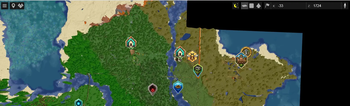
Some categories: house, bees, boat, villagers,....
After crafting a cache, it will be set in an inventory slot.

markers collection 3.2
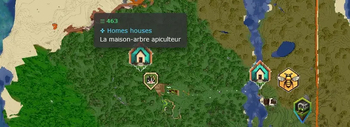
The default style on marker mouse hover
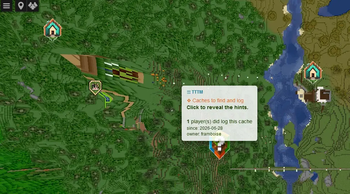
A geocache marker: cache/marker index, count of logged players, date and owner. The marker is clickable to revela the geocache Hints text.
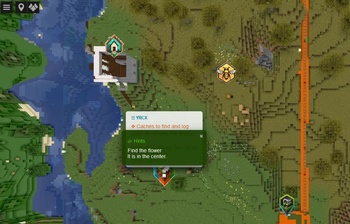
It reveals the hints to find the geocache location.
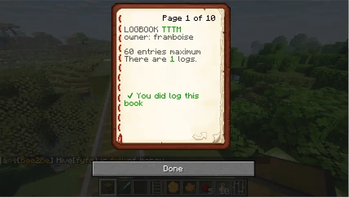
First pasge view of a logbook. Entries are limited, an configurable (60 max by default)
| Version | Minecraft | Loader | Download |
|---|---|---|---|
|
The markers-sizes-decision update. 3.3 |
1.21, 1.21.1, 1.21.2, 1.21.3, 1.21.4, 1.21.5, 1.21.6, 1.21.7, 1.21.8, 1.21.9, 1.21.10, 1.21.11, 26.1, 26.1.1, 26.1.2
|
paper, spigot
|
Download |