

BlueMap Sign Markers
Overview
Fabric plugin for BlueMap that displays markers based on in-game signs
Installation
Place in your mods folder along with BlueMap.
Server-side only.
Usage
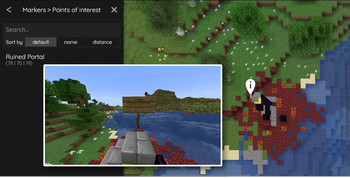
Place a sign or hanging sign with the following text on either the front or back:
[poi]
<short description>
A marker will be displayed on the map at the location of the sign with the text <short description>. The marker will
be removed from the map when the sign is broken.
Note that the prefixes can be configured in the configuration file.
Configuration
The mod will create a BMSM-Core.json file in the config/bluemapsignmarkers folder. This file contains the following
options:
markerGroups- a list of marker groups (described in detail below); default is a list with a single marker group configured for the[poi]prefix.
Marker Groups
A marker group is a collection of markers that can be toggled on and off in the BlueMap UI. Each marker group configuration contains the following options:
prefix- prefix that the sign must contain to be included in the marker group; required;matchType- the type of match to use when checking the first non-empty sign text line; optional; default isSTARTS_WITH(case-sensitive exact match);STARTS_WITH- line must start with the prefix;REGEX- line must match the regular expression (uses Java regex engine);
name- the name of the marker group; required;type- the type of marker to display; optional; default isPOIPOI- a single point marker per sign;LINE- signs sharing this group's prefix and the same first-line label become ordered points of one line marker (points ordered by placement time); requires at least 2 signs to appear;SHAPE- signs sharing this group's prefix and the same first-line label become ordered points of one filled polygon marker (points ordered by placement time, height taken from the tallest member); requires at least 3 signs to appear;EXTRUDE- sharesSHAPE's exact membership model (same prefix/label grouping, 3+ signs, points ordered by placement time), but renders the polygon extruded as a solid volume: the floor is taken from the lowest member's Y, the ceiling from the tallest member's Y (if all members share the same Y, the ceiling is bumped up by 1 block to avoid a zero-height volume);
icon- the icon path or URL to display for the marker; optional; default isnull(BlueMap default POI icon);POIonlyoffsetX- the x offset of the marker; optional; default is0(corresponds withanchor.xin BlueMap base configuration);POIonlyoffsetY- the y offset of the marker; optional; default is0(corresponds withanchor.yin BlueMap base configuration);POIonlydefaultHidden- If this is true, the marker-set will be hidden by default and can be enabled by the user; optional; default isfalseminDistance- the minimum distance from the camera at which the marker will be displayed; optional; default is0.0(floating point, double precision)maxDistance- the maximum distance from the camera at which the marker will be displayed; optional; default is10000000.0(floating point, double precision)lineWidth- the width in pixels of the line/shape/extrude border; optional; default is2;LINE/SHAPE/EXTRUDEonlylineColor- the hex color (with alpha) of the line/shape/extrude border, e.g.#FF0000FF; optional; default is#FF0000FF;LINE/SHAPE/EXTRUDEonlyfillColor- the hex color (with alpha) of a shape's or extrude volume's interior, e.g.#FF000033; optional; default is#FF000033(translucent red);SHAPE/EXTRUDEonlysorting- the marker-set's order in the map's layer menu (lower sorts first); optional; default is0toggleable- whether the marker-set can be hidden/shown by a player at all; optional; default istruedepthTest- whether terrain can occlude the marker (setfalseto keep an underground trail/region visible through terrain); optional; default istrue;LINE/SHAPE/EXTRUDEonlycssClasses- a list of CSS classes added to the marker element, for styling via BlueMap'scustom.css; optional; default is an empty list;POIonly
Setting a field on a group type it doesn't apply to (e.g. icon on a LINE/SHAPE/EXTRUDE group, fillColor on a
POI/LINE group, depthTest on a POI group, or cssClasses on a LINE/SHAPE/EXTRUDE group) is not an error;
the mod logs a warning and ignores the field.
Examples
{
  "markerGroups": [
    {
      "prefix": "[poi]",
      "name": "Points of Interest"
    },
    {
      "prefix": "[store]",
      "name": "Stores",
      "icon": "assets/store.png"
    },
    {
      "prefix": "\\[[vV][iI][lL][lL][aA][gG][eE]\\]",
      "matchType": "REGEX",
      "name": "Villages"
    },
    {
      "prefix": "[trail]",
      "name": "Trails",
      "type": "LINE",
      "lineWidth": 3,
      "lineColor": "#00A2FFFF"
    },
    {
      "prefix": "[region]",
      "name": "Regions",
      "type": "SHAPE",
      "lineWidth": 2,
      "lineColor": "#FFA500FF",
      "fillColor": "#FFA50040"
    },
    {
      "prefix": "[building]",
      "name": "Buildings",
      "type": "EXTRUDE",
      "lineWidth": 2,
      "lineColor": "#4682B4FF",
      "fillColor": "#4682B440"
    }
  ]
}
This example configuration creates 6 marker groups: one for [poi] signs, one for [store] signs, one for signs
where the prefix is a regex match for villages (e.g. [Village] or [VILLAGE]), one for [trail] signs, one for
[region] signs, and one for [building] signs.
Troubleshooting
- Editing a marker group's prefix (especially a
REGEXprefix) orphans existing signs. On servers running a version before this fix, changing a group's prefix text can make already-placed signs vanish from the map after/bluemap reload, and they won't come back on their own. Re-edit the sign's text (even re-typing the same text) or restart the server to fix it. Signs created or re-edited on a version that ships this fix self-heal automatically on/bluemap reload- no manual fix needed going forward. - Markers are hidden on maps whose
render-maskexcludes them. A sign's marker only shows up on a given BlueMap map if the sign's position is inside that map's ownrender-mask(configured inconfig/bluemap/maps/<id>.conf) - e.g. a nether-roof map withmin-y: 127won't show markers for signs placed below y=127. A map with norender-maskis unaffected. After upgrading to a version with this fix, run/bluemap reloadonce to sweep away any markers that were already showing on a map outside its render bounds - a plain server restart alone does not trigger this sweep.
| Version | Minecraft | Loader | Download |
|---|---|---|---|
|
26.3-1.0.1.89 |
26.3
|
fabric
|
Download |
|
26.3-1.0.1.88-beta |
26.3
|
fabric
|
Download |
|
26.2-1.0.0.87 |
26.2
|
fabric
|
Download |
|
26.2-1.0.0.86-beta |
26.2
|
fabric
|
Download |
|
26.2-1.0.0.85-alpha |
26.2
|
fabric
|
Download |
|
26.2-0.23.0.84-alpha |
26.2
|
fabric
|
Download |
|
26.2-0.23.0.83-alpha |
26.2
|
fabric
|
Download |
|
26.2-0.21.0.82-alpha |
26.2
|
fabric
|
Download |
|
26.2-0.19.0.81-alpha |
26.2
|
fabric
|
Download |
|
26.2-0.18.0.80-alpha |
26.2
|
fabric
|
Download |
|
26.2-0.17.1.78 |
26.2
|
fabric
|
Download |
|
26.2-0.17.1.77-alpha |
26.2
|
fabric
|
Download |
|
26.2-0.17.0.76 |
26.2
|
fabric
|
Download |
|
26.2-0.17.0.75-alpha |
26.2
|
fabric
|
Download |
|
26.2-0.16.0.74 |
26.2
|
fabric
|
Download |
|
26.2-0.16.0.73-alpha |
26.2
|
fabric
|
Download |
|
26.1.2-0.16.0.72 |
26.1.2
|
fabric
|
Download |
|
26.1.1-0.16.0.71 |
26.1.1
|
fabric
|
Download |
|
26.1.2-0.16.0.70-alpha |
26.1.2
|
fabric
|
Download |
|
26.1.1-0.16.0.69-alpha |
26.1.1
|
fabric
|
Download |
|
1.21.11-0.15.0.68 |
1.21.11
|
fabric
|
Download |
|
1.21.11-0.15.0.67-alpha |
1.21.11
|
fabric
|
Download |
|
1.21.10-0.14.0.66 |
1.21.10
|
fabric
|
Download |
|
1.21.10-0.14.0.65-alpha |
1.21.10
|
fabric
|
Download |
|
1.21.9-0.13.0.64 |
1.21.9
|
fabric
|
Download |
|
1.21.9-0.13.0.63-alpha |
1.21.9
|
fabric
|
Download |
|
1.21.9-0.12.1.62 |
1.21.9
|
fabric
|
Download |
|
1.21.9-0.12.1.61-alpha |
1.21.9
|
fabric
|
Download |
|
1.21.9-0.12.0.60 |
1.21.9
|
fabric
|
Download |
|
1.21.9-0.12.0.59-alpha |
1.21.9
|
fabric
|
Download |
|
1.21.8-0.11.0.58 |
1.21.8
|
fabric
|
Download |
|
1.21.8-0.11.0.57-alpha |
1.21.8
|
fabric
|
Download |
|
1.21.7-0.11.0.56 |
1.21.7
|
fabric
|
Download |
|
1.21.7-0.11.0.55-alpha |
1.21.7
|
fabric
|
Download |
|
1.21.6-0.11.0.54 |
1.21.6
|
fabric
|
Download |
|
1.21.6-0.11.0.53-alpha |
1.21.6
|
fabric
|
Download |
|
1.21.5-0.10.1.52 |
1.21.5
|
fabric
|
Download |
|
1.21.5-0.10.1.51-alpha |
1.21.5
|
fabric
|
Download |
|
1.21.5-0.10.0.50-alpha |
1.21.5
|
fabric
|
Download |
|
1.21.5-0.10.0.49 |
1.21.5
|
fabric
|
Download |
|
1.21.5-0.10.0.48-alpha |
1.21.5
|
fabric
|
Download |
|
1.21.5-0.9.0.47 |
1.21.5
|
fabric
|
Download |
|
1.21.5-0.9.0.46-alpha |
1.21.5
|
fabric
|
Download |
|
1.21.5-0.8.0.45 |
1.21.5
|
fabric
|
Download |
|
1.21.5-0.8.0.44-alpha |
1.21.5
|
fabric
|
Download |
|
1.21.5-0.8.0.43-alpha |
1.21.5
|
fabric
|
Download |
|
1.21.3-0.5.2.41 |
1.21.3
|
fabric
|
Download |
|
1.21.4-0.7.1.40 |
1.21.4
|
fabric
|
Download |
|
1.21.4-0.7.1.39-alpha |
1.21.4
|
fabric
|
Download |
|
1.21.4-0.7.0.38 |
1.21
|
fabric
|
Download |
|
1.21.4-0.6.0.37 |
1.21
|
fabric
|
Download |
|
1.21.4-0.6.1.36-alpha |
1.21
|
fabric
|
Download |
|
1.21.3-0.5.1.35 |
1.21
|
fabric
|
Download |
|
1.21.3-0.5.1.34-alpha |
1.21
|
fabric
|
Download |
|
1.21-0.4.1.33 |
1.21
|
fabric
|
Download |
|
1.21-0.4.1.32-alpha |
1.21
|
fabric
|
Download |
|
1.21.3-0.5.0.31 |
1.21
|
fabric
|
Download |
|
1.21-0.4.0.30 |
1.21
|
fabric
|
Download |
|
1.21-0.4.0.29-alpha |
1.21
|
fabric
|
Download |
|
1.20.1-0.2.4.28 |
1.20, 1.20.1
|
fabric
|
Download |
|
1.20.1-0.2.4.27-alpha |
1.20, 1.20.1
|
fabric
|
Download |
|
1.21.1-0.3.5.26 |
1.21
|
fabric
|
Download |
|
1.21.1-0.3.5.25-alpha |
1.21
|
fabric
|
Download |
|
1.21.1-0.3.4.24-alpha |
1.21
|
fabric
|
Download |
|
1.21.1-0.3.3.23-alpha |
1.21
|
fabric
|
Download |
|
1.21.1-0.3.3.22-alpha |
1.21
|
fabric
|
Download |
|
1.20.1-0.2.3.20 |
1.20, 1.20.1
|
fabric
|
Download |
|
1.20.1-0.2.3.19-alpha |
1.20, 1.20.1
|
fabric
|
Download |
|
1.20.1-0.2.2.18-alpha |
1.20, 1.20.1
|
fabric
|
Download |
|
1.20.1-0.2.1.17-alpha |
1.20, 1.20.1
|
fabric
|
Download |
|
1.20.1-0.2.1.16-alpha |
1.20, 1.20.1
|
fabric
|
Download |
|
1.20.1-0.2.0.15 |
1.20, 1.20.1
|
fabric
|
Download |
|
1.20.1-0.2.0.14-alpha |
1.20, 1.20.1
|
fabric
|
Download |
|
1.20.1-0.1.2.13 |
1.20, 1.20.1
|
fabric
|
Download |
|
1.20.1-0.1.2.12-alpha |
1.20, 1.20.1
|
fabric
|
Download |
|
1.20.1-0.1.1.10 |
1.20, 1.20.1
|
fabric
|
Download |
|
1.20.1-0.1.1.9-alpha |
1.20, 1.20.1
|
fabric
|
Download |
|
1.20.1-0.1.0.8 |
1.20, 1.20.1
|
fabric
|
Download |
|
1.20.1-0.0.4.7-alpha |
1.20, 1.20.1
|
fabric
|
Download |
|
1.20.1-0.0.3.6 |
1.20, 1.20.1
|
fabric
|
Download |
|
1.20.1-0.0.2.5 |
1.20, 1.20.1
|
fabric
|
Download |
|
1.20.1-0.0.2.4-alpha |
1.20, 1.20.1
|
fabric
|
Download |