

Camera Head
Mod for cameras that work through heads
More about the features
Cameras work through the player's head and by renaming them.
To create a camera, rename the camera to camera:<name>:[mode].
Specifying
:[mode]is optional; without it, the default mode will be selected.
Camera control
- Camera rotation can be adjusted using the arrow keys or holding down the left mouse button
- Zoom can be adjusted using the mouse wheel
Camera modes
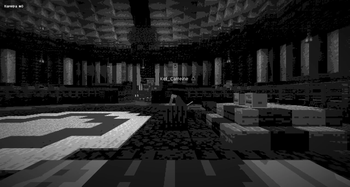
Default
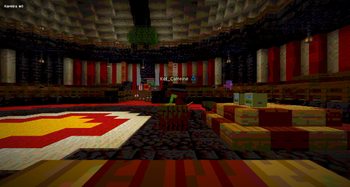
RGB
Clear
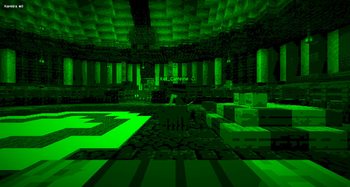
Creeper
Monitors are created in the same way as cameras, except that they must be named monitor:<name>
Important! The names of the camera and monitor must match for the connection to work.
F&Q
- Can textures be changed?: Yes, they can. The camera's operation does not depend on the texture, only on the name.
- What is the camera's radius?: 100 blocks from the monitor.
- Do cameras work outside the preload?: No.
- Will the cameras work if the heads are turned?: Yes
- What is the order of the cameras?: Everything goes in order:
- From -100 on y from the camera to 100 from the camera on y
- From -100 on x from the camera to 100 from the camera on x
- From -100 z from the camera to 100 z from the camera
- (Simply put, from -yxz to +yxz)

| Version | Minecraft | Loader | Download |
|---|---|---|---|
|
1.0.0-alpha.6+mc26.3 1.0.0-alpha.6 |
26.3
|
fabric
|
Download |
|
[26.2] 1.0.0-alpha.5 1.0.0-alpha.5 |
26.2
|
fabric, quilt
|
Download |
|
[26.2] 1.0.0-alpha.4 1.0.0-alpha.4 |
26.2
|
fabric, quilt
|
Download |
|
[26.2] 1.0.0-alpha.3 1.0.0-alpha.3 |
26.2
|
fabric, quilt
|
Download |
|
[1.21.9] 1.0.0-alpha.2 1.0.0-alpha.2 |
1.21.10, 1.21.9
|
fabric, quilt
|
Download |
|
[1.21.11] 1.0.0-alpha.2 1.0.0-alpha.2 |
1.21.11
|
fabric, quilt
|
Download |
|
[1.21.6-8] 1.0.0-alpha.2 1.0.0-alpha.2 |
1.21.6, 1.21.7, 1.21.8
|
fabric, quilt
|
Download |
|
[1.21.6-8] 1.0.0-alpha.1 1.0.0-alpha.1 |
1.21.6, 1.21.7, 1.21.8
|
fabric, quilt
|
Download |