🎵 CDisc Music
Turn any track from the internet into a real, playable music disc in Minecraft. Drop it in a jukebox and everyone nearby hears it through proximity voice chat — the closer you stand, the louder it gets.
Supports YouTube, Spotify, SoundCloud, Yandex Music, VK, TikTok and more.
✨ Features
- 🎧 Custom discs from anywhere — create a disc from a search query or a direct link.
- 📡 True proximity audio — the music plays from the jukebox and fades with distance. No global spam, no plugin messages — just sound in the world.
- 🔊 Two voice backends — works with Simple Voice Chat or Plasmo Voice. Pick whichever your server already runs.
- 🎛️ In-game player GUI — right-click a playing jukebox to open a full player: play / pause, seek ±5 s, previous / next track, and repeat modes.
- 📀 Disc queue system — load up to 42 discs into one jukebox and let them play back-to-back. Choose what happens to a finished disc (keep it, eject it, or move it to the end) and set repeat to off / whole queue / single track.
- 📊 Now-Playing boss bar — sneak near a jukebox to see the current track and a progress bar that fills as it plays.
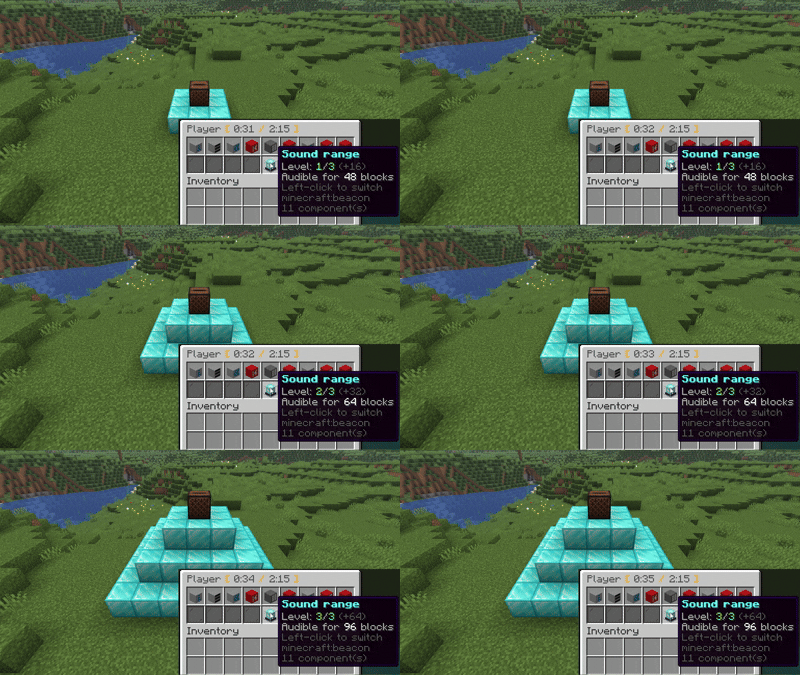
- 🔦 Beacon range boost — build a beacon pyramid under a jukebox to extend how far the music can be heard (bigger pyramid = bigger range).
- 🌍 Many sources — YouTube, SoundCloud, Spotify, Yandex Music, VK, TikTok, Bandcamp, Vimeo, Twitch, Mixcloud, and direct HTTP streams.
📥 Requirements
- Simple Voice Chat or Plasmo Voice — required (one of them)
Drop the plugin (and the voice-chat plugin) into your server's plugins/ folder and restart. Players need the matching voice-chat client mod installed to hear anything.
Stats:
https://bstats.org/plugin/bukkit/CDisc%20Music
🚀 How to use
1. Create a disc
Hold any music disc in your hand and run:
/cdisc create <search or link>
Examples:
/cdisc create yt:never gonna give you up— search YouTube/cdisc create https://youtu.be/dQw4w9WgXcQ— a direct link/cdisc create sc:lofi hip hop— search SoundCloud
The disc in your hand becomes a custom CDisc with the track baked in — its name and author show up in the tooltip. From here it's a normal item: carry it, trade it, store it in a chest, give it to a friend.
Tip: a link that contains a playlist (
...&list=...) automatically plays just the single track it points to.
2. Play it
Put the custom disc into a jukebox, exactly like a vanilla record. The track streams through the voice chat and plays from the jukebox itself — walk away and it fades out, walk closer and it gets louder. Everyone in range hears the same thing, in sync.
3. See what's playing — the boss bar
Sneak (Shift) while looking at the jukebox. A bar appears at the top of your screen showing Author - Track [time / length] and fills up as the song plays. It stays until you sneak at the jukebox again — so you can turn away and it keeps updating.
This also "arms" the jukebox for the next step.
4. Open the player — right-click
While the boss bar is showing, right-click the jukebox to open the player GUI:
- ⏯️ Play / Pause
- ⏪⏩ Seek −5s / +5s (or click the info item to type an exact timecode in chat)
- ⏮️⏭️ Previous / Next track in the queue
- 🔁 Repeat: off → whole queue → single track
- 📀 Open the disc queue
- 🔦 Sound range (beacon boost — see below)
⚠️ Right-clicking without sneaking first ejects the disc, just like vanilla. Sneak first, then right-click, to open the player.
5. Build a queue
A single jukebox can hold a whole playlist.
- Shift + right-click a playing jukebox (or hit the queue button in the player) to open the queue GUI.
- Drop custom discs into the 42 cells — they play top-to-bottom, one after another.
- Click a disc to jump straight to it — confirm with the green wool, cancel with the red wool.
- The played-disc policy button decides what happens to each disc once it finishes:
- Keep in the queue — it stays where it is.
- Eject — it pops out of the jukebox.
- Move to the end — it goes to the back, so the queue keeps cycling through your discs.
- Combine the policy with repeat (queue / track) for endless playback.
6. Extend the range with a beacon
Build a beacon pyramid under the jukebox (you don't even need the beacon block — just the pyramid). Then open the player and click Sound range to raise the level:
| Pyramid level | Extra range |
|---|---|
| 1 | +16 blocks |
| 2 | +32 blocks |
| 3 | +64 blocks |
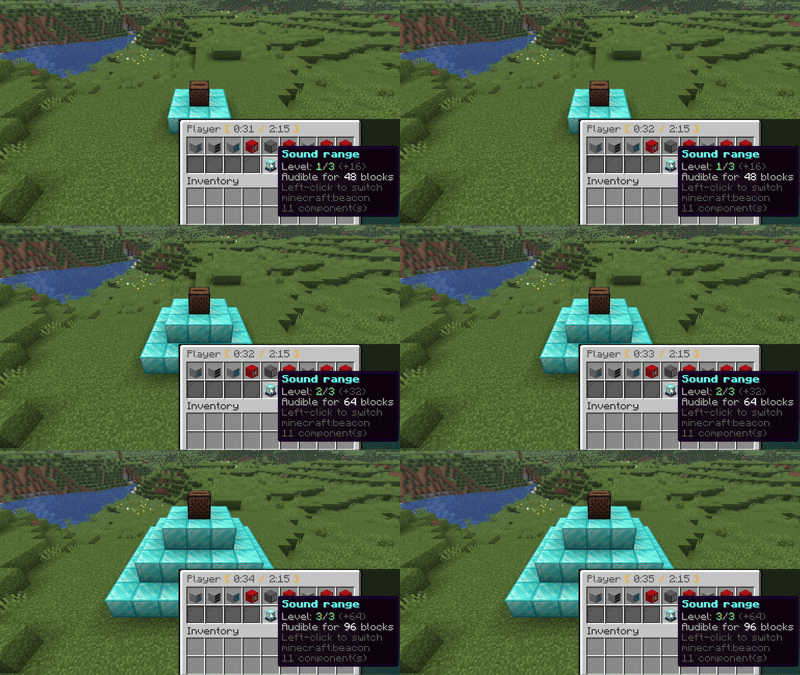
Perfect for a town square, an arena, or a club. The boost is added on top of the base distance from config.yml.
7. Breaking the jukebox
Break the jukebox and every disc in its queue drops on the ground — nothing is lost and nothing is duplicated.
⌨️ Commands
| Command | Description |
|---|---|
/cdisc create <query / URL> |
Turn the disc in your hand into a custom music disc |
/cdisc seek <SS | MM:SS | HH:MM:SS> |
Jump to a timecode in the current track (look at the jukebox) |
/cdisc clear |
Reset the held disc back to normal |
/cdisc reload |
Reload the configuration |
/cdisc ytsetup |
Set up YouTube OAuth |
Search prefixes
yt: YouTube · sc: SoundCloud · sp: Spotify · ym: Yandex Music · vk: VK · tt: TikTok
A direct link works too — e.g.
/cdisc create https://youtu.be/...
⚙️ Optional setup
Some sources work better (or only) with credentials in config.yml:
- YouTube — OAuth (
/cdisc ytsetup) and/or a Remote Cipher Server - Spotify — client ID + secret
- Yandex Music — access token
- VK Music — user token