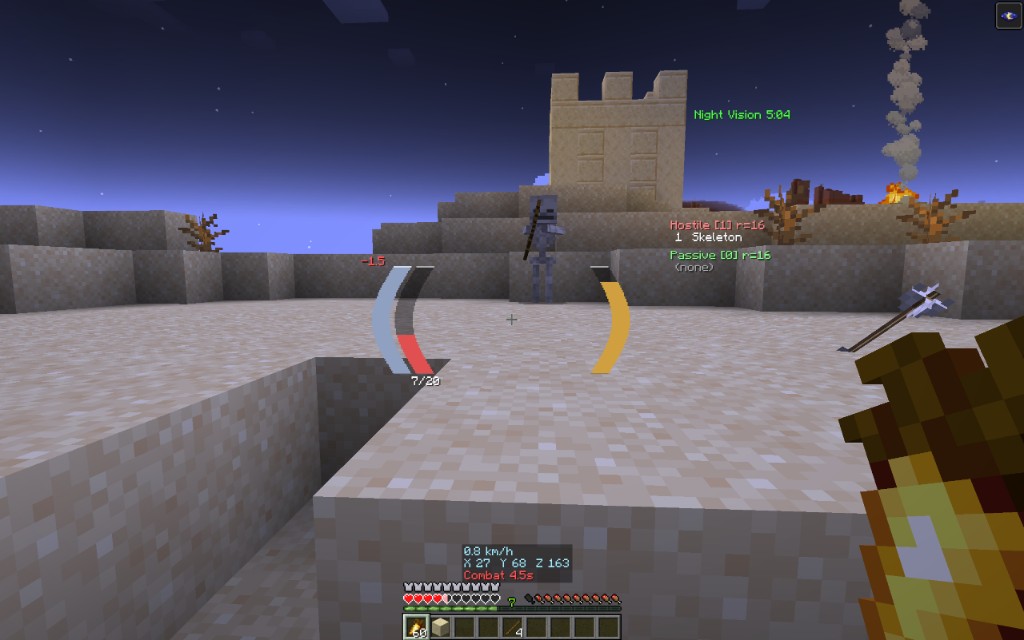
Center HUD replaces the bottom-of-screen clutter with a clean, modular HUD you can drag into place. Curved bars around the crosshair, floating combat numbers, nearby mob counts, and a small info strip - all client-side, all configurable.
What you get
- Player bars - health (with absorption), hunger, armor, air/freeze, mount; curved or straight; themes and gradients
- Scrolling combat text - damage taken/dealt, heals, crits, XP, effects; lanes so numbers do not pile on one pixel
- Awareness - hostile/passive counters, look-at target stats, status effects list
- Info panel - speed, coordinates, facing, combat timer
- Elytra - durability + glide readout (and an optional bar in the cluster)
- Waypoints - arrow, distance, and a simple waypoints screen
- Layout editor - press O in-game, drag modules, done
- Vanilla cleanup - optionally hide hearts, food, armor, air, mount, and effect icons so nothing doubles up
Install
- Fabric Loader for your Minecraft version
- Fabric API + Cloth Config
- This mod
- Optional: Mod Menu for the settings screen
Open Mod Menu → Center HUD (or edit config/centerhud.json).
Supported versions
26.2, 26.1.2 (also 26.1 / 26.1.1), 1.21.11, 1.21.1
Pick the jar that matches your game version.
Links
MIT license. Client-only. Source is not published.