

ChatReply (Client Mod)

A lightweight, client-side mod that automatically responds to configurable chat messages and handles scheduled text intervals.



Features
- Auto-Response: Triggers customized replies to specific phrases.
- Message Recall: Instantly access and reuse previous chat history.
- Response Delay: Prevent instant replies by adding a custom time buffer.
- Scheduled Loop: Send text automatically at custom intervals (e.g., every 10s or 20s).
- In-Game GUI: Toggle features and modify settings on the fly.
- Quick Keybinds: Enable, disable, or open menus instantly via hotkeys.
- Client-Side: Runs purely on your system with zero server footprint.
Configuration Menu
ChatReply features a clean, in-game configuration menu. All changes take effect immediately without requiring a game restart.
Auto-Respond Settings
- Toggle: Instantly enable or disable the automated response engine.
- Watch For: Define the exact keyword or phrase that triggers the mod.
- Reply With: Set the custom message sent back when triggered.
Delayed Messages
- Interval Loops: Create automated messages that broadcast at custom times.
- Live Editing: Tweak the output text and timing delays directly in-game.
Commands
/chatreply on                     - Enables automatic chat responding
/chatreply off                    - Disables automatic chat responding
/chatreply setmessage <text>      - Sets the trigger phrase to listen for
/chatreply setresponse <text>     - Sets the automated reply message
/chatreply senddelay <text> <sec> - Loops a message at custom intervals
/chatreply stopsenddelay          - Stops the active scheduled interval loop
Keybinds
- C — Opens the message recall menu.
- H — Toggles the entire response system on or off.
- I — Opens the main configuration GUI.
Note: All hotkeys can be remapped anytime in the standard Minecraft controls menu.
Installation & Recommendations
Setup Guide
- Download the mod file matching your Minecraft version.
- Place the file inside your local client
modsfolder. - Launch the game and type
/chatreplyto verify installation.
Recommendations
- Always Update: Use the latest file version for the best stability.
- Interface Scaling: Set your game GUI size to 3 for the best layout look.
Client Compatibility
This mod runs on standard Minecraft clients supporting client-side mods, and has been tested on:
- Feather Client
- Lunar Client
Note: Total compatibility with all third-party launchers cannot be guaranteed.
Transparency & Security
- Purely Client-Side: Runs exclusively on your game instance.
- No Data Collection: Does not gather, store, or transmit personal details.
- No Account Tracking: Never accesses tokens, passwords, or session data.
- No External Links: Does not connect to outside master servers.
- Vanilla Mimicry: Dispatches messages safely through standard vanilla chat protocols.
Server Warning & Disclaimer
⚠️ Important Warning: This mod automates chat actions. Many multiplayer servers classify this behavior as a macro or illegal automation. Using this mod on public servers that restrict automation can result in player mutes, kicks, or permanent account bans.
User Responsibility
- You must verify individual server rules regarding chat macros.
- You assume full responsibility for any server punishments or bans incurred.
- The developer holds zero liability for rule violations or player bans.
Suggested Use Cases
- Personal or private survival worlds.
- Servers where automated chat macros are explicitly permitted.
- Repetitive AFK status messages with pre-approved staff consent.
If you need more detailed support or have a some suggestions on more fetures then feel free to contact me by opening a ticket on my dicsord server!

Now features a clean, in-game configuration menu that allows you to set everything up on the fly!
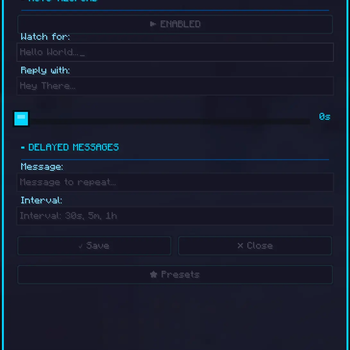
Added a new slider to the configuration menu for Auto-Respond, allowing you to set a response delay in seconds.
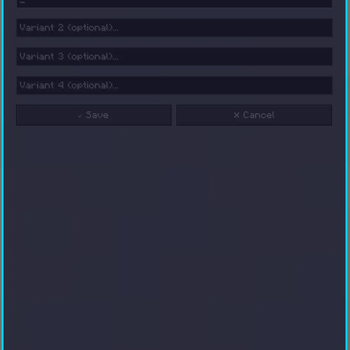
Added support for up to 4 random responses per auto-reply trigger, allowing replies to vary for a more natural experience.
| Version | Minecraft | Loader | Download |
|---|---|---|---|
|
ChatReply 2.2 2.2 |
1.21, 1.21.1, 1.21.10, 1.21.11, 1.21.2, 1.21.3, 1.21.4, 1.21.5, 1.21.6, 1.21.7, 1.21.8, 1.21.9
|
fabric
|
Download |
|
ChatReply 2.1 2.1 |
1.21, 1.21.1, 1.21.10, 1.21.11, 1.21.2, 1.21.3, 1.21.4, 1.21.5, 1.21.6, 1.21.7, 1.21.8, 1.21.9
|
fabric
|
Download |
|
ChatReply 2.0 2.0 |
1.21, 1.21.1, 1.21.10, 1.21.11, 1.21.2, 1.21.3, 1.21.4, 1.21.5, 1.21.6, 1.21.7, 1.21.8, 1.21.9
|
fabric
|
Download |
|
ChatReply 1.9 1.9 |
1.21, 1.21.1, 1.21.2, 1.21.3, 1.21.4, 1.21.5, 1.21.6, 1.21.7, 1.21.8
|
fabric
|
Download |
|
ChatReply 1.8 1.8 |
1.21, 1.21.1, 1.21.2, 1.21.3, 1.21.4, 1.21.5, 1.21.6, 1.21.7, 1.21.8
|
fabric
|
Download |
|
ChatReply 1.6 1.6 |
1.21, 1.21.1, 1.21.2, 1.21.3, 1.21.4, 1.21.5, 1.21.6, 1.21.7, 1.21.8
|
fabric
|
Download |
|
ChatReply 1.5 1.5 |
1.21, 1.21.1, 1.21.2, 1.21.3, 1.21.4, 1.21.5, 1.21.6, 1.21.7, 1.21.8
|
fabric
|
Download |
|
ChatReply 1.4 1.4 |
1.21, 1.21.1, 1.21.2, 1.21.3, 1.21.4, 1.21.5, 1.21.6, 1.21.7, 1.21.8
|
fabric
|
Download |
|
ChatReply 1.3 1.3 |
1.21, 1.21.1, 1.21.2, 1.21.3, 1.21.4, 1.21.5, 1.21.6, 1.21.7, 1.21.8
|
fabric
|
Download |
|
ChatReply 1.2 1.2 |
1.21, 1.21.1, 1.21.2, 1.21.3, 1.21.4, 1.21.5, 1.21.6, 1.21.7, 1.21.8
|
fabric
|
Download |
|
ChatReply 1.1 1.1 |
1.21, 1.21.1, 1.21.2, 1.21.3, 1.21.4, 1.21.5, 1.21.6, 1.21.7, 1.21.8
|
fabric
|
Download |
|
ChatReply 1.0 1.0 |
1.21, 1.21.1, 1.21.2, 1.21.3, 1.21.4, 1.21.5, 1.21.6, 1.21.7, 1.21.8
|
fabric
|
Download |