


Complete timed chess matches in Minecraft's native Paper dialog UI



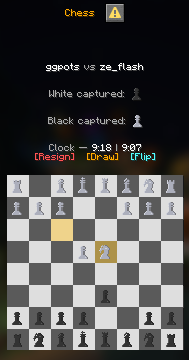
Chess turns Paper's native dialog system into a live, clickable 8x8 board. Challenge another player, choose a clock, and play a complete match without chest menus or a physical board.
Highlights
- Native dialog board: 64 individually clickable squares in a clean, live interface.
- Complete move handling: castling, en passant, promotion, check, checkmate, and stalemate.
- Timed games: 17 presets from one-minute bullet to five-hour games, with increment options.
- Useful board feedback: legal moves, selection, last move, check, captures, coordinates, and both clocks can be displayed directly in the dialog.
- Player-friendly controls: flip the board, offer or accept a draw, resign safely, close the dialog, and reopen an active game at any time.
- Resource-pack aware: the textured board is bundled, can register itself with ResourcePackManager, and has an optional Unicode fallback.
- Folia ready: game mutations, clocks, commands, dialog sends, and pack delivery use Folia-safe scheduling.
- Configurable: tune sounds, expiry timers, board behavior, labels, and messages.
See it in game

Requirements
- Java: 21
- Server: Paper 1.21.11 or Folia based on the same API
- Optional: ResourcePackManager
This plugin requires Paper's native Dialog API and does not run on a standard Spigot server. The
chess engine and the board pack are included in Chess.jar; ResourcePackManager is not required.
Getting started
- Put
Chess.jarin the server'spluginsfolder and restart. - With ResourcePackManager installed, Chess registers its pack automatically.
- Without ResourcePackManager, host
plugins/Chess/resourcepack.zipand set the public URL atresource-pack.urlinplugins/Chess/settings.yml. - Have one player run
/chess duel <player> <time>and the other run/chess accept <player>.
Set ui.dialog.use-glyphs: false for standard Unicode pieces without the custom textures. Set
resource-pack.use-resourcepack: false when another system will merge or distribute the pack.
Commands
| Command | What it does |
|---|---|
/chess duel <player> <time> |
Send a timed duel request. |
/chess accept <player> |
Accept a request from that player. |
/chess decline <player> |
Decline a request from that player. |
/chess open |
Reopen your active board. |
/chess help |
Show command help. |
Time modes: 1, 1|1, 2|1, 3, 3|2, 5, 5|2, 5|5, 10, 10|5, 15|10, 30,
60, 120, 180, 240, and 300. In increment modes, 5|2 means five minutes plus two
seconds after each move.
All players can use Chess; version 1.0.0 has no permission nodes.
Support
| Version | Minecraft | Loader | Download |
|---|---|---|---|
|
Chess v1.0.7 1.0.7 |
1.21.10, 1.21.11, 1.21.6, 1.21.7, 1.21.8, 1.21.9, 26.1, 26.1.1, 26.1.2, 26.2, 26.3
|
folia, paper, purpur, spigot
|
Download |
|
Chess v1.0.6 1.0.6 |
1.21.10, 1.21.11, 1.21.6, 1.21.7, 1.21.8, 1.21.9, 26.1, 26.1.1, 26.1.2, 26.2
|
folia, paper, purpur, spigot
|
Download |
|
Chess v1.0.5 1.0.5 |
1.21.10, 1.21.11, 1.21.6, 1.21.7, 1.21.8, 1.21.9, 26.1, 26.1.1, 26.1.2, 26.2
|
folia, paper, purpur, spigot
|
Download |
|
Chess v1.0.4 1.0.4 |
1.21.10, 1.21.11, 1.21.6, 1.21.7, 1.21.8, 1.21.9, 26.1, 26.1.1, 26.1.2, 26.2
|
folia, paper, purpur, spigot
|
Download |
|
Chess v1.0.3 1.0.3 |
1.21.10, 1.21.11, 1.21.6, 1.21.7, 1.21.8, 1.21.9, 26.1, 26.1.1, 26.1.2, 26.2
|
folia, paper, purpur
|
Download |
|
Chess v1.0.2 1.0.2 |
1.21.10, 1.21.11, 1.21.6, 1.21.7, 1.21.8, 1.21.9, 26.1, 26.1.1, 26.1.2, 26.2
|
folia, paper, purpur
|
Download |
|
Chess v1.0.1 1.0.1 |
1.21.10, 1.21.11, 1.21.6, 1.21.7, 1.21.8, 1.21.9, 26.1, 26.1.1, 26.1.2, 26.2
|
folia, paper, purpur
|
Download |
|
Chess v1.0.0 1.0.0 |
1.21.10, 1.21.11, 1.21.6, 1.21.7, 1.21.8, 1.21.9, 26.1, 26.1.1, 26.1.2, 26.2
|
folia, paper, purpur
|
Download |