

ChunkMap
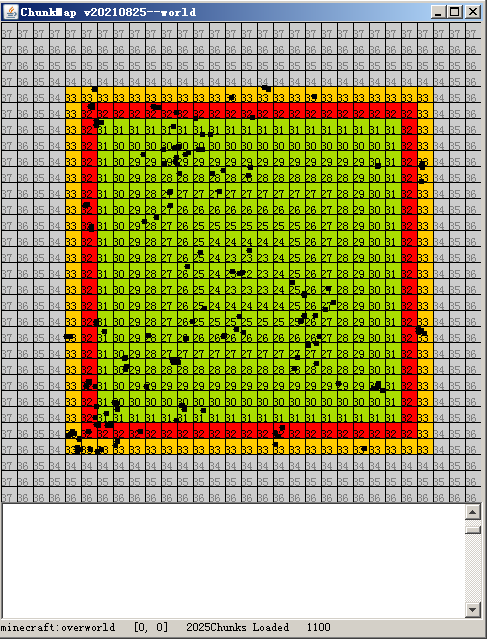
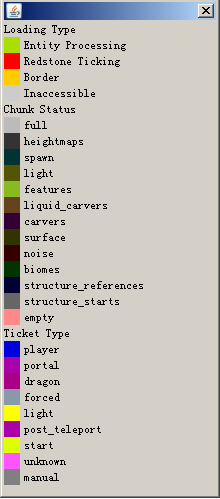
In the map, a chunk is displayed as a quad with a color which provides some information.
Basic Operations
-
L : Switch to chunk loading viewer mode.
-
G : Switch to chunk generation viewer mode.
-
T : Switch to ticket vierer mode.
-
E : Toggle the entity overlay.
-
W,A,S and D : Move the center of the map.If one of these keys are pressed while the Alt key is down,the center of the map will be moved to 16 instead of 1 chunks away.
-
M : Open a dialog where you can move the center of the map to a given chunkpos.
-
H : Help.
-
0 : Move to the Nether
-
1 : Move to the Overworld.
-
2 : Move to the End.
-
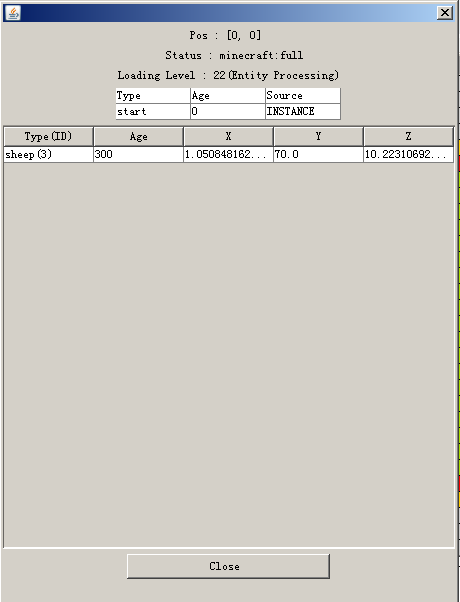
Double click a chunk : Get more information about the chunk,or load the chunk to a given level (31,or entity processing bydefault).
Known Problems
-
The MSPT it uses up may be too high(about 12).
-
If you want to interact with the window of the map,it is necessary to open the game to the LAN (Maybe it can never be fixed).
-
The manually loaded chunks may fail to be unloaded beacuse of a problem related to the synchornization of the ticket list.
| Version | Minecraft | Loader | Download |
|---|---|---|---|
|
ChunkMap 1.21.2-20250126 1.21.2-20250126 |
1.21.2, 1.21.3
|
fabric
|
Download |
|
ChunkMap 1.20-20230725 1.20-20230725 |
1.20, 1.20.1
|
fabric
|
Download |
|
ChunkMap 1.17-1.19-20230404 1.17-1.19-20230404 |
1.17, 1.17.1, 1.18, 1.18.1, 1.18.2, 1.19, 1.19.1, 1.19.2, 1.19.3, 1.19.4
|
fabric
|
Download |
|
ChunkMap 1.16.x-20230304 1.16.x-20230304 |
1.16, 1.16.1, 1.16.2, 1.16.3, 1.16.4, 1.16.5
|
fabric
|
Download |
|
v20220803 |
1.16.4, 1.16.5
|
fabric
|
Download |
|
1.17 & 1.18 & 1.19 Port v20220127 |
1.17, 1.17.1, 1.18, 1.18.1, 1.18.2, 1.19, 1.19.1, 1.19.2, 1.19.3
|
fabric
|
Download |
|
v20210825 |
1.16.4, 1.16.5
|
fabric
|
Download |