Stop snapping in. Start zooming like a film camera.
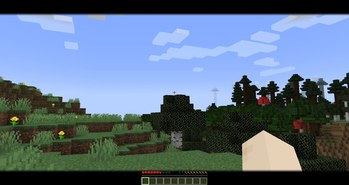
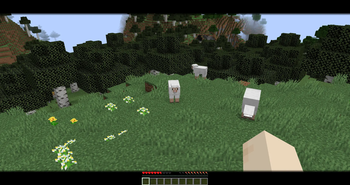
CinematicZoom replaces the usual instant FOV punch with a hold-to-zoom that actually feels good. Press and hold C and the camera eases into a tight ~50% FOV while thin black bars slide in from the top and bottom of the screen. Let go, and the world and the bars ease back just as smoothly. No pop-in. No leftover HUD junk.
Built for players who want OptiFine-style zoom without the rest of OptiFine — and for anyone who records, streams, or just likes lining up a shot.
Features
Cinematic Look
Short, full-width letterbox bars fade in with the zoom and vanish the same way.
Smooth Motion
Zoom and bars are driven by real time, not tick steps, so it stays fluid at any FPS.
Mouse Control
Sensitivity scales down with the zoom so you can track a far target instead of overshooting it.
Customization
Zoom amount, animation speed, bar height, and opacity are configurable through Mod Menu.
Client-Side
No server installation required. Doesn't stack with the vanilla spyglass. Opening a menu releases the zoom cleanly.
Keybind
Default key is C. You can rebind it in Controls → CinematicZoom.
Configuration
- Zoom amount
- Animation speed
- Letterbox bar height
- Letterbox opacity
- Mouse sensitivity
Installation
- Install the mod.
- Place it in your
modsfolder. - Launch Minecraft.
- Hold C to zoom.
Compatibility
Client-side only. No server installation required.
Who It's For
PvP and long-range players who want a stable zoom. Builders lining up details. Creators who want a widescreen look for clips and screenshots. Anyone tired of zoom mods that snap, stutter, or ignore mouse feel.
Hold C. The world leans in. That's the whole pitch.