

ClaimModCompanion — Dynamic Client-Side Claim Overlays & GUI

ClaimModCompanion is a purely client-side Fabric mod that functions as the optional companion to the ClaimMod protection system. While ClaimMod handles all server-side validations and vanilla particle configurations, this mod hooks into a lightweight network packet channel to build a smooth, instantaneous client-side rendering matrix.
By tracking server boundary metadata locally, ClaimModCompanion removes server overhead and visualizes claim indicators as smooth GPU lines directly in the world geometry, alongside introducing an ergonomic, out-of-game style land settings GUI.
📧 Contact & Support
💬 Primary Support (Preferred)
All general questions, feature requests, and non-urgent bug reports should be posted in the appropriate channels on our Discord Server. We actively monitor it and will respond as soon as possible so the whole community benefits.
🆘 Urgent PM Policy
You may PM me directly only under specific urgent circumstances:
- Allowed reason: Your server is crashing or experiencing critical, game-breaking errors directly related to this mod.
- Requirement: You must be the server owner.
- Time zone: (CET/CEST) — Brussels Time
- PM hours: 10:00 AM – 10:00 PM Brussels Time only
Immediate responses are not guaranteed. Private messaging is a professional courtesy, not an entitlement. Thank you for your understanding!
🎛️ Interactive Claim Menu
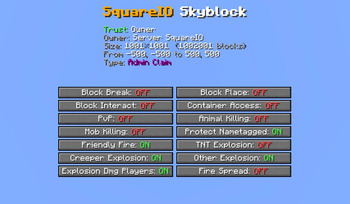
Tired of using long command lines like /claim flag <name> <value> to configure your claims? ClaimModCompanion introduces a fully integrated claim menu:
- One-Click Hotkey (Default: N): Opens the claim menu layered seamlessly over your gameplay. Rebindable in the Controls menu.
- Claim Overview: The top of the menu shows the claim you stand in: owner, your trust level, size, corners and claim type.
- Flag Categories: Flags are grouped into Building, Block Use, Interactions, Combat, Environment, Mob Spawning, Movement & Misc and Notifications. Collapse or expand any category with one click; any number can be open at once, and the menu remembers your choice until you close the game.
- One-Click Toggles: Clicking a flag switches it instantly on the server, without chat spam.
- Hover Explanations: Every flag button and every small button explains exactly what it does when you hover over it.
- Smart Permission Filtering: The menu only shows the flags you are actually allowed to change in that claim, as decided by the server.
🧰 Menu Toolbar
A row of small square buttons sits in the top-left corner of the menu. Only one popup is open at a time:
-
$Claim Blocks: Your total, used and available claim blocks, how many you earn per hour online (including your rank's rate), and a live countdown to your next payout. On servers with EcoBal it also shows your money and the price per claim block. -
Your Player Head: Online Players: Every online player with their head and name, plus quick buttons:
^trust the playerˇuntrust the playerXkick the player out of your claim
Trusting and untrusting apply to the claim you stand in if it's yours, or to all your claims otherwise.
-
≡My Claims: All claims you own or co-own, with name, world, size and centre coordinates. Rename a claim right in the list, or abandon it with a double-click confirmation.
🧱 Client-Side Border Rendering
Say goodbye to waiting for server visuals. ClaimModCompanion draws claim borders on your own client:
- Instant Borders While Holding a Tool: Hold the claim tool (Golden Shovel, Copper Shovel) or a plain Stick in either hand and the borders of every nearby claim appear immediately; put it away and they disappear.
- Always Up to Date: The server keeps the companion supplied with nearby claim bounds as you move, so borders are already there before you reach a claim.
- Role-Based Border Colors: Borders match your trust status in each claim:
- Owner: Gold Blocks with Glowstone corners.
- Trusted: Lapis Lazuli Blocks with Sea Lantern corners.
- Visitor / Stranger: Iron Blocks with Shroomlight corners.
- Purely Visual: Border blocks exist only on your screen and never change the real world.
🔌 Setup & System Integration
- 100% Client-Side: This mod does not need to be installed on servers. You can keep it active in your client mod folder safely while jumping between vanilla servers, modded networks, or single-player worlds.
- Server Handshake Detection: Features only switch on when the server runs ClaimMod. On vanilla or unsupported servers the companion stays dormant, and menu features that need a newer ClaimMod simply show "Not available on this server".
- Full Rebind Support: The menu key integrates directly into the standard Minecraft Controls configuration under its own dedicated category.
Modpack Policy
- ✅ You may include ClaimModCompanion in any modpack.
- ❌ The modpack must not be sold.
| Version | Minecraft | Loader | Download |
|---|---|---|---|
|
ClaimModCompanion 1.0.2 1.0.2 |
26.3
|
fabric
|
Download |
|
ClaimModCompanion 1.0.2 1.0.2 |
26.2
|
fabric
|
Download |
|
ClaimModCompanion 1.0.2 1.0.2 |
26.1.2, 26.1.1, 26.1
|
fabric
|
Download |
|
ClaimModCompanion 1.0.1 1.0.1 |
26.3
|
fabric
|
Download |
|
ClaimModCompanion 1.0.1 1.0.1 |
26.2
|
fabric
|
Download |
|
ClaimModCompanion 1.0.1 1.0.1 |
26.1.2
|
fabric
|
Download |
|
ClaimModCompanion 1.0.0 1.0.0 |
26.1.2
|
fabric
|
Download |