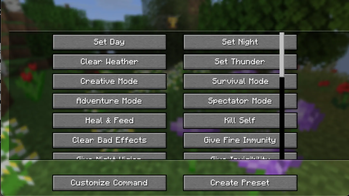
CommandHelper gives you an in-game menu to run common commands instantly instead of typing them out in chat every time. Just press Y to pull up a scrollable menu of shortcuts. You can change this keybind in your normal Minecraft controls settings.
Features: 32 Built-in Commands: Split into a clean, scrolling layout. Includes quick buttons for time, weather, gamemodes, item spawning, and potion effects.
100% Client-Side: You only need to install this on your own game. It works fine on servers without needing the mod installed on the server side.
Mob Purge Selector: Click "Customize Command" to open a sub-menu listing vanilla mobs. Select one to automatically run a /kill @e[type=...] command for that specific mob.
Custom Presets: Click "Create Preset" to type in your own custom command and give it a name. It saves directly to your computer so it stays there even after you close the game.
The current Preset Commands are:
- Time and Weather
- Set Day -> time set day
- Set Night -> time set night
- Clear Weather -> weather clear
- Set Thunder -> weather thunder
- Game Modes
- Creative Mode -> gamemode creative
- Survival Mode -> gamemode survival
- Adventure Mode -> gamemode adventure
- Spectator Mode -> gamemode spectator
- Player Health and Effects
- Heal and Feed -> effect give @s instant_health 1 255 and effect give @s saturation 1 255
- Kill Self -> kill
- Clear Bad Effects -> effect clear @s
- Give Fire Immunity -> effect give @s fire_resistance 9999 1
- Give Night Vision -> effect give @s night_vision 9999 1
- Give Invisibility -> effect give @s invisibility 9999 1
- Super Speed -> effect give @s speed 9999 5
- Super Jump Boost -> effect give @s jump_boost 9999 5
- Game Rules
- Keep Inventory ON -> gamerule keepInventory true
- Keep Inventory OFF -> gamerule keepInventory false
- Disable Mob Grief -> gamerule mobGriefing falseEnable
- Mob Grief -> gamerule mobGriefing trueStop
- Stop Weather Loop -> gamerule doWeatherCycle falseStart
- Items and Experience Drops
- Give 1 Diamond -> give @s diamond 1
- Give 64 Diamonds -> give @s diamond 64
- Give Netherite -> give @s netherite_ingot 1
- Give God Apple -> give @s enchanted_golden_apple 1
- Give 10 XP Levels -> xp add @s 10 levels
- Give 100 XP Levels -> xp add @s 100 levels
- Mechanics and Utilities
- Freeze Game Tick -> tick freeze
- Unfreeze Game Tick -> tick unfreezeSummon Lightning -> summon lightning_bolt
- Locate Village -> locate structure village
- Clear Inventory -> clear