CozyRadio Mod
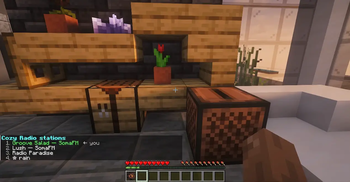
An endless, server-synchronized internet radio stream for Minecraft — drop the Cozy Radio disc in a jukebox and every player nearby (~65 blocks) tunes in together. Compatible with vanilla jukeboxes: insert/eject, redstone comparator output and music particles all work normally.
No bundled audio: the default playlist is curated MP3 relays (SomaFM, Radio Paradise), and every player can add their own YouTube live streams as personal stations.
Loader: Fabric — Game version: 1.21.11 — Type: Client + Server (install on both, or in singleplayer)
Features
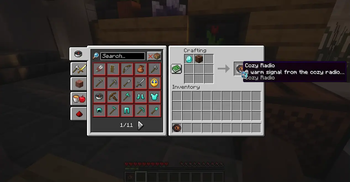
- Cozy Radio disc — craft it with a
jukebox+ adiamond, pop it into a jukebox, and every player within ~65 blocks tunes in. - Server-synchronized rotation — the whole server rotates stations together on a configurable interval (default 5 min); no client state.
- Per-player controls —
/cozyradio next|prev|station <name>switches your station until the next rotation boundary; other players keep their own picks or the rotation. - Personal YouTube radios — register your own YouTube live streams with
/cozyradio add <url> [label](up to 5), listed with ★ and played like any other station. Saved on disk and kept per player. - Play your own rotation —
/cozyradio rotation oncycles only your personal stations on the rotation cadence. - HUD status card — an animated "Connecting…" sweep bar while a station buffers, then a fading "Now playing" card with the station name.
- Volume follows your Record × Master sliders (both must be non-zero).
- Resilient playback — stream dropouts retry automatically; streams that never produce audio reconnect instead of staying silent; expired YouTube download URLs re-resolve on their own.
- One-time YouTube authorization — when YouTube bot-checks your network, the mod asks for access through YouTube's official device flow, right in the game chat (more below).
Installation
- Install Fabric Loader 0.19.3+ and Fabric API for 1.21.11 (Java 21+).
- Drop
cozyradio-mod-*.jarinto themods/folder of both your server and your client (singleplayer only needs the one instance). - On first server start, the mod writes its config to
config/cozyradio-mod/playlist.json— edit the station list or the rotation interval and restart to apply.
Usage
- Craft the Cozy Radio disc (
jukebox+diamondin a crafting table). - Place a jukebox, insert the disc.
- Use the commands below to control the radio.
Commands
| Command | Description |
|---|---|
/cozyradio status |
Jukeboxes playing, rotation interval, current station, your personal-station count |
/cozyradio list |
All stations (yours are marked ★); marks the one you're hearing |
/cozyradio next |
Skip to the next station (per player) |
/cozyradio prev |
Go back to the previous station (per player) |
/cozyradio station <name> |
Jump to a station by name (tab-complete: your stations) |
/cozyradio add <url> [label] |
Register a YouTube live stream as your station (max 5; label must be a single word) |
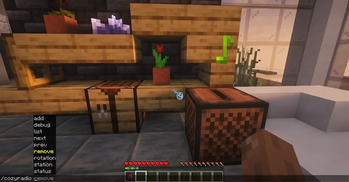
/cozyradio remove <name> |
Remove one of your personal stations by name |
/cozyradio rotation on|off |
Cycle the rotation through your personal stations (no-arg shows state) |
/cozyradio debug |
Op-only: jukebox positions, listener streams |
Personal stations (YouTube)
/cozyradio add "https://www.youtube.com/watch?v=X4VbdwhkE10" "MyLofi"
→ Added "MyLofi" to your stations — /cozyradio station MyLofi
/cozyradio list                # shared stations first, yours after with ★
/cozyradio station MyLofi      # select by name, case-insensitive
- Identified by their label (no spaces in it) — re-adding the same name replaces that station's URL instead of duplicating.
- Accepted links:
www.youtube.com/watch?v=…,youtu.be/…,music.youtube.com/…(plainhttpworks too). Other URLs — including MP3 relays — are rejected, so servers can't point your client at arbitrary hosts. - Saved to
config/cozyradio-mod/personal-stations.json, survive restarts, and files from older versions (which usedyours-<videoId>ids) migrate automatically.
YouTube authorization (one-time)
YouTube bot-checks anonymous requests on some networks, so each player's client authorizes YouTube access once through YouTube's official device flow. When a YouTube station needs it, a message appears in the in-game chat (link is clickable):
Cozy Radio: YouTube authorization required — open <url> and enter code <code>
Click the link or open it in any browser on any device, sign in with any Google
account, enter the code and allow access. The client polls automatically, saves
the refresh token to config/cozyradio-mod/youtube-oauth.json, and starts playing
— no restart needed. While the authorization is pending, YouTube stations stay
silent (MP3 stations keep playing); once you complete the code, the waiting stream
resumes on its own. This happens once per client — the server never needs a
token.
About YouTube live streams: live IDs die whenever a 24/7 broadcast restarts (the famous Lofi Girl ID died in 2026). That's why no YouTube station ships in the default playlist — players add current ones with
/cozyradio add. A stale station is fixed by removing it and adding the current URL.
Configuration
config/cozyradio-mod/playlist.json (written on first start):
{
  "rotationMinutes": 5,
  "stations": [
    { "id": "groove-salad", "name": "Groove Salad — SomaFM", "url": "https://ice1.somafm.com/groovesalad-128-mp3", "type": "mp3" },
    { "id": "lush", "name": "Lush — SomaFM", "url": "https://ice1.somafm.com/lush-128-mp3", "type": "mp3" },
    { "id": "radio-paradise", "name": "Radio Paradise", "url": "https://stream.radioparadise.com/mp3-192", "type": "mp3" }
  ]
}
"type": "mp3"— a SHOUTcast/Icecast MP3 stream (default whentypeis missing)."type": "youtube"— a YouTube video or live stream URL.
The defaults are only written when the file doesn't exist yet — delete it to regenerate.
Troubleshooting
- No sound? The stream volume follows the Record and Master sliders. If either is muted, you'll hear silence (the mod does not use the Music slider).
- A station goes silent or fails to load — radio relay URLs change occasionally.
Update the station's
urlinconfig/cozyradio-mod/playlist.jsonand restart. - A YouTube station stays silent — check the in-game chat for the
Cozy Radio: YouTube authorization requiredmessage and complete the one-time authorization; the stream resumes on its own. - A YouTube station stops — the live stream's video ID died (the 24/7 broadcast
restarted). Remove it and
/cozyradio addthe current URL.
License & credits
- Mod code: CC0-1.0 — Source on GitHub · Report issues
- Playback: Lavaplayer (
dev.arbjerg:lavaplayer, Apache-2.0) + youtube-source (dev.lavalink.youtube:v2) — bundled jar-in-jar, ~34 MB total (includes the Lavaplayer natives for all platforms). - This project is roughly 90% AI-generated code, reviewed and tested by a human before release — bugs are still possible, reports welcome.