

CraftViaTPA
CraftViaTPA is a lightweight, highly configurable server-side teleport request plugin for survival, SMP and economy servers.
It keeps /tpa simple for players while giving server owners control over cooldowns, warmups, messages, sounds and request behavior.
Features
/tpa <player>/tpahere <player>/tpaccept [player]/tpdeny [player]and/tpadeny/tpacancel/tpatoggle- Click the incoming TPA message to instantly accept it
- Multiple incoming teleport requests
- Shared configurable cooldown for
/tpaand/tpahere - Separate
/tpaand/tpahererequest lifetimes - Separate teleport warmups
- Cancel teleport when the player moves
- Configurable sound effects for requests, accepts, denies, cooldowns, movement cancellation and more
- Fully customizable player-facing messages with placeholders
- Persistent player TPA toggle state
- Automatic request cleanup
- In-game admin settings GUI with
/craftvia tpa - Runtime configuration changes without restarting
- Folia-aware scheduling and teleport support
- No dependencies
- Server-side only — players do not need to install anything
In-game configuration
Run:
/craftvia tpa
The settings GUI lets server owners configure request lifetimes, cooldowns, teleport warmups, movement cancellation and incoming request limits.
Exact values can also be changed with commands:
/craftvia tpa set tpa-lifetime 60/craftvia tpa set tpahere-lifetime 60/craftvia tpa set cooldown 15/craftvia tpa set tpa-warmup 3/craftvia tpa set tpahere-warmup 3/craftvia tpa set max-incoming 10
Custom messages
All player-facing messages can be customized in messages.yml or directly in-game.
Examples:
/craftvia tpa message request-to-you &e{player} wants to teleport to you./craftvia tpa message warmup &eTeleporting in {seconds}s. Do not move./craftvia tpa message cooldown &cYou cannot do this right now, on cooldown./craftvia tpa message reset request-to-you
Custom sound effects
TPA feedback sounds can be individually configured without cluttering the settings GUI.
Example:
/craftvia tpa sfx cooldown ENTITY_VILLAGER_NO 0.8 1.0
Sound, volume and pitch can be customized for different TPA events.
Installation
- Download CraftViaTPA.
- Place the JAR inside your server's
pluginsfolder. - Restart the server.
- Run
/craftvia tpato configure it.
Permissions
craftvia.tpa.use— use TPA commandscraftvia.tpa.toggle— toggle incoming requestscraftvia.tpa.bypass-toggle— bypass another player's TPA togglecraftvia.tpa.bypass-cooldown— explicitly bypass the request cooldowncraftvia.tpa.admin— access and edit the admin settings
Compatibility
CraftViaTPA is built using the Bukkit API without NMS and is designed for broad legacy-to-modern server compatibility.
Runtime testing includes Paper, Purpur, Folia and direct Spigot testing, including Spigot 1.8.8 and modern Paper/Purpur/Folia releases.
0.1.0
Initial public release of CraftViaTPA.

Simple teleport requests for Minecraft servers.
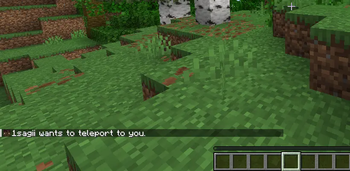
Receive teleport requests with clear chat feedback.
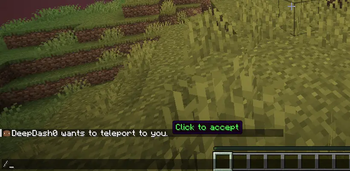
Accept incoming teleport requests directly from chat with one click.
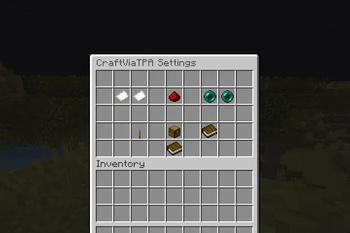
Configure CraftViaTPA behavior and server settings through a simple in-game menu.
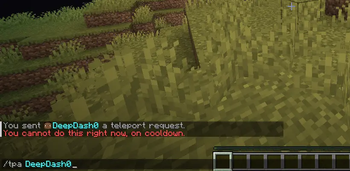
Built-in cooldown protection prevents teleport spam and keeps requests under
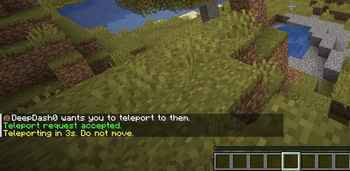
Invite players to your location with /tpahere and use a configurable teleport warmup before moving.