玩偶类型
| 类型 | 说明 |
|---|---|
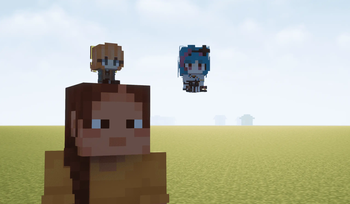
| 玩家模型玩偶 | 玩家模型。可放置、可摆姿势、可切换发光。 |
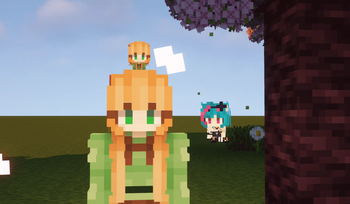
| Q版玩家玩偶 | 大头小身 Q 版造型。可放置,可戴在头上,或作为 Trinkets 饰品佩戴。 |
| 展示人偶 | 用于固定展示 Q版玩偶的展架。可将玩偶置于角色身旁(高度可调)或头顶。 |
皮肤来源
支持 5 种皮肤获取方式,输入后实时预览:
- 玩家名 – 输入正版玩家名,模组自动查询
Mojang UUID与皮肤。 - LittleSkin – 支持
ls:541929/tid:541929输入获取。 - NameMC – 支持
nm:.../namemc:...或 NameMC 皮肤页链接。 - 自定义 URL – 粘贴任意
.png皮肤图片直链。 - 铁砧改名 – 在铁砧中重命名玩偶,模组自动根据新名称更新皮肤。
姿势编辑器(预览功能)
部位级控制
左键选择部位,拖拽移动,拖拽坐标轴旋转,滚轮调整缩放。
9 个可控部位:
- 整体 / 身体 / 头部 / 双臂 / 双腿 / 左臂 / 右臂 / 左腿 / 右腿
每个部位可独立调节:
- 旋转(俯仰 / 偏航 / 翻滚)
- 水平 / 垂直位移
- 缩放
整体模型变换
- 整体缩放(0.5 ~ 1.6 倍)
- 纵向压扁(0.55 ~ 1.25)与横向加宽(0.65 ~ 1.45)
- 整体旋转(俯仰 / 偏航 / 翻滚)
- 地面 X / Y / Z 偏移
辅助功能
- 一键站姿 / 坐姿
- 多步撤销 / 重做
- 实时 3D 预览:右键拖拽旋转视角,滚轮缩放,左键拖拽移动模型
姿势预设
- 将当前姿势保存为命名预设(同名自动覆盖)
- 加载预设:方向键选择,Enter 确认,Esc 取消;右侧实时预览参数
- 删除预设:显示确认弹窗(可勾选"不再提醒")
- 预设存储于(pcl示例路径):
.minecraft/config/playerdollmod_pose_preset.json
其他功能
- 发光开关:玩偶方块发光(亮度 15),状态随 NBT 保存
- V 键 ID 追踪:按下 V 键开启后,准星对准玩偶或装有玩偶的展示框时,动作栏(Actionbar)持续显示其皮肤 ID
- 中键查询:准星对准玩偶按下鼠标中键,立即显示其玩家 ID
- 物品展示框:Ctrl + 右键点击装有玩偶的展示框,切换玩偶正面 / 背面
- 皮肤缓存:远程皮肤自动缓存至
playerdollmod-cache/skins/,界面提供一键打开缓存文件夹按钮;缓存失败自动重试 - 破坏粒子:挖掘 / 破坏玩偶时掉落皮肤配色粒子(从皮肤取色)
- 多语言支持:简体中文、繁體中文、English、日本語、한국어、Русский
兼容性与要求
- Minecraft 1.21.1(Fabric)
- 前置模组:前置模组:Fabric API、Trinkets(佩戴 Q版玩偶需要)、Cardinal Components API
- 服务端与客户端均需安装
- 姿势 / 皮肤 / 发光 / 展示偏移在多人游戏中实时同步
- 三种玩偶均可放入物品展示框,支持拾起(保留数据)与掉落(保留数据)
致谢
本模组的部分功能实现参考并使用了以下项目的代码:
- Cat Burger(猫猫汉堡) – 由 zhaijineet 开发,采用 MIT 许可证。
项目地址:https://github.com/zhaijineet/catburger
Copyright (c) 2025 zhaijineet
完整许可证文本见:https://github.com/zhaijineet/CatBurger/blob/forge_1.20.1/LICENSE
Doll Types
| Type | Description |
|---|---|
| Player Model Doll | A player model. Placeable, posable, and can be toggled to glow. |
| Chibi Player Doll | Cute chibi style with a big head and small body. Placeable, wearable on your head, or equippable as a Trinkets accessory. |
| Display Stand | A stand used to mount and display chibi dolls. Place dolls beside your character (height adjustable) or on top of your head. |
Skin Sources
Supports 5 ways to obtain skins, with real-time preview after input:
- Player Name – Enter a premium player name and the mod automatically fetches the
Mojang UUIDand skin. - LittleSkin – Supports
ls:541929/tid:541929input. - NameMC – Supports
nm:.../namemc:...or NameMC skin page links. - Custom URL – Paste any direct link to a
.pngskin image. - Anvil Rename – Rename the doll in an anvil and the mod automatically updates its skin based on the new name.
Pose Editor (Preview Feature)
Part-Level Control
Left-click to select a part, drag to move, drag on the axes to rotate, and use the scroll wheel to adjust scale.
9 controllable parts:
- Whole / Body / Head / Both Arms / Both Legs / Left Arm / Right Arm / Left Leg / Right Leg
Each part can be adjusted independently:
- Rotation (pitch / yaw / roll)
- Horizontal / vertical offset
- Scale
Whole Model Transform
- Overall scale (0.5x ~ 1.6x)
- Vertical flattening (0.55 ~ 1.25) and horizontal widening (0.65 ~ 1.45)
- Whole-model rotation (pitch / yaw / roll)
- Ground X / Y / Z offset
QoL Features
- One-click standing / sitting pose
- Multi-step undo / redo
- Real-time 3D preview: right-click drag to orbit the camera, scroll to zoom, left-click drag to move the model
Pose Presets
- Save the current pose as a named preset (same name automatically overwrites)
- Load presets: arrow keys to select, Enter to confirm, Esc to cancel; real-time parameter preview on the right
- Delete presets: shows a confirmation dialog (with a "Don't ask again" checkbox)
- Presets are stored at (PCL example path):
.minecraft/config/playerdollmod_pose_preset.json
Other Features
- Glow toggle: doll blocks can glow (light level 15); the state is saved with the NBT data
- V-key ID tracking: press V to enable; while aiming at a doll or an item frame containing a doll, the Actionbar continuously shows its skin ID
- Middle-click query: middle-click while aiming at a doll to instantly display its player ID
- Item frames: Ctrl + right-click an item frame containing a doll to flip the doll between front and back
- Skin cache: remote skins are automatically cached to
playerdollmod-cache/skins/, with a one-click button in the UI to open the cache folder; failed downloads retry automatically - Break particles: digging / breaking a doll drops skin-colored particles (sampled from the skin)
- Multi-language support: 简体中文, 繁體中文, English, 日本語, 한국어, Русский
Compatibility & Requirements
- Minecraft 1.21.1 (Fabric)
- Dependencies: Fabric API, Trinkets (required for wearing chibi dolls), Cardinal Components API
- Required on both server and client
- Poses / skins / glow / display offsets are synced in real-time in multiplayer
- All three doll types can be placed in item frames; supports pickup (preserving data) and dropping (preserving data)
Credits
Part of this mod's functionality references and uses code from the following project:
- Cat Burger – developed by zhaijineet, licensed under MIT. Project page: https://github.com/zhaijineet/catburger
Copyright (c) 2025 zhaijineet
Full license text: https://github.com/zhaijineet/CatBurger/blob/forge_1.20.1/LICENSE