
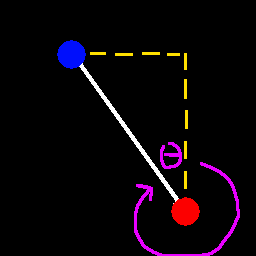
In the ingame menu (aka. pause menu) (both singleplayer and multiplayer), at the bottom right, there are two text fields and one textlabel. the left textfield is for the destination X coordinate. The right textfield is for the destination Z coordinate. Once both the X and Z coords are entered, the direction towards that spot from your current position is calculated. The textlabel tells you the Yaw of that direction that you should face and move towards in order to reach the destination position in the shortest amount of time geometrically. Because a straight line is supposed to be the fastest way to get to anywhere.
I got tired of doing trig manually, so i made a quick mod to do it for me. You dont need to guess anymore where to go. This gives you a straight path.
Useful on anarchy servers where you gotta travel far. Just put in the X and Z coordinates of wherever you wanna go, and turn on your debug menu or a modded menu that can tell you your yaw, then match the yaw, and go forward.
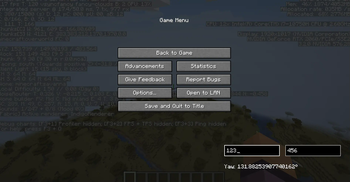
the Left textfield is for the destination X coordinate. the Right textfield is for the destination Z coordinate. The Calculated yaw you should travel in is calculated and displayed below.
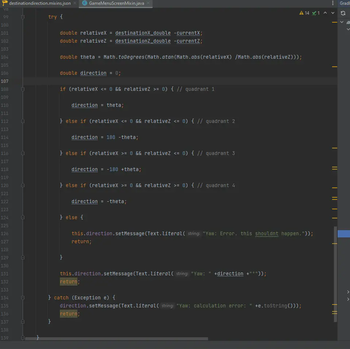
heres a code snippet. its simple. gets the relative position of the destination, finds the angle associated, and then turns it into a final yaw.
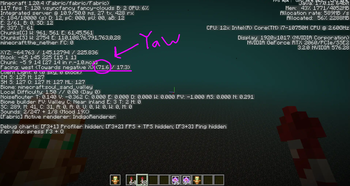
just pointing out where Yaw is in F3 (debug) menu. Its in the line that says "Facing". in those parentheses, its the left number. So the yaw in this image is 71.6 degrees. :)
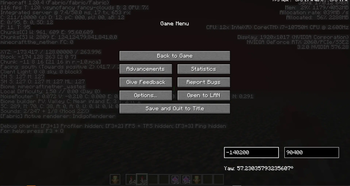
Lets say im in the nether and i want to go to nether coords -140200 90400, i just put those numbers in, and it says i should move at yaw 57.2 degrees. So i would exit the menu, rotate until my yaw says 57.2 (or close to it), and then elytra fly forward!