

DiscordConnect
Link your Minecraft server chat with your Discord server — simple, fast, and no complicated setup.
🚀 Setup (Takes under 1 minute)
-
Invite the Discord bot: https://discord.com/oauth2/authorize?client_id=1484706366689116302&permissions=8&scope=bot%20applications.commands
-
Install the plugin on your Minecraft server
-
Run "/chatlink" in the Discord channel you want to link
-
Copy the code it gives you
-
Paste the code into your server console
Done. Your chats are now fully linked.
💬 Features
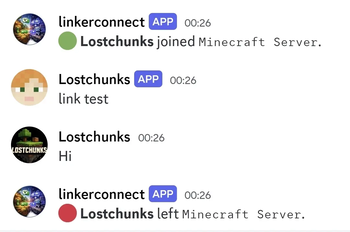
- Real-time chat sync between Minecraft and Discord
- Super easy setup (no config needed)
- Works with modern servers & proxies
- Clean and readable chat formatting
- Lightweight & fast
⚡ Why DiscordConnect?
No configs. No hassle. No wasting time.
Just install it and it works.
| Version | Minecraft | Loader | Download |
|---|---|---|---|
|
discordconnect 1.0.0 1.0.0 |
1.19, 1.19.1, 1.19.2, 1.19.3, 1.19.4, 1.20, 1.20.1, 1.20.2, 1.20.3, 1.20.4, 1.20.5, 1.20.6, 1.21, 1.21.1, 1.21.2, 1.21.3, 1.21.4, 1.21.5, 1.21.6, 1.21.7, 1.21.8, 1.21.9, 1.21.10, 1.21.11
|
bukkit, paper, purpur, spigot
|
Download |