Entity Logger
Entity Logger is a Minecraft server administration and logging plugin designed to help you track interactions with entities, containers, and other supported objects.
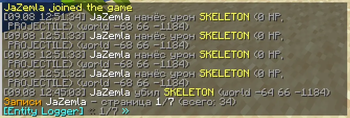
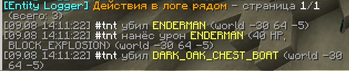
It records important actions performed by players and allows administrators to quickly search and inspect the logs directly in-game. Use it to investigate suspicious activity, find who interacted with an entity, check nearby activity, or inspect a specific player or target.
Features
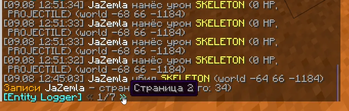
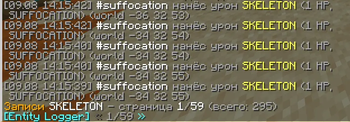
- 📋 Detailed activity logging — records the player, action, entity type, world, coordinates, item/material, amount, and entity UUID.
- 🔎 Powerful log search — search by player, target, time, entity type, item, action, and more.
- 📍 Nearby activity search — find logged actions around your current location.
- 🌎 Global search — search all matching activity in the current world with
radius:#global. - 👁️ Inspection mode — enable inspection mode and right-click a supported block or entity to view its logged activity.
- 📄 Pagination — large search results are split into pages with clickable navigation buttons.
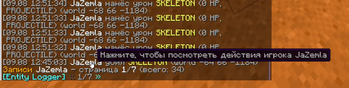
- 🖱️ Interactive results — player names can be clicked to search their activity, and coordinates can be clicked to quickly use them.
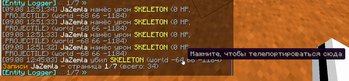
- 🎯 Spectator teleportation — players in Spectator mode can click logged coordinates to teleport directly to the location.
- ⌨️ Tab completion — commands and filter values provide automatic suggestions.
Logged Actions
Entity Logger currently supports the following action types:
ADD— an item was added to an entity/container.REMOVE— an item was removed from an entity/container.DAMAGE— a player dealt damage to an entity.DEATH— an entity was killed.PLACE— a supported entity was placed.
Commands
/el near
Search for logged activity near your current location.
/el near radius:<number> [time:<time>] [include:<type>] [exclude:<type>] [user:<player>] [action:<action>] [page:<number>]
Example:
/el near radius:20
Shows logged activity within 20 blocks of your current location.
You can combine multiple filters:
/el near radius:50 time:1h action:REMOVE
This searches for item removal activity within 50 blocks from the last hour.
Global Search
Use #global instead of a numerical radius to search the entire current world:
/el near radius:#global
You can combine it with filters:
/el near radius:#global time:1d user:Steve
This searches the current world's logs for activity performed by Steve during the last day.
/el lookup
Search logs associated with a specific player or target.
Search by player
/el lookup user:<player>
Example:
/el lookup user:Steve
You can add filters:
/el lookup user:Steve time:7d action:DAMAGE
This shows damage-related activity performed by Steve during the last 7 days.
Search by target
/el lookup target:<entity>
Example:
/el lookup target:CHEST_BOAT
You can also filter the results:
/el lookup target:HORSE time:1h action:DAMAGE
user: and target: cannot be used together in the same /el lookup command.
Filters
Entity Logger supports several filters that can be combined to narrow down search results.
Time
Use time: to search only recent activity.
Supported units:
s— secondsm— minutesh— hoursd— days
Examples:
time:30s
time:10m
time:1h
time:7d
Include
Only show matching entity types or items:
include:HORSE
include:DIAMOND
Exclude
Hide matching entity types or items:
exclude:HORSE
exclude:DIAMOND
Action
Filter by a specific action:
action:ADD
action:REMOVE
action:DAMAGE
action:DEATH
action:PLACE
User
Filter activity performed by a specific player:
user:Steve
Target
Search activity related to a specific supported entity type:
target:HORSE
Page
Select a specific results page:
page:2
/el i
Toggles Inspection Mode for the player.
/el i
When enabled, right-click a supported block or entity to inspect its logged activity.
Run /el i again to disable Inspection Mode.
Interactive Log Results
Log entries contain interactive elements to make investigation easier.
Clicking a player name suggests an /el lookup user:<player> command, allowing you to quickly view that player's activity.
Coordinates are also clickable. In Spectator mode, clicking coordinates can teleport you directly to the logged location. This teleport feature is restricted to Spectator mode.
Permissions
The plugin uses separate permissions for its commands:
entlog.use
entlog.near
entlog.lookup
entlog.i
entlog.tpcoords
entlog.use is required to use the main Entity Logger commands, while individual subcommands have their own permissions.
Configuration
Entity Logger provides configuration options for controlling in-memory log retention, search result size, the maximum /el near radius, and cleanup frequency.
Example:
memory-days: 14
check-page-size: 5
max-near-radius: 200
prune-interval-minutes: 60
Configuration options
memory-days— how many days of logs are kept in memory for checking. Log files on disk are not deleted.check-page-size— number of entries displayed per page.max-near-radius— maximum radius allowed for/el near.prune-interval-minutes— how often old in-memory entries are cleaned up.
Use Cases
Entity Logger is useful for:
- Server administration
- Investigating player activity
- Tracking container interactions
- Finding nearby entity activity
- Investigating damage and deaths
- Checking who interacted with a specific target
- Moderation and troubleshooting
Entity Logger is designed to make server activity easier to investigate without requiring administrators to manually search through raw log files.