Eternal Furnace
Give Netherrack a new purpose.
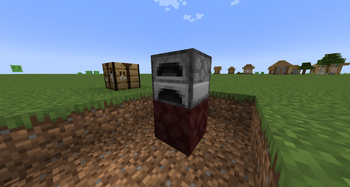
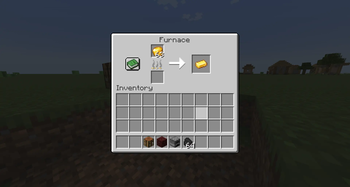
Craft Hellfire Netherrack, place it directly beneath a regular Furnace, and the Furnace gains infinite fuel — no coal, charcoal, lava buckets, or other fuel required.
The trade-off is speed: when powered by Hellfire, smelting takes 1.8× longer than normal.
How it works
Combine Flint and Steel + Netherrack to craft Hellfire Netherrack.
Place Hellfire Netherrack directly underneath a regular Furnace and add something to smelt. The fuel slot can remain completely empty.
| Normal Furnace | Hellfire Furnace | |
|---|---|---|
| Fuel | Consumes normal fuel | Infinite |
| Standard smelting time | ~10 seconds | ~18 seconds |
| Fuel slot required | Yes | No |
The slowdown is based on the recipe's normal cooking time, so recipes with custom smelting times are supported as well.
Features
- New block: Hellfire Netherrack
- Simple recipe: Flint and Steel + Netherrack
- Infinite Furnace fuel
- Balanced by 1.8× longer smelting time
- Existing normal fuel is never discarded when Hellfire is placed beneath an already-burning Furnace
- Remove Hellfire and the Furnace returns to normal vanilla behavior
- Works only with the regular vanilla Furnace
- Smokers and Blast Furnaces are intentionally unaffected
- Supports recipes with custom cooking times
- Works in both singleplayer and multiplayer
Installation
- Install Minecraft Forge 47.x for Minecraft 1.20.1.
- Download Eternal Furnace.
- Place the
.jarfile into yourmodsfolder. - Launch Minecraft.
Requirements
- Minecraft 1.20.1
- Forge 47.x
- Java 17
License
Eternal Furnace is licensed under the MIT License.
Copyright © 2026 veizakn1