First Join NeoForge
First Join NeoForge is a server-side utility mod for Minecraft 1.21.1 on NeoForge. It lets server owners control where new players spawn on their first join, including worlds managed by WorldSwitcher.
Tested and validated to work with Cobblemon mods/server.
The mod creates a readable config file where admins can set the first-join spawn, welcome message, main /spawn location, named warps, RTP target world, blocked RTP origin worlds, and RTP search settings.
Players can use commands such as /spawn, /warp <name>, /medical, and /rtp. Player teleports include a short countdown, cancel if the player moves, check for safe destinations, show colored confirmation messages, and display arrival particles.
OP-only commands are included for setup and testing, including setting spawn points, managing warps, configuring RTP, reloading/saving config, and resetting first-join test states.
Commands
Player Commands
/spawn
Teleports you to the configured server spawn.
/medical
Teleports you to the configured medical warp.
/warp <name>
Teleports you to a named warp, such as /warp spawn or /warp medical.
/rtp
Randomly teleports you to a safe location in the configured RTP world.
OP/Admin Commands
/warp set <name>
Creates or updates a named warp at your current location.
/warp delete <name>
Deletes a named warp.
/warp list
Lists all configured warps.
/fjs setfirstjoin here
Sets the first-join spawn to your current location.
/fjs setfirstjoin <world> <x y z> <yaw> <pitch>
Manually sets the first-join spawn location.
/fjs setspawn here
Sets the /spawn location to your current position.
/fjs setrtpworld <world>
Sets the world that /rtp will send players into.
/fjs rtpinfo
Shows the current RTP world, blocked RTP origin worlds, radius, and attempts.
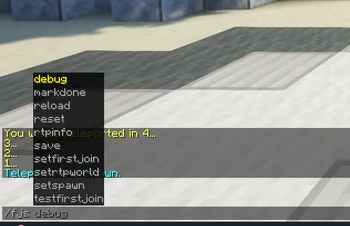
/fjs debug <player>
Shows first-join status and configured spawn/RTP information for a player.
/fjs reset <player>
Resets a player’s first-join status so they can be tested again.
/fjs markdone <player>
Marks a player as having completed first-join spawn.
/fjs testfirstjoin [player]
Runs the first-join teleport test on yourself or a chosen player.
/fjs reload
Reloads config and first-join player data from disk.
/fjs save
Saves config and first-join player data to disk.