

FlashWhite - Automated Whitelist Management via Discord
FlashWhite is a lightweight, high-performance Minecraft plugin that completely automates your server's whitelist management. Players can submit access requests using intuitive Discord Modals, while administrators can instantly review, accept, or deny applications with one-click buttons right from their Discord server.
Key Features
- Seamless Discord Integration: Painless application process via Discord Modals and easy management using interactive Approve / Reject buttons.
- UUID-Based Storage: Players are saved by their unique UUID. Licensed account holders can change their in-game nicknames without losing access or data.
- HEX Color Support: Full support for hexadecimal color codes to create beautiful, branded, and vibrant chat messages.
- Ultra-Lightweight & Performant: Highly optimized codebase that runs instantly without impacting your server's TPS or performance.
Installation
- Open your
server.propertiesfile and disable the default Minecraft whitelist by changing the value to:white-list=false - Drop the downloaded
.jarfile into your server's/plugins/folder. - Start or restart your server to generate the configuration files.
- Set up your Discord Bot token and channel IDs in the generated
config.yml.
Commands & Permissions
Minecraft In-Game Commands
| Command | Description | Permission Node |
|---|---|---|
/fw reload |
Reloads the plugin configuration files | flashwhite.reload |
/fw add [nickname] |
Manually adds a player to the whitelist | flashwhite.add |
/fw addtemp [nickname] [time] |
Temporarily adds a player for a specific duration | flashwhite.add |
/fw remove [nickname] |
Removes a player from the whitelist | flashwhite.remove |
/fw check [nickname] |
Displays player info and their linked Discord ID | flashwhite.check |
/fw list [page] |
Views the structured list of whitelisted participants | flashwhite.list |
/fw on / /fw off |
Enables or disables the whitelist mode | flashwhite.toggle |
💡 Bypass Permission: Grant
flashwhite.bypassto allow specific users or staff groups to connect to the server regardless of the whitelist status.
Discord Slash Commands
/setup_panel- Sends the initial information embed with the application button to the designated text channel.
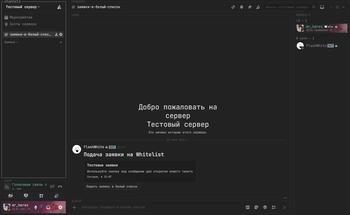
A message where you can describe the process of applying for a whitelist.
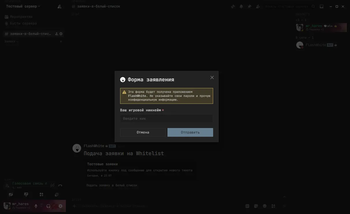
A modal window with your questions that the user must answer in order to submit an application. The configuration is done through config.yml.
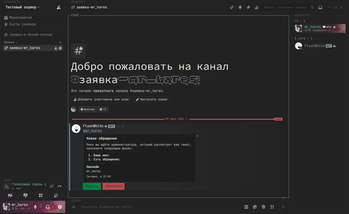
The channel contains all the information previously provided by the user in the form. At this stage, server moderators have the option to reject or accept the application.
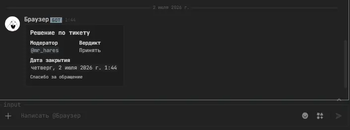
The final verdict on the user's application, indicating whether the application is approved or denied.
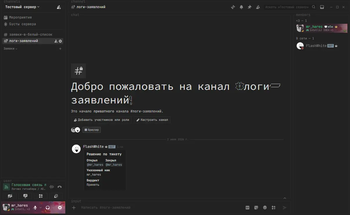
Information about applications that have already been processed by the server's moderation.
| Version | Minecraft | Loader | Download |
|---|---|---|---|
|
FlashWhite - v1.5.0 1.5.0 |
26.1, 26.1.1, 26.1.2, 26.2, 26.3
|
bukkit, folia, paper
|
Download |
|
FlashWhite - v1.1.3 1.1.3 |
1.21, 1.21.1, 1.21.10, 1.21.11, 1.21.2, 1.21.3, 1.21.4, 1.21.5, 1.21.6, 1.21.7, 1.21.8, 1.21.9
|
bukkit, folia, paper, purpur
|
Download |
|
FlashWhite - v1.1.1 1.1.1 |
1.21, 1.21.1, 1.21.10, 1.21.11, 1.21.2, 1.21.3, 1.21.4, 1.21.5, 1.21.6, 1.21.7, 1.21.8, 1.21.9
|
bukkit, paper, purpur
|
Download |
|
FlashWhite - v1.1.0 1.1.0 |
1.21, 1.21.1, 1.21.10, 1.21.11, 1.21.2, 1.21.3, 1.21.4, 1.21.5, 1.21.6, 1.21.7, 1.21.8, 1.21.9
|
bukkit, paper, purpur
|
Download |
|
FlashWhite - v2.1 2.1 |
1.21, 1.21.1, 1.21.10, 1.21.11, 1.21.2, 1.21.3, 1.21.4, 1.21.5, 1.21.6, 1.21.7, 1.21.8, 1.21.9
|
bukkit, paper, purpur
|
Download |
|
FlashWhite - v1.2 1.2 |
1.21, 1.21.1, 1.21.10, 1.21.11, 1.21.2, 1.21.3, 1.21.4, 1.21.5, 1.21.6, 1.21.7, 1.21.8, 1.21.9
|
paper, purpur
|
Download |
|
FlashWhite - v1.0 1.0 |
1.21, 1.21.1, 1.21.10, 1.21.11, 1.21.2, 1.21.3, 1.21.4, 1.21.5, 1.21.6, 1.21.7, 1.21.8, 1.21.9
|
paper, purpur
|
Download |