


🇬🇧 English
FOUtil is a client-side utility mod for the mcFallout.net server.
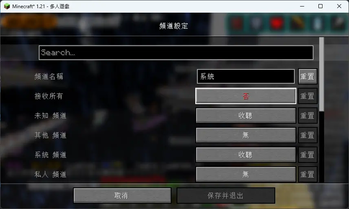
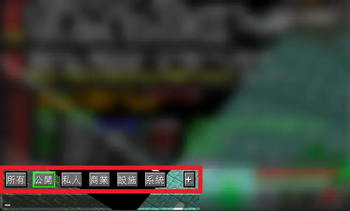
- Chat channels – tabs above the chat box split public, trade, private, system and other messages. Combine channels into your own tabs.
- SafariNet preview – hold Shift over a capture egg to see the mob, its equipment, villager trades, profession, curer, and size when it differs from normal. Hold Alt to pin the preview.
- Map art tools – buttons beside chests, shulker boxes and the cartography table: one-click locking,
/copyrightand/nosellingtoggles for everything in a container, and "deposit maps with the same UUID". - Better map rendering – mipmapped filtering for item-frame maps, adjacent maps merged into one texture, longer frame view distance, and remembers distant frames the server stops sending.
- Ledger –
/moneyrecordand/coinrecordopen instantly from cache, scroll to load more pages, and show per-player income and expense. - Trail & item history – a local record of what went in and out of containers, trades and transfers, searchable by player or item (including what was inside shulker boxes).
- Shard switching – Numpad + then type 1–109; + then - jumps back to the previous shard.
- ItemScroller / Tweakeroo – shulker boxes with the same contents move together again (ignores
PublicBukkitValuesfor comparison only).
Open the tool panel with F9 or /foutil. All data stays on your computer in ~/.foutil.
關於本模組
FOUtil 是給 mcFallout.net(廢土伺服器)用的客戶端模組,只裝在自己的遊戲裡,不需要伺服器配合。
按 F9 或輸入 /foutil 開啟工具面板,所有紀錄都只存在自己電腦的 ~/.foutil 裡。
功能
💬 聊天頻道分類
- 聊天框上方的按鈕把訊息分成公共、閒聊、交易、抽獎、設施、領地/附近、私訊、系統等頻道
- 系統訊息再細分轉帳、報表、獎勵、傳送、領地
- 「分類…」可以選更多頻道,或把幾個頻道組成自己的按鈕
- 點按鈕後輸入框仍保持游標,不用再點一次
🥚 生物收納器預覽
滑鼠停在生物收納器上按住 Shift,就能看到裡面的生物(按住 Alt 固定預覽):
- 生物模型、名稱與身上的裝備
- 村民:職業、等級、完整交易清單與剩餘次數
- 殭屍村民:治療進度、治療者;折扣來源玩家
- 體型:和一般大小不同時顯示倍率(例如
1.209 倍)
🗺️ 地圖畫工具
背包、箱子、界伏盒與製圖台左側會出現小按鈕(滑鼠停留看說明):
- 一鍵鎖定:製圖台自動放入地圖與玻璃片並取回,Shift+點擊鎖定身上每一幅作品
- 防複印/販售設定:
/copyright、/noselling手上這張、全部或整幅作品預設 - 容器內全部:把箱子裡的地圖畫拉下來切換設定,再放回原本那格
- 放入同 UUID 地圖畫:把身上和容器裡同一幅作品的地圖放進去並合成一疊
🖼️ 地圖顯示優化(整合 BetterMapRender)
- 展示框地圖專用濾波,遠看不再閃爍、鋸齒
- 同一面牆相鄰的地圖合成一張大圖,大量地圖畫牆也不卡
- 正面地圖可看到 256/512/1024 格(受視距限制)
- 伺服器不再傳送的遠處展示框會記住並繼續顯示
💰 帳目
/moneyrecord、/coinrecord立刻顯示上次的紀錄,再自動更新- 往下捲自動載入下一頁,收入綠、支出紅,顯示玩家頭像
- 「收支往來」統計每位玩家的綠寶石、村民錠收入、支出與淨額
👣 足跡與物品流向
- 記錄開過的箱子、放入/取出的物品、村民交易、轉帳與附近遇到的玩家
- 依玩家、物品或訊息搜尋;連界伏盒、收納袋裡裝的東西也找得到
- 點一筆紀錄可看它前後發生了什麼
🔀 其他
- 分流切換:按小鍵盤 + 輸入 1–109;+ 再按 - 回到上一個分流
- 金額縮寫:
pay、addmoney、qsput支援k、w、kw、ww、e - Item Scroller/Tweakeroo:內容相同的界伏盒可以正常一起移動
- 更新提示:進入世界時檢查 Modrinth 新版本(不會自動下載,可在設定關閉)
安裝
| Minecraft | Java | Fabric Loader |
|---|---|---|
| 1.21.11 | 21 以上 | 0.18.4 以上 |
| 26.2 | 25 以上 | 0.18.4 以上 |
| 26.3 | 25 以上 | 0.19.3 以上 |
- 需要 Fabric API
- 請移除舊版 FOUtil、fallout-tweaks 與獨立的 BetterMapRender,避免功能重複
- 可搭配 Sodium、Iris、ImmediatelyFast、Mod Menu
常見問題
會影響其他玩家嗎? FOUtil 只改變自己看到的畫面與紀錄;地圖畫按鈕送出的都是你自己也能手動輸入的指令與點擊。
紀錄會上傳嗎?
不會。帳目、足跡、玩家資料都存在 ~/.foutil,只有你按下查詢按鈕時才會向 Mojang 查玩家造型。
別的伺服器也能用嗎? 預設只在 mcfallout.net 啟用紀錄功能,其他伺服器可在面板設定裡開啟。

| Version | Minecraft | Loader | Download |
|---|---|---|---|
|
FOUtil 0.1.11 (26.3) 0.1.11+26.3 |
26.3
|
fabric
|
Download |
|
FOUtil 0.1.11 (26.2) 0.1.11+26.2 |
26.2
|
fabric
|
Download |
|
FOUtil 0.1.11 (1.21.11) 0.1.11+1.21.11 |
1.21.11
|
fabric
|
Download |
|
FOUtil 0.1.10 (26.3) 0.1.10+26.3 |
26.3
|
fabric
|
Download |
|
FOUtil 0.1.10 (26.2) 0.1.10+26.2 |
26.2
|
fabric
|
Download |
|
FOUtil 0.1.10 (1.21.11) 0.1.10+1.21.11 |
1.21.11
|
fabric
|
Download |
|
FOUtil 0.1.9 (26.3) 0.1.9+26.3 |
26.3
|
fabric
|
Download |
|
FOUtil 0.1.9 (26.2) 0.1.9+26.2 |
26.2
|
fabric
|
Download |
|
FOUtil 0.1.9 (1.21.11) 0.1.9+1.21.11 |
1.21.11
|
fabric
|
Download |
|
FOUtil 0.1.8 (26.3) 0.1.8+26.3 |
26.3
|
fabric
|
Download |
|
FOUtil 0.1.8 (26.2) 0.1.8+26.2 |
26.2
|
fabric
|
Download |
|
FOUtil 0.1.8 (1.21.11) 0.1.8+1.21.11 |
1.21.11
|
fabric
|
Download |
|
FOUtil 0.1.6 (26.3) 0.1.6+26.3 |
26.3
|
fabric
|
Download |
|
FOUtil 0.1.6 (26.2) 0.1.6+26.2 |
26.2
|
fabric
|
Download |
|
FOUtil 0.1.6 (1.21.11) 0.1.6+1.21.11 |
1.21.11
|
fabric
|
Download |
|
FOUtil 0.1.5 (26.3) 0.1.5+26.3 |
26.3
|
fabric
|
Download |
|
FOUtil 0.1.5 (26.2) 0.1.5+26.2 |
26.2
|
fabric
|
Download |
|
FOUtil 0.1.5 (1.21.11) 0.1.5+1.21.11 |
1.21.11
|
fabric
|
Download |
|
FOUtil 0.1.4 (26.3) 0.1.4+26.3 |
26.3
|
fabric
|
Download |
|
FOUtil 0.1.4 (26.2) 0.1.4+26.2 |
26.2
|
fabric
|
Download |
|
FOUtil 0.1.4 (1.21.11) 0.1.4+1.21.11 |
1.21.11
|
fabric
|
Download |
|
FOUtil 0.1.3 (26.3) 0.1.3+26.3 |
26.3
|
fabric
|
Download |
|
FOUtil 0.1.3 (26.2) 0.1.3+26.2 |
26.2
|
fabric
|
Download |
|
FOUtil 0.1.3 (1.21.11) 0.1.3+1.21.11 |
1.21.11
|
fabric
|
Download |
|
FOUtil 0.1.2 (26.3) 0.1.2+26.3 |
26.3
|
fabric
|
Download |
|
FOUtil 0.1.2 (26.2) 0.1.2+26.2 |
26.2
|
fabric
|
Download |
|
FOUtil 0.1.2 (1.21.11) 0.1.2+1.21.11 |
1.21.11
|
fabric
|
Download |
|
FOUtil 0.1.1 (26.3) 0.1.1+26.3 |
26.3
|
fabric
|
Download |
|
FOUtil 0.1.1 (26.2) 0.1.1+26.2 |
26.2
|
fabric
|
Download |
|
FOUtil 0.1.1 (1.21.11) 0.1.1+1.21.11 |
1.21.11
|
fabric
|
Download |
|
FOUtil 0.1.0 (26.3) 0.1.0+26.3 |
26.3
|
fabric
|
Download |
|
FOUtil 0.1.0 (26.2) 0.1.0+26.2 |
26.2
|
fabric
|
Download |
|
FOUtil 0.1.0 (1.21.11) 0.1.0+1.21.11 |
1.21.11
|
fabric
|
Download |
|
FOUtil 0.1.0-SNAPSHOT for 26.2 0.1.0-SNAPSHOT+26.2 |
26.2
|
fabric
|
Download |
|
廢土豆丨FOUtil 0.0.18.2+1.21.11 0.0.18.2+1.21.11 |
1.21.11
|
fabric
|
Download |
|
0.0.18+1.21.11 0.0.18.1+1.21.11 |
1.21.11
|
fabric
|
Download |
|
0.0.18+1.21.11 |
1.21.11
|
fabric
|
Download |
|
0.0.18+1.21.8 |
1.21.8
|
fabric
|
Download |
|
0.0.17+1.21.8 |
1.21.8
|
fabric
|
Download |
|
0.0.16+1.21.8 |
1.21.8
|
fabric
|
Download |
|
0.0.16+1.21.4 |
1.21.4
|
fabric
|
Download |
|
0.0.15+1.21.4 |
1.21.4
|
fabric
|
Download |
|
0.0.14+1.21.4 |
1.21.4
|
fabric
|
Download |
|
0.0.11+1.21.4 |
1.21.4
|
fabric
|
Download |
|
0.0.10+1.21.4 |
1.21.4
|
fabric
|
Download |
|
0.0.9 |
1.21
|
fabric
|
Download |
|
廢土小幫手 0.0.5 0.0.5 |
1.21
|
fabric
|
Download |
|
廢土小幫手 0.0.4-SNAPSHOT 0.0.4-SNAPSHOT |
1.21
|
fabric
|
Download |