
Freecam
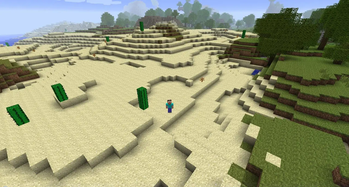
A mod that adds a freecam to the game
Features
- A Freecam
- Changing freecam speed
- Ability to control the player while the freecam is active
- Saving and loading of camerapositions
Controls
- Toggling freecam
- Default: C
- Going to previous freecam position
- Hold CTRL while pressing the Toggle Freecam button (Default: C)
- Toggle player movement
- Default: V
- Changing freecam speed
- Hold the Change Freecam Speed button (Default: B) and move the mouse left or right
- Loading camera position
- Press the Save/Load Camera Position button (Default: N) and type the cameraposition name (Numbers only)
- Saving camera position
- Press CTRL and the Save/Load Camera Position button (Default: N), then type the cameraposition name (Numbers only)
- Opening saved camera position GUI
- Default: M
Requirements
| Version | Minecraft | Loader | Download |
|---|---|---|---|
|
Freecam StationAPI 0.3.2 0.3.2 |
b1.7.3
|
babric, fabric
|
Download |
|
Freecam StationAPI 0.3.1 0.3.1 |
b1.7.3
|
babric, fabric
|
Download |
|
Freecam StationAPI 0.3.0 0.3.0 |
b1.7.3
|
babric, fabric
|
Download |
|
Freecam StationAPI 0.2.1 0.2.1 |
b1.7.3
|
babric, fabric
|
Download |
|
Freecam StationAPI 0.2.0 0.2.0 |
b1.7.3
|
babric, fabric
|
Download |
|
Freecam 0.1.0 0.1.0 |
b1.7.3
|
babric, fabric
|
Download |