


Fzzy Config is a powerful multi-loader configuration engine for Minecraft Mods that meets you where you want to be. Quick and dirty or detailed and featureful, Fzzy Config will work with you. It provides a wide array of features above and beyond what you can find in other libraries.
The Basics
- Automatic serialization to TOML.
- Minimal API with lightweight integration requirements
GUIs
- Automatic GUI generation based on the layout and content of your config files.
- Screens are fully keyboard-navigable and narratable out of the box.
- Fully vetted and tested by a visually impaired member of the modding community.
- No need for screen builders or registration.
- ModMenu and Catalogue automatically integrated.
Synchronization
- Automatic server-client sync.
- Push live updates to a server from a client.
- Forward client settings to other users who want your setup.
Validation
- Validation and Correction built into everything, beyond just primitive types.
- Tightly control what values a player can choose from and how they choose them.
- Automatic suggestions for settings like tags and identifiers.
Updates
- Versioned updates supported with one simple method implementation.
- Scrape previous configs to easily update from another config library.
Flexibility
- Implement a config with as little or much effort as you want.
- Plain java/kotlin object, or Minecraft GameOptions-like carefully crafted settings.
- Seamless multi-loader support. Use the same API on Fabric and Forge; including a lightweight mutli-loader Networking API!




use the /configure command to open any registered config screen, or access them thru ModMenu or Catalogue
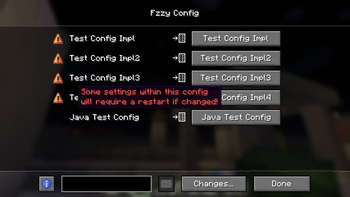
Mods can add multiple configs under one namespace. All configs in that namespace will be summarized in a "header" screen with buttons leading to each. Configs can have settings that prompt a restart.
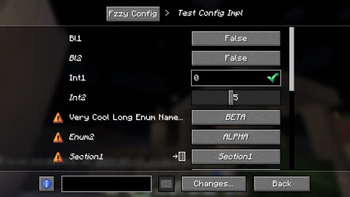
A typical config screen. The breadcrumbs at the top track back to the previous config screens opened. The settings list is fully translatable and describable. settings can be searched for at the bottom.
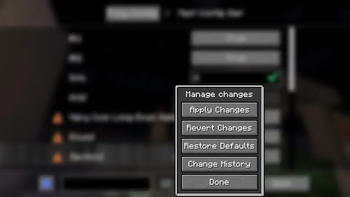
All changes are tracked and can be applied, reverted, and more.
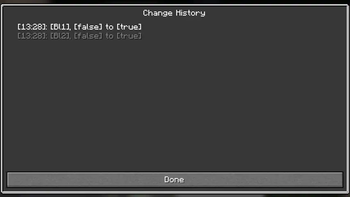
All tracked changes can be viewed in the Change History button of the Change Manager
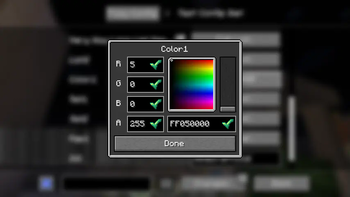
All settings are controlled with powerful pre--defined widgets, some inline and some as popups.
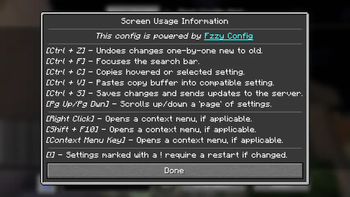
Fzzy Config works with a variety of common key combinations, such as copy/paste, page up/down, and more. It also supports context menus via right clicking.
| Version | Minecraft | Loader | Download |
|---|---|---|---|
|
fzzy_config-0.7.7+fix1+1.21+neoforge 0.7.7+fix1+1.21+neoforge |
1.21, 1.21.1
|
neoforge
|
Download |
|
fzzy_config-0.7.7+fix1+1.21.3+neoforge 0.7.7+fix1+1.21.3+neoforge |
1.21.2, 1.21.3, 1.21.4
|
neoforge
|
Download |
|
fzzy_config-0.7.7+fix3+26.3+neoforge 0.7.7+fix3+26.3+neoforge |
26.3
|
neoforge
|
Download |
|
fzzy_config-0.7.7+fix3+26.3 0.7.7+fix3+26.3 |
26.3
|
fabric
|
Download |
|
fzzy_config-0.7.7+fix2+26.3+neoforge 0.7.7+fix2+26.3+neoforge |
26.3
|
neoforge
|
Download |
|
fzzy_config-0.7.7+fix2+26.3 0.7.7+fix2+26.3 |
26.3
|
fabric
|
Download |
|
fzzy_config-0.7.7-fix1+26.3 0.7.7-fix1+26.3 |
26.3
|
fabric
|
Download |
|
fzzy_config-0.7.7-fix1+26.3+neoforge 0.7.7-fix1+26.3+neoforge |
26.3
|
neoforge
|
Download |
|
fzzy_config-0.7.7+26.3+neoforge 0.7.7+26.3+neoforge |
26.3
|
neoforge
|
Download |
|
fzzy_config-0.7.7+26.3 0.7.7+26.3 |
26.3
|
fabric
|
Download |
|
Fzzy Config 0.7.7+1.20.1+forge 0.7.7+1.20.1+forge |
1.20.1
|
forge, neoforge
|
Download |
|
fzzy_config-0.7.7+26.2 0.7.7+26.2 |
26.2
|
fabric
|
Download |
|
fzzy_config-0.7.7+26.1 0.7.7+26.1 |
26.1, 26.1.1, 26.1.2
|
fabric
|
Download |
|
fzzy_config-0.7.7+1.21.11 0.7.7+1.21.11 |
1.21.11
|
fabric
|
Download |
|
fzzy_config-0.7.7+1.21.9 0.7.7+1.21.9 |
1.21.9, 1.21.10
|
fabric
|
Download |
|
fzzy_config-0.7.6+1.21.6 0.7.6+1.21.6 |
1.21.6, 1.21.7, 1.21.8
|
fabric
|
Download |
|
fzzy_config-0.7.7+1.21.5 0.7.7+1.21.5 |
1.21.5
|
fabric
|
Download |
|
fzzy_config-0.7.7+1.21.3 0.7.7+1.21.3 |
1.21.2, 1.21.3, 1.21.4
|
fabric
|
Download |
|
fzzy_config-0.7.7+1.21 0.7.7+1.21 |
1.21, 1.21.1
|
fabric
|
Download |
|
fzzy_config-0.7.7+1.20.1 0.7.7+1.20.1 |
1.20.1
|
fabric
|
Download |
|
fzzy_config-0.7.7+26.2+neoforge 0.7.7+26.2+neoforge |
26.2
|
neoforge
|
Download |
|
fzzy_config-0.7.7+26.1+neoforge 0.7.7+26.1+neoforge |
26.1, 26.1.1, 26.1.2
|
neoforge
|
Download |
|
fzzy_config-0.7.7+1.21.11+neoforge 0.7.7+1.21.11+neoforge |
1.21.11
|
neoforge
|
Download |
|
fzzy_config-0.7.7+1.21.9+neoforge 0.7.7+1.21.9+neoforge |
1.21.9, 1.21.10
|
neoforge
|
Download |
|
fzzy_config-0.7.7+1.21.7+neoforge 0.7.7+1.21.7+neoforge |
1.21.7, 1.21.8
|
neoforge
|
Download |
|
fzzy_config-0.7.7+1.21.6+neoforge 0.7.7+1.21.6+neoforge |
1.21.6
|
neoforge
|
Download |
|
fzzy_config-0.7.7+1.21.5+neoforge 0.7.7+1.21.5+neoforge |
1.21.5
|
neoforge
|
Download |
|
fzzy_config-0.7.7+1.21.3+neoforge 0.7.7+1.21.3+neoforge |
1.21.2, 1.21.3, 1.21.4
|
neoforge
|
Download |
|
fzzy_config-0.7.7+1.21+neoforge 0.7.7+1.21+neoforge |
1.21, 1.21.1
|
neoforge
|
Download |
|
fzzy_config-0.7.6+26.2 0.7.6+26.2 |
26.2
|
fabric, quilt
|
Download |
|
fzzy_config-0.7.6+26.2+neoforge 0.7.6+26.2+neoforge |
26.2
|
neoforge
|
Download |
|
fzzy_config-0.7.6+26.1 0.7.6+26.1 |
26.1, 26.1.1, 26.1.2
|
fabric, quilt
|
Download |
|
fzzy_config-0.7.6+26.1+neoforge 0.7.6+26.1+neoforge |
26.1, 26.1.1, 26.1.2
|
neoforge
|
Download |
|
fzzy_config-0.7.6+1.21.11 0.7.6+1.21.11 |
1.21.11
|
fabric, quilt
|
Download |
|
fzzy_config-0.7.6+1.21.9 0.7.6+1.21.9 |
1.21.9, 1.21.10
|
fabric, quilt
|
Download |
|
fzzy_config-0.7.6+1.21.6 0.7.6+1.21.6 |
1.21.6, 1.21.7, 1.21.8
|
fabric, quilt
|
Download |
|
fzzy_config-0.7.6+1.21.5 0.7.6+1.21.5 |
1.21.5
|
fabric, quilt
|
Download |
|
fzzy_config-0.7.6+1.21.3 0.7.6+1.21.3 |
1.21.2, 1.21.3, 1.21.4
|
fabric, quilt
|
Download |
|
fzzy_config-0.7.6+1.21 0.7.6+1.21 |
1.21, 1.21.1
|
fabric, quilt
|
Download |
|
fzzy_config-0.7.6+1.20.1 0.7.6+1.20.1 |
1.20.1
|
fabric, quilt
|
Download |
|
fzzy_config-0.7.6+1.21.11+neoforge 0.7.6+1.21.11+neoforge |
1.21.11
|
neoforge
|
Download |
|
fzzy_config-0.7.6+1.21.9+neoforge 0.7.6+1.21.9+neoforge |
1.21.9, 1.21.10
|
neoforge
|
Download |
|
fzzy_config-0.7.6+1.21.7+neoforge 0.7.6+1.21.7+neoforge |
1.21.7, 1.21.8
|
neoforge
|
Download |
|
fzzy_config-0.7.6+1.21.6+neoforge 0.7.6+1.21.6+neoforge |
1.21.6
|
neoforge
|
Download |
|
fzzy_config-0.7.6+1.21.5+neoforge 0.7.6+1.21.5+neoforge |
1.21.5
|
neoforge
|
Download |
|
fzzy_config-0.7.6+1.21.3+neoforge 0.7.6+1.21.3+neoforge |
1.21.2, 1.21.3, 1.21.4
|
neoforge
|
Download |
|
fzzy_config-0.7.6+1.21+neoforge 0.7.6+1.21+neoforge |
1.21, 1.21.1
|
neoforge
|
Download |
|
fzzy_config-0.7.6+1.20.1+forge 0.7.6+1.20.1+forge |
1.20.1
|
forge, neoforge
|
Download |
|
fzzy_config-0.7.5+1.21.11 0.7.5+1.21.11 |
1.21.11
|
fabric, quilt
|
Download |
|
fzzy_config-0.7.5+1.21.9 0.7.5+1.21.9 |
1.21.9, 1.21.10
|
fabric, quilt
|
Download |
|
fzzy_config-0.7.5+1.21.6 0.7.5+1.21.6 |
1.21.6, 1.21.7, 1.21.8
|
fabric, quilt
|
Download |
|
fzzy_config-0.7.5+1.21.5 0.7.5+1.21.5 |
1.21.5
|
fabric, quilt
|
Download |
|
fzzy_config-0.7.5+1.21.3 0.7.5+1.21.3 |
1.21.2, 1.21.3, 1.21.4
|
fabric, quilt
|
Download |
|
fzzy_config-0.7.5+1.21 0.7.5+1.21 |
1.21, 1.21.1
|
fabric, quilt
|
Download |
|
fzzy_config-0.7.5+1.20.1 0.7.5+1.20.1 |
1.20.1
|
fabric, quilt
|
Download |
|
fzzy_config-0.7.5+1.21.11+neoforge 0.7.5+1.21.11+neoforge |
1.21.11
|
neoforge
|
Download |
|
fzzy_config-0.7.5+1.21.9+neoforge 0.7.5+1.21.9+neoforge |
1.21.9, 1.21.10
|
neoforge
|
Download |
|
fzzy_config-0.7.5+1.21.7+neoforge 0.7.5+1.21.7+neoforge |
1.21.7, 1.21.8
|
neoforge
|
Download |
|
fzzy_config-0.7.5+1.21.6+neoforge 0.7.5+1.21.6+neoforge |
1.21.6
|
neoforge
|
Download |
|
fzzy_config-0.7.5+1.21.5+neoforge 0.7.5+1.21.5+neoforge |
1.21.5
|
neoforge
|
Download |
|
fzzy_config-0.7.5+1.21.3+neoforge 0.7.5+1.21.3+neoforge |
1.21.2, 1.21.3, 1.21.4
|
neoforge
|
Download |
|
fzzy_config-0.7.5+1.21+neoforge 0.7.5+1.21+neoforge |
1.21, 1.21.1
|
neoforge
|
Download |
|
fzzy_config-0.7.5+1.20.1+forge 0.7.5+1.20.1+forge |
1.20.1
|
forge, neoforge
|
Download |
|
fzzy_config-0.7.4-fix2+1.21.9 0.7.4-fix2+1.21.9 |
1.21.9, 1.21.10
|
fabric, quilt
|
Download |
|
fzzy_config-0.7.4-fix2+1.21.11 0.7.4-fix2+1.21.11 |
1.21.11
|
fabric, quilt
|
Download |
|
fzzy_config-0.7.4-fix1+1.20.1 0.7.4-fix1+1.20.1 |
1.20.1
|
fabric, quilt
|
Download |
|
fzzy_config-0.7.4-fix1+1.21 0.7.4-fix1+1.21 |
1.21, 1.21.1
|
fabric, quilt
|
Download |
|
fzzy_config-0.7.4-fix1+1.21.3 0.7.4-fix1+1.21.3 |
1.21.2, 1.21.3, 1.21.4
|
fabric, quilt
|
Download |
|
fzzy_config-0.7.4-fix1+1.21.5 0.7.4-fix1+1.21.5 |
1.21.5
|
fabric, quilt
|
Download |
|
fzzy_config-0.7.4-fix1+1.21.6 0.7.4-fix1+1.21.6 |
1.21.6, 1.21.7, 1.21.8
|
fabric, quilt
|
Download |
|
fzzy_config-0.7.4-fix1+1.21.9 0.7.4-fix1+1.21.9 |
1.21.9, 1.21.10
|
fabric, quilt
|
Download |
|
fzzy_config-0.7.4-fix1+1.21.11 0.7.4-fix1+1.21.11 |
1.21.11
|
fabric, quilt
|
Download |
|
fzzy_config-0.7.4+1.21.11+neoforge 0.7.4+1.21.11+neoforge |
1.21.11
|
neoforge
|
Download |
|
fzzy_config-0.7.4+1.21.9+neoforge 0.7.4+1.21.9+neoforge |
1.21.9, 1.21.10
|
neoforge
|
Download |
|
fzzy_config-0.7.4+1.21.7+neoforge 0.7.4+1.21.7+neoforge |
1.21.7, 1.21.8
|
neoforge
|
Download |
|
fzzy_config-0.7.4+1.21.6+neoforge 0.7.4+1.21.6+neoforge |
1.21.6
|
neoforge
|
Download |
|
fzzy_config-0.7.4+1.21.5+neoforge 0.7.4+1.21.5+neoforge |
1.21.5
|
neoforge
|
Download |
|
fzzy_config-0.7.4+1.21.3+neoforge 0.7.4+1.21.3+neoforge |
1.21.2, 1.21.3, 1.21.4
|
neoforge
|
Download |
|
fzzy_config-0.7.4+1.20.1+forge 0.7.4+1.20.1+forge |
1.20.1
|
forge, neoforge
|
Download |
|
fzzy_config-0.7.4+1.21+neoforge 0.7.4+1.21+neoforge |
1.21, 1.21.1
|
neoforge
|
Download |
|
fzzy_config-0.7.4+1.21.11 0.7.4+1.21.11 |
1.21.11
|
fabric, quilt
|
Download |
|
fzzy_config-0.7.4+1.21.9 0.7.4+1.21.9 |
1.21.9, 1.21.10
|
fabric, quilt
|
Download |
|
fzzy_config-0.7.4+1.21.6 0.7.4+1.21.6 |
1.21.6, 1.21.7, 1.21.8
|
fabric, quilt
|
Download |
|
fzzy_config-0.7.4+1.21.5 0.7.4+1.21.5 |
1.21.5
|
fabric, quilt
|
Download |
|
fzzy_config-0.7.4+1.21.3 0.7.4+1.21.3 |
1.21.2, 1.21.3, 1.21.4
|
fabric, quilt
|
Download |
|
fzzy_config-0.7.4+1.21 0.7.4+1.21 |
1.21, 1.21.1
|
fabric, quilt
|
Download |
|
fzzy_config-0.7.4+1.20.1 0.7.4+1.20.1 |
1.20.1
|
fabric, quilt
|
Download |
|
fzzy_config-0.7.3+1.21.11 0.7.3+1.21.11 |
1.21.11
|
fabric, quilt
|
Download |
|
fzzy_config-0.7.3+1.21.11+neoforge 0.7.3+1.21.11+neoforge |
1.21.11
|
neoforge
|
Download |
|
fzzy_config-0.7.3+1.21.9 0.7.3+1.21.9 |
1.21.9, 1.21.10
|
fabric, quilt
|
Download |
|
fzzy_config-0.7.3+1.21.6 0.7.3+1.21.6 |
1.21.6, 1.21.7, 1.21.8
|
fabric, quilt
|
Download |
|
fzzy_config-0.7.3+1.21.5 0.7.3+1.21.5 |
1.21.5
|
fabric, quilt
|
Download |
|
fzzy_config-0.7.3+1.21.3 0.7.3+1.21.3 |
1.21.2, 1.21.3, 1.21.4
|
fabric, quilt
|
Download |
|
fzzy_config-0.7.3+1.21 0.7.3+1.21 |
1.21, 1.21.1
|
fabric, quilt
|
Download |
|
fzzy_config-0.7.3+1.20.1 0.7.3+1.20.1 |
1.20.1
|
fabric, quilt
|
Download |
|
fzzy_config-0.7.3+1.21.9+neoforge 0.7.3+1.21.9+neoforge |
1.21.9, 1.21.10
|
neoforge
|
Download |
|
fzzy_config-0.7.3+1.21.7+neoforge 0.7.3+1.21.7+neoforge |
1.21.7, 1.21.8
|
neoforge
|
Download |
|
fzzy_config-0.7.3+1.21.6+neoforge 0.7.3+1.21.6+neoforge |
1.21.6
|
neoforge
|
Download |
|
fzzy_config-0.7.3+1.21.5+neoforge 0.7.3+1.21.5+neoforge |
1.21.5
|
neoforge
|
Download |
|
fzzy_config-0.7.3+1.21.3+neoforge 0.7.3+1.21.3+neoforge |
1.21.2, 1.21.3, 1.21.4
|
neoforge
|
Download |
|
fzzy_config-0.7.3+1.21+neoforge 0.7.3+1.21+neoforge |
1.21, 1.21.1
|
neoforge
|
Download |
|
fzzy_config-0.7.3+1.20.1+forge 0.7.3+1.20.1+forge |
1.20.1
|
forge, neoforge
|
Download |
|
fzzy_config-0.7.2+1.21.9+neoforge 0.7.2+1.21.9+neoforge |
1.21.9, 1.21.10
|
neoforge
|
Download |
|
fzzy_config-0.7.2+1.21.9 0.7.2+1.21.9 |
1.21.9, 1.21.10
|
fabric, quilt
|
Download |
|
fzzy_config-0.7.2+1.21.6 0.7.2+1.21.6 |
1.21.6, 1.21.7, 1.21.8
|
fabric, quilt
|
Download |
|
fzzy_config-0.7.2+1.21.5 0.7.2+1.21.5 |
1.21.5
|
fabric, quilt
|
Download |
|
fzzy_config-0.7.2+1.21.3 0.7.2+1.21.3 |
1.21.2, 1.21.3, 1.21.4
|
fabric, quilt
|
Download |
|
fzzy_config-0.7.2+1.20.1 0.7.2+1.20.1 |
1.20.1
|
fabric, quilt
|
Download |
|
fzzy_config-0.7.2+1.21.7+neoforge 0.7.2+1.21.7+neoforge |
1.21.7, 1.21.8
|
neoforge
|
Download |
|
fzzy_config-0.7.2+1.21.6+neoforge 0.7.2+1.21.6+neoforge |
1.21.6
|
neoforge
|
Download |
|
fzzy_config-0.7.2+1.21.5+neoforge 0.7.2+1.21.5+neoforge |
1.21.5
|
neoforge
|
Download |
|
fzzy_config-0.7.2+1.21.5+neoforge 0.7.2+1.21.5+neoforge |
1.21.5
|
neoforge
|
Download |
|
fzzy_config-0.7.2+1.21.3+neoforge 0.7.2+1.21.3+neoforge |
1.21.2, 1.21.3, 1.21.4
|
neoforge
|
Download |
|
fzzy_config-0.7.2+1.21+neoforge 0.7.2+1.21+neoforge |
1.21, 1.21.1
|
neoforge
|
Download |
|
fzzy_config-0.7.2+1.21 0.7.2+1.21 |
1.21, 1.21.1
|
fabric, quilt
|
Download |
|
fzzy_config-0.7.2+1.20.1+forge 0.7.2+1.20.1+forge |
1.20.1
|
forge, neoforge
|
Download |
|
fzzy_config-0.7.1+1.21.6 0.7.1+1.21.6 |
1.21.6, 1.21.7, 1.21.8
|
fabric, quilt
|
Download |
|
fzzy_config-0.7.1+1.21.5 0.7.1+1.21.5 |
1.21.5
|
fabric, quilt
|
Download |
|
fzzy_config-0.7.1+1.21.3 0.7.1+1.21.3 |
1.21.2, 1.21.3, 1.21.4
|
fabric, quilt
|
Download |
|
fzzy_config-0.7.1+1.21 0.7.1+1.21 |
1.21, 1.21.1
|
fabric, quilt
|
Download |
|
fzzy_config-0.7.1+1.20.1 0.7.1+1.20.1 |
1.20.1
|
fabric, quilt
|
Download |
|
fzzy_config-0.7.1+1.21.7+neoforge 0.7.1+1.21.7+neoforge |
1.21.7, 1.21.8
|
neoforge
|
Download |
|
fzzy_config-0.7.1+1.21.6+neoforge 0.7.1+1.21.6+neoforge |
1.21.6
|
neoforge
|
Download |
|
fzzy_config-0.7.1+1.21.5+neoforge 0.7.1+1.21.5+neoforge |
1.21.5
|
neoforge
|
Download |
|
fzzy_config-0.7.1+1.21.3+neoforge 0.7.1+1.21.3+neoforge |
1.21.2, 1.21.3, 1.21.4
|
neoforge
|
Download |
|
fzzy_config-0.7.1+1.21+neoforge 0.7.1+1.21+neoforge |
1.21, 1.21.1
|
neoforge
|
Download |
|
fzzy_config-0.7.1+1.20.1+forge 0.7.1+1.20.1+forge |
1.20.1
|
forge, neoforge
|
Download |
|
fzzy_config-0.7.0+1.21.7+neoforge 0.7.0+1.21.7+neoforge |
1.21.7
|
neoforge
|
Download |
|
Fzzy Config 0.7.0-fix2+1.21.6 0.7.0-fix2+1.21.6 |
1.21.6, 1.21.7
|
fabric
|
Download |
|
fzzy_config-0.7.0-fix1+1.21.6 0.7.0-fix1+1.21.6 |
1.21.6, 1.21.7
|
fabric, quilt
|
Download |
|
fzzy_config-0.7.0+1.21.6 0.7.0+1.21.6 |
1.21.6, 1.21.7
|
fabric, quilt
|
Download |
|
fzzy_config-0.7.0+1.21.6+neoforge 0.7.0+1.21.6+neoforge |
1.21.6
|
neoforge
|
Download |
|
fzzy_config-0.7.0+1.21.5 0.7.0+1.21.5 |
1.21.5
|
fabric, quilt
|
Download |
|
fzzy_config-0.7.0+1.21.3 0.7.0+1.21.3 |
1.21.2, 1.21.3, 1.21.4
|
fabric, quilt
|
Download |
|
fzzy_config-0.7.0+1.21 0.7.0+1.21 |
1.21, 1.21.1
|
fabric, quilt
|
Download |
|
fzzy_config-0.7.0+1.20.1 0.7.0+1.20.1 |
1.20.1
|
fabric, quilt
|
Download |
|
fzzy_config-0.7.0+1.21.5+neoforge 0.7.0+1.21.5+neoforge |
1.21.5
|
neoforge
|
Download |
|
fzzy_config-0.7.0+1.21.3+neoforge 0.7.0+1.21.3+neoforge |
1.21.2, 1.21.3, 1.21.4
|
neoforge
|
Download |
|
fzzy_config-0.7.0+1.21+neoforge 0.7.0+1.21+neoforge |
1.21, 1.21.1
|
neoforge
|
Download |
|
fzzy_config-0.7.0+1.20.1+forge 0.7.0+1.20.1+forge |
1.20.1
|
forge, neoforge
|
Download |
|
fzzy_config-0.6.9+1.21.5 0.6.9+1.21.5 |
1.21.5
|
fabric, quilt
|
Download |
|
fzzy_config-0.6.9+1.21.3 0.6.9+1.21.3 |
1.21.2, 1.21.3, 1.21.4
|
fabric, quilt
|
Download |
|
fzzy_config-0.6.9+1.21 0.6.9+1.21 |
1.21, 1.21.1
|
fabric, quilt
|
Download |
|
fzzy_config-0.6.9+1.20.1 0.6.9+1.20.1 |
1.20.1
|
fabric, quilt
|
Download |
|
fzzy_config-0.6.9+1.21.5+neoforge 0.6.9+1.21.5+neoforge |
1.21.5
|
neoforge
|
Download |
|
fzzy_config-0.6.9+1.21.3+neoforge 0.6.9+1.21.3+neoforge |
1.21.2, 1.21.3, 1.21.4
|
neoforge
|
Download |
|
fzzy_config-0.6.9+1.21+neoforge 0.6.9+1.21+neoforge |
1.21, 1.21.1
|
neoforge
|
Download |
|
fzzy_config-0.6.9+1.20.1+forge 0.6.9+1.20.1+forge |
1.20.1
|
forge, neoforge
|
Download |
|
fzzy_config-0.6.8+1.21.5+neoforge 0.6.8+1.21.5+neoforge |
1.21.5
|
neoforge
|
Download |
|
fzzy_config-0.6.8+1.21.5 0.6.8+1.21.5 |
1.21.5
|
fabric, quilt
|
Download |
|
fzzy_config-0.6.8+1.21.3 0.6.8+1.21.3 |
1.21.2, 1.21.3, 1.21.4
|
fabric, quilt
|
Download |
|
fzzy_config-0.6.8+1.21 0.6.8+1.21 |
1.21, 1.21.1
|
fabric, quilt
|
Download |
|
fzzy_config-0.6.8+1.20.1 0.6.8+1.20.1 |
1.20.1
|
fabric, quilt
|
Download |
|
fzzy_config-0.6.8+1.21.3+neoforge 0.6.8+1.21.3+neoforge |
1.21.2, 1.21.3, 1.21.4
|
neoforge
|
Download |
|
fzzy_config-0.6.8+1.21+neoforge 0.6.8+1.21+neoforge |
1.21, 1.21.1
|
neoforge
|
Download |
|
fzzy_config-0.6.8+1.20.1+forge 0.6.8+1.20.1+forge |
1.20.1
|
forge, neoforge
|
Download |
|
fzzy_config-0.6.7+1.21.3 0.6.7+1.21.3 |
1.21.2, 1.21.3, 1.21.4
|
fabric, quilt
|
Download |
|
fzzy_config-0.6.7+1.21 0.6.7+1.21 |
1.21, 1.21.1
|
fabric, quilt
|
Download |
|
fzzy_config-0.6.7+1.20.1 0.6.7+1.20.1 |
1.20.1
|
fabric, quilt
|
Download |
|
fzzy_config-0.6.7+1.21.3+neoforge 0.6.7+1.21.3+neoforge |
1.21.2, 1.21.3, 1.21.4
|
neoforge
|
Download |
|
fzzy_config-0.6.7+1.21+neoforge 0.6.7+1.21+neoforge |
1.21, 1.21.1
|
neoforge
|
Download |
|
fzzy_config-0.6.7+1.20.1+forge 0.6.7+1.20.1+forge |
1.20.1
|
forge, neoforge
|
Download |
|
fzzy_config-0.6.6+1.21.3 0.6.6+1.21.3 |
1.21.2, 1.21.3, 1.21.4
|
fabric, quilt
|
Download |
|
fzzy_config-0.6.6+1.21 0.6.6+1.21 |
1.21, 1.21.1
|
fabric, quilt
|
Download |
|
fzzy_config-0.6.6+1.20.1 0.6.6+1.20.1 |
1.20.1
|
fabric, quilt
|
Download |
|
fzzy_config-0.6.6+1.21.3+neoforge 0.6.6+1.21.3+neoforge |
1.21.2, 1.21.3, 1.21.4
|
neoforge
|
Download |
|
fzzy_config-0.6.6+1.21+neoforge 0.6.6+1.21+neoforge |
1.21, 1.21.1
|
neoforge
|
Download |
|
fzzy_config-0.6.6+1.20.1+forge 0.6.6+1.20.1+forge |
1.20.1
|
forge, neoforge
|
Download |
|
fzzy_config-0.6.5-fix1+1.20.1+forge 0.6.5-fix1+1.20.1+forge |
1.20.1
|
forge, neoforge
|
Download |
|
fzzy_config-0.6.5-fix1+1.21.3+neoforge 0.6.5-fix1+1.21.3+neoforge |
1.21.2, 1.21.3, 1.21.4
|
neoforge
|
Download |
|
fzzy_config-0.6.5+1.21.3 0.6.5+1.21.3 |
1.21.2, 1.21.3, 1.21.4
|
fabric, quilt
|
Download |
|
fzzy_config-0.6.5+1.21 0.6.5+1.21 |
1.21, 1.21.1
|
fabric, quilt
|
Download |
|
fzzy_config-0.6.5+1.20.1 0.6.5+1.20.1 |
1.20.1
|
fabric, quilt
|
Download |
|
fzzy_config-0.6.5+1.21.3+neoforge 0.6.5+1.21.3+neoforge |
1.21.2, 1.21.3, 1.21.4
|
neoforge
|
Download |
|
fzzy_config-0.6.5+1.21+neoforge 0.6.5+1.21+neoforge |
1.21, 1.21.1
|
neoforge
|
Download |
|
fzzy_config-0.6.5+1.20.1+forge 0.6.5+1.20.1+forge |
1.20.1
|
forge, neoforge
|
Download |
|
fzzy_config-0.6.4+1.21.3 0.6.4+1.21.3 |
1.21.2, 1.21.3, 1.21.4
|
fabric, quilt
|
Download |
|
fzzy_config-0.6.4+1.21 0.6.4+1.21 |
1.21, 1.21.1
|
fabric, quilt
|
Download |
|
fzzy_config-0.6.4+1.20.1 0.6.4+1.20.1 |
1.20.1
|
fabric, quilt
|
Download |
|
fzzy_config-0.6.4+1.21.3+neoforge 0.6.4+1.21.3+neoforge |
1.21.2, 1.21.3, 1.21.4
|
neoforge
|
Download |
|
fzzy_config-0.6.4+1.21+neoforge 0.6.4+1.21+neoforge |
1.21, 1.21.1
|
neoforge
|
Download |
|
fzzy_config-0.6.4+1.20.1+forge 0.6.4+1.20.1+forge |
1.20.1
|
forge, neoforge
|
Download |
|
fzzy_config-0.6.3+1.21.3 0.6.3+1.21.3 |
1.21.2, 1.21.3, 1.21.4
|
fabric, quilt
|
Download |
|
fzzy_config-0.6.3+1.21 0.6.3+1.21 |
1.21, 1.21.1
|
fabric, quilt
|
Download |
|
fzzy_config-0.6.3+1.20.1 0.6.3+1.20.1 |
1.20.1
|
fabric, quilt
|
Download |
|
fzzy_config-0.6.3+1.21.3+neoforge 0.6.3+1.21.3+neoforge |
1.21.2, 1.21.3, 1.21.4
|
neoforge
|
Download |
|
fzzy_config-0.6.3+1.21+neoforge 0.6.3+1.21+neoforge |
1.21, 1.21.1
|
neoforge
|
Download |
|
fzzy_config-0.6.3+1.20.1+forge 0.6.3+1.20.1+forge |
1.20.1
|
forge, neoforge
|
Download |
|
fzzy_config-0.6.2+1.21.3 0.6.2+1.21.3 |
1.21.2, 1.21.3, 1.21.4
|
fabric, quilt
|
Download |
|
fzzy_config-0.6.2+1.21 0.6.2+1.21 |
1.21, 1.21.1
|
fabric, quilt
|
Download |
|
fzzy_config-0.6.2+1.20.1 0.6.2+1.20.1 |
1.20.1
|
fabric, quilt
|
Download |
|
fzzy_config-0.6.2+1.21.3+neoforge 0.6.2+1.21.3+neoforge |
1.21.2, 1.21.3, 1.21.4
|
neoforge
|
Download |
|
fzzy_config-0.6.2+1.21+neoforge 0.6.2+1.21+neoforge |
1.21, 1.21.1
|
neoforge
|
Download |
|
fzzy_config-0.6.2+1.20.1+forge 0.6.2+1.20.1+forge |
1.20.1
|
forge, neoforge
|
Download |
|
fzzy_config-0.6.1+1.21.3 0.6.1+1.21.3 |
1.21.2, 1.21.3, 1.21.4
|
fabric, quilt
|
Download |
|
fzzy_config-0.6.1+1.21 0.6.1+1.21 |
1.21, 1.21.1
|
fabric, quilt
|
Download |
|
fzzy_config-0.6.1+1.20.1 0.6.1+1.20.1 |
1.20.1
|
fabric, quilt
|
Download |
|
fzzy_config-0.6.1+1.21.3+neoforge 0.6.1+1.21.3+neoforge |
1.21.2, 1.21.3, 1.21.4
|
neoforge
|
Download |
|
fzzy_config-0.6.1+1.21+neoforge 0.6.1+1.21+neoforge |
1.21, 1.21.1
|
neoforge
|
Download |
|
fzzy_config-0.6.1+1.20.1+forge 0.6.1+1.20.1+forge |
1.20.1
|
forge, neoforge
|
Download |
|
fzzy_config-0.6.0+1.21.3 0.6.0+1.21.3 |
1.21.2, 1.21.3, 1.21.4
|
fabric, quilt
|
Download |
|
fzzy_config-0.6.0+1.21 0.6.0+1.21 |
1.21, 1.21.1
|
fabric, quilt
|
Download |
|
fzzy_config-0.6.0+1.20.1 0.6.0+1.20.1 |
1.20.1
|
fabric, quilt
|
Download |
|
fzzy_config-0.6.0+1.21.3+neoforge 0.6.0+1.21.3+neoforge |
1.21.2, 1.21.3, 1.21.4
|
neoforge
|
Download |
|
fzzy_config-0.6.0+1.21+neoforge 0.6.0+1.21+neoforge |
1.21, 1.21.1
|
neoforge
|
Download |
|
fzzy_config-0.6.0+1.20.1+forge 0.6.0+1.20.1+forge |
1.20.1
|
forge, neoforge
|
Download |
|
fzzy_config-0.5.9+1.21.3 0.5.9+1.21.3 |
1.21.2, 1.21.3
|
fabric, quilt
|
Download |
|
fzzy_config-0.5.9+1.21 0.5.9+1.21 |
1.21, 1.21.1
|
fabric, quilt
|
Download |
|
fzzy_config-0.5.9+1.20.6 0.5.9+1.20.6 |
1.20.5, 1.20.6
|
fabric, quilt
|
Download |
|
fzzy_config-0.5.9+1.20.4 0.5.9+1.20.4 |
1.20.4
|
fabric, quilt
|
Download |
|
fzzy_config-0.5.9+1.20.1 0.5.9+1.20.1 |
1.20.1
|
fabric, quilt
|
Download |
|
fzzy_config-0.5.9+1.21.3+neoforge 0.5.9+1.21.3+neoforge |
1.21.2, 1.21.3
|
neoforge
|
Download |
|
fzzy_config-0.5.9+1.21+neoforge 0.5.9+1.21+neoforge |
1.21, 1.21.1
|
neoforge
|
Download |
|
fzzy_config-0.5.9+1.20.6+neoforge 0.5.9+1.20.6+neoforge |
1.20.5, 1.20.6
|
neoforge
|
Download |
|
fzzy_config-0.5.9+1.20.4+neoforge 0.5.9+1.20.4+neoforge |
1.20.4
|
neoforge
|
Download |
|
fzzy_config-0.5.9+1.20.1+forge 0.5.9+1.20.1+forge |
1.20.1
|
forge, neoforge
|
Download |
|
fzzy_config-0.5.8+1.21.2 0.5.8+1.21.2 |
1.21.2, 1.21.3
|
fabric, quilt
|
Download |
|
fzzy_config-0.5.8+1.21 0.5.8+1.21 |
1.21, 1.21.1
|
fabric, quilt
|
Download |
|
fzzy_config-0.5.8+1.20.6 0.5.8+1.20.6 |
1.20.5, 1.20.6
|
fabric, quilt
|
Download |
|
fzzy_config-0.5.8+1.20.4 0.5.8+1.20.4 |
1.20.4
|
fabric, quilt
|
Download |
|
fzzy_config-0.5.8+1.20.1 0.5.8+1.20.1 |
1.20.1
|
fabric, quilt
|
Download |
|
fzzy_config-0.5.8+1.21.2+neoforge 0.5.8+1.21.2+neoforge |
1.21.2, 1.21.3
|
neoforge
|
Download |
|
fzzy_config-0.5.8+1.21+neoforge 0.5.8+1.21+neoforge |
1.21, 1.21.1
|
neoforge
|
Download |
|
fzzy_config-0.5.8+1.20.6+neoforge 0.5.8+1.20.6+neoforge |
1.20.5, 1.20.6
|
neoforge
|
Download |
|
fzzy_config-0.5.8+1.20.4+neoforge 0.5.8+1.20.4+neoforge |
1.20.4
|
neoforge
|
Download |
|
fzzy_config-0.5.8+1.20.1+forge 0.5.8+1.20.1+forge |
1.20.1
|
forge, neoforge
|
Download |
|
fzzy_config-0.5.7+1.21.2 0.5.7+1.21.2 |
1.21.2, 1.21.3
|
fabric, quilt
|
Download |
|
fzzy_config-0.5.7+1.21 0.5.7+1.21 |
1.21, 1.21.1
|
fabric, quilt
|
Download |
|
fzzy_config-0.5.7+1.20.6 0.5.7+1.20.6 |
1.20.5, 1.20.6
|
fabric, quilt
|
Download |
|
fzzy_config-0.5.7+1.20.4 0.5.7+1.20.4 |
1.20.4
|
fabric, quilt
|
Download |
|
fzzy_config-0.5.7+1.20.1 0.5.7+1.20.1 |
1.20.1
|
fabric, quilt
|
Download |
|
fzzy_config-0.5.7+1.21.2+neoforge 0.5.7+1.21.2+neoforge |
1.21.2, 1.21.3
|
neoforge
|
Download |
|
fzzy_config-0.5.7+1.21+neoforge 0.5.7+1.21+neoforge |
1.21, 1.21.1
|
neoforge
|
Download |
|
fzzy_config-0.5.7+1.20.6+neoforge 0.5.7+1.20.6+neoforge |
1.20.5, 1.20.6
|
neoforge
|
Download |
|
fzzy_config-0.5.7+1.20.4+neoforge 0.5.7+1.20.4+neoforge |
1.20.4
|
neoforge
|
Download |
|
fzzy_config-0.5.7+1.20.1+forge 0.5.7+1.20.1+forge |
1.20.1
|
forge, neoforge
|
Download |
|
fzzy_config-0.5.6+1.21.2 0.5.6+1.21.2 |
1.21.2
|
fabric, quilt
|
Download |
|
fzzy_config-0.5.6+1.21 0.5.6+1.21 |
1.21, 1.21.1
|
fabric, quilt
|
Download |
|
fzzy_config-0.5.6+1.20.6 0.5.6+1.20.6 |
1.20.5, 1.20.6
|
fabric, quilt
|
Download |
|
fzzy_config-0.5.6+1.20.4 0.5.6+1.20.4 |
1.20.4
|
fabric, quilt
|
Download |
|
fzzy_config-0.5.6+1.20.1 0.5.6+1.20.1 |
1.20.1
|
fabric, quilt
|
Download |
|
fzzy_config-0.5.6+1.21.2+neoforge 0.5.6+1.21.2+neoforge |
1.21.2
|
neoforge
|
Download |
|
fzzy_config-0.5.6+1.21+neoforge 0.5.6+1.21+neoforge |
1.21, 1.21.1
|
neoforge
|
Download |
|
fzzy_config-0.5.6+1.20.6+neoforge 0.5.6+1.20.6+neoforge |
1.20.5, 1.20.6
|
neoforge
|
Download |
|
fzzy_config-0.5.6+1.20.4+neoforge 0.5.6+1.20.4+neoforge |
1.20.4
|
neoforge
|
Download |
|
fzzy_config-0.5.6+1.20.1+forge 0.5.6+1.20.1+forge |
1.20.1
|
forge, neoforge
|
Download |
|
fzzy_config-0.5.5-fix2+1.21.2 0.5.5-fix2+1.21.2 |
1.21.2
|
fabric, quilt
|
Download |
|
fzzy_config-0.5.5-fix1+1.21.2 0.5.5-fix1+1.21.2 |
1.21.2
|
fabric, quilt
|
Download |
|
fzzy_config-0.5.5-fix1+1.21.2+neoforge 0.5.5-fix1+1.21.2+neoforge |
1.21.2
|
neoforge
|
Download |
|
fzzy_config-0.5.5+1.21.2 0.5.5+1.21.2 |
1.21.2
|
fabric, quilt
|
Download |
|
fzzy_config-0.5.5+1.21.2+neoforge 0.5.5+1.21.2+neoforge |
1.21.2
|
neoforge
|
Download |
|
fzzy_config-0.5.5-fix1+1.20.1+forge 0.5.5-fix1+1.20.1+forge |
1.20.1
|
forge, neoforge
|
Download |
|
fzzy_config-0.5.5+1.21.2-pre4 0.5.5+1.21.2-pre4 |
1.21.2-pre4
|
fabric, quilt
|
Download |
|
fzzy_config-0.5.5+1.21 0.5.5+1.21 |
1.21, 1.21.1
|
fabric, quilt
|
Download |
|
fzzy_config-0.5.5+1.20.6 0.5.5+1.20.6 |
1.20.5, 1.20.6
|
fabric, quilt
|
Download |
|
fzzy_config-0.5.5+1.20.4 0.5.5+1.20.4 |
1.20.4
|
fabric, quilt
|
Download |
|
fzzy_config-0.5.5+1.20.1 0.5.5+1.20.1 |
1.20.1
|
fabric, quilt
|
Download |
|
fzzy_config-0.5.5+1.21+neoforge 0.5.5+1.21+neoforge |
1.21, 1.21.1
|
neoforge
|
Download |
|
fzzy_config-0.5.5+1.20.6+neoforge 0.5.5+1.20.6+neoforge |
1.20.5, 1.20.6
|
neoforge
|
Download |
|
fzzy_config-0.5.5+1.20.4+neoforge 0.5.5+1.20.4+neoforge |
1.20.4
|
neoforge
|
Download |
|
fzzy_config-0.5.5+1.20.1+forge 0.5.5+1.20.1+forge |
1.20.1
|
forge, neoforge
|
Download |
|
fzzy_config-0.5.4+1.21.2-pre4 0.5.4+1.21.2-pre4 |
1.21.2-pre4
|
fabric, quilt
|
Download |
|
fzzy_config-0.5.4+1.21 0.5.4+1.21 |
1.21, 1.21.1
|
fabric, quilt
|
Download |
|
fzzy_config-0.5.4+1.20.6 0.5.4+1.20.6 |
1.20.5, 1.20.6
|
fabric, quilt
|
Download |
|
fzzy_config-0.5.4+1.20.4 0.5.4+1.20.4 |
1.20.4
|
fabric, quilt
|
Download |
|
fzzy_config-0.5.4+1.20.1 0.5.4+1.20.1 |
1.20.1
|
fabric, quilt
|
Download |
|
fzzy_config-0.5.4+1.21+neoforge 0.5.4+1.21+neoforge |
1.21, 1.21.1
|
neoforge
|
Download |
|
fzzy_config-0.5.4+1.20.6+neoforge 0.5.4+1.20.6+neoforge |
1.20.5, 1.20.6
|
neoforge
|
Download |
|
fzzy_config-0.5.4+1.20.4+neoforge 0.5.4+1.20.4+neoforge |
1.20.4
|
neoforge
|
Download |
|
fzzy_config-0.5.4+1.20.1+forge 0.5.4+1.20.1+forge |
1.20.1
|
forge, neoforge
|
Download |
|
fzzy_config-0.5.3+24w40a 0.5.3+24w40a |
24w40a
|
fabric, quilt
|
Download |
|
fzzy_config-0.5.3+24w34a 0.5.3+24w34a |
24w34a
|
fabric, quilt
|
Download |
|
fzzy_config-0.5.3+1.21 0.5.3+1.21 |
1.21, 1.21.1
|
fabric, quilt
|
Download |
|
fzzy_config-0.5.3+1.20.6 0.5.3+1.20.6 |
1.20.5, 1.20.6
|
fabric, quilt
|
Download |
|
fzzy_config-0.5.3+1.20.4 0.5.3+1.20.4 |
1.20.4
|
fabric, quilt
|
Download |
|
fzzy_config-0.5.3+1.20.1 0.5.3+1.20.1 |
1.20.1
|
fabric, quilt
|
Download |
|
fzzy_config-0.5.3+1.21+neoforge 0.5.3+1.21+neoforge |
1.21, 1.21.1
|
neoforge
|
Download |
|
fzzy_config-0.5.3+1.20.6+neoforge 0.5.3+1.20.6+neoforge |
1.20.5, 1.20.6
|
neoforge
|
Download |
|
fzzy_config-0.5.3+1.20.4+neoforge 0.5.3+1.20.4+neoforge |
1.20.4
|
neoforge
|
Download |
|
fzzy_config-0.5.3+1.20.1+forge 0.5.3+1.20.1+forge |
1.20.1
|
forge, neoforge
|
Download |
|
fzzy_config-0.5.2+24w40a 0.5.2+24w40a |
24w40a
|
fabric, quilt
|
Download |
|
fzzy_config-0.5.2+24w34a 0.5.2+24w34a |
24w34a
|
fabric, quilt
|
Download |
|
fzzy_config-0.5.2+1.21 0.5.2+1.21 |
1.21, 1.21.1
|
fabric, quilt
|
Download |
|
fzzy_config-0.5.2+1.20.6 0.5.2+1.20.6 |
1.20.5, 1.20.6
|
fabric, quilt
|
Download |
|
fzzy_config-0.5.2+1.20.4 0.5.2+1.20.4 |
1.20.4
|
fabric, quilt
|
Download |
|
fzzy_config-0.5.2+1.20.1 0.5.2+1.20.1 |
1.20.1
|
fabric, quilt
|
Download |
|
fzzy_config-0.5.2+1.21+neoforge 0.5.2+1.21+neoforge |
1.21, 1.21.1
|
neoforge
|
Download |
|
fzzy_config-0.5.2+1.20.6+neoforge 0.5.2+1.20.6+neoforge |
1.20.5, 1.20.6
|
neoforge
|
Download |
|
fzzy_config-0.5.2+1.20.4+neoforge 0.5.2+1.20.4+neoforge |
1.20.4
|
neoforge
|
Download |
|
fzzy_config-0.5.2+1.20.1+forge 0.5.2+1.20.1+forge |
1.20.1
|
forge, neoforge
|
Download |
|
fzzy_config-0.5.1+24w40a 0.5.1+24w40a |
24w40a
|
fabric, quilt
|
Download |
|
fzzy_config-0.5.1+24w34a 0.5.1+24w34a |
24w34a
|
fabric, quilt
|
Download |
|
fzzy_config-0.5.1+1.21 0.5.1+1.21 |
1.21, 1.21.1
|
fabric, quilt
|
Download |
|
fzzy_config-0.5.1+1.20.6 0.5.1+1.20.6 |
1.20.5, 1.20.6
|
fabric, quilt
|
Download |
|
fzzy_config-0.5.1+1.20.4 0.5.1+1.20.4 |
1.20.4
|
fabric, quilt
|
Download |
|
fzzy_config-0.5.1+1.20.1 0.5.1+1.20.1 |
1.20.1
|
fabric, quilt
|
Download |
|
fzzy_config-0.5.1+1.21+neoforge 0.5.1+1.21+neoforge |
1.21, 1.21.1
|
neoforge
|
Download |
|
fzzy_config-0.5.1+1.20.6+neoforge 0.5.1+1.20.6+neoforge |
1.20.5, 1.20.6
|
neoforge
|
Download |
|
fzzy_config-0.5.1+1.20.4+neoforge 0.5.1+1.20.4+neoforge |
1.20.4
|
neoforge
|
Download |
|
fzzy_config-0.5.1+1.20.1+forge 0.5.1+1.20.1+forge |
1.20.1
|
forge, neoforge
|
Download |
|
fzzy_config-0.5.0+24w34a 0.5.0+24w34a |
24w34a
|
fabric, quilt
|
Download |
|
fzzy_config-0.5.0+1.21 0.5.0+1.21 |
1.21, 1.21.1
|
fabric, quilt
|
Download |
|
fzzy_config-0.5.0+1.20.6 0.5.0+1.20.6 |
1.20.5, 1.20.6
|
fabric, quilt
|
Download |
|
fzzy_config-0.5.0+1.20.4 0.5.0+1.20.4 |
1.20.4
|
fabric, quilt
|
Download |
|
fzzy_config-0.5.0+1.20.1 0.5.0+1.20.1 |
1.20.1
|
fabric, quilt
|
Download |
|
fzzy_config-0.5.0+1.21+neoforge 0.5.0+1.21+neoforge |
1.21, 1.21.1
|
neoforge
|
Download |
|
fzzy_config-0.5.0+1.20.6+neoforge 0.5.0+1.20.6+neoforge |
1.20.5, 1.20.6
|
neoforge
|
Download |
|
fzzy_config-0.5.0+1.20.4+neoforge 0.5.0+1.20.4+neoforge |
1.20.4
|
neoforge
|
Download |
|
fzzy_config-0.5.0+1.20.1+forge 0.5.0+1.20.1+forge |
1.20.1
|
forge, neoforge
|
Download |
|
fzzy_config-0.4.3+24w34a 0.4.3+24w34a |
24w34a
|
fabric, quilt
|
Download |
|
fzzy_config-0.4.3+1.21 0.4.3+1.21 |
1.21, 1.21.1
|
fabric, quilt
|
Download |
|
fzzy_config-0.4.3+1.20.6 0.4.3+1.20.6 |
1.20.5, 1.20.6
|
fabric, quilt
|
Download |
|
fzzy_config-0.4.3+1.20.4 0.4.3+1.20.4 |
1.20.4
|
fabric, quilt
|
Download |
|
fzzy_config-0.4.3+1.20.1 0.4.3+1.20.1 |
1.20.1
|
fabric, quilt
|
Download |
|
fzzy_config-0.4.3+1.21+neoforge 0.4.3+1.21+neoforge |
1.21, 1.21.1
|
neoforge
|
Download |
|
fzzy_config-0.4.3+1.20.6+neoforge 0.4.3+1.20.6+neoforge |
1.20.5, 1.20.6
|
neoforge
|
Download |
|
fzzy_config-0.4.3+1.20.4+neoforge 0.4.3+1.20.4+neoforge |
1.20.4
|
neoforge
|
Download |
|
fzzy_config-0.4.3+1.20.1+forge 0.4.3+1.20.1+forge |
1.20.1
|
forge, neoforge
|
Download |
|
fzzy_config-0.4.2+24w34a 0.4.2+24w34a |
24w34a
|
fabric, quilt
|
Download |
|
fzzy_config-0.4.2+1.21 0.4.2+1.21 |
1.21, 1.21.1
|
fabric, quilt
|
Download |
|
fzzy_config-0.4.2+1.20.6 0.4.2+1.20.6 |
1.20.5, 1.20.6
|
fabric, quilt
|
Download |
|
fzzy_config-0.4.2+1.20.4 0.4.2+1.20.4 |
1.20.4
|
fabric, quilt
|
Download |
|
fzzy_config-0.4.2+1.20.1 0.4.2+1.20.1 |
1.20.1
|
fabric, quilt
|
Download |
|
fzzy_config-0.4.2+1.21+neoforge 0.4.2+1.21+neoforge |
1.21, 1.21.1
|
neoforge
|
Download |
|
fzzy_config-0.4.2+1.20.6+neoforge 0.4.2+1.20.6+neoforge |
1.20.5, 1.20.6
|
neoforge
|
Download |
|
fzzy_config-0.4.2+1.20.4+neoforge 0.4.2+1.20.4+neoforge |
1.20.4
|
neoforge
|
Download |
|
fzzy_config-0.4.2+1.20.1+forge 0.4.2+1.20.1+forge |
1.20.1
|
forge, neoforge
|
Download |
|
fzzy_config-0.4.1-fix1+1.21+neoforge 0.4.1-fix1+1.21+neoforge |
1.21, 1.21.1
|
neoforge
|
Download |
|
fzzy_config-0.4.1-fix1+1.20.6+neoforge 0.4.1-fix1+1.20.6+neoforge |
1.20.5, 1.20.6
|
neoforge
|
Download |
|
fzzy_config-0.4.1-fix1+1.20.4+neoforge 0.4.1-fix1+1.20.4+neoforge |
1.20.4
|
neoforge
|
Download |
|
fzzy_config-0.4.1-fix1+1.20.1+forge 0.4.1-fix1+1.20.1+forge |
1.20.1
|
forge, neoforge
|
Download |
|
fzzy_config-0.4.1+24w34a 0.4.1+24w34a |
24w34a
|
fabric, quilt
|
Download |
|
fzzy_config-0.4.1+1.21 0.4.1+1.21 |
1.21, 1.21.1
|
fabric, quilt
|
Download |
|
fzzy_config-0.4.1+1.20.6 0.4.1+1.20.6 |
1.20.5, 1.20.6
|
fabric, quilt
|
Download |
|
fzzy_config-0.4.1+1.20.4 0.4.1+1.20.4 |
1.20.4
|
fabric, quilt
|
Download |
|
fzzy_config-0.4.1+1.20.1 0.4.1+1.20.1 |
1.20.1
|
fabric, quilt
|
Download |
|
fzzy_config-0.4.1+1.21+neoforge 0.4.1+1.21+neoforge |
1.21, 1.21.1
|
neoforge
|
Download |
|
fzzy_config-0.4.1+1.20.6+neoforge 0.4.1+1.20.6+neoforge |
1.20.5, 1.20.6
|
neoforge
|
Download |
|
fzzy_config-0.4.1+1.20.4+neoforge 0.4.1+1.20.4+neoforge |
1.20.4
|
neoforge
|
Download |
|
fzzy_config-0.4.1+1.20.1+forge 0.4.1+1.20.1+forge |
1.20.1
|
forge, neoforge
|
Download |
|
fzzy_config-0.4.0+1.21 0.4.0+1.21 |
1.21, 1.21.1
|
fabric, quilt
|
Download |
|
fzzy_config-0.4.0+1.20.6 0.4.0+1.20.6 |
1.20.5, 1.20.6
|
fabric, quilt
|
Download |
|
fzzy_config-0.4.0+1.20.4 0.4.0+1.20.4 |
1.20.4
|
fabric, quilt
|
Download |
|
fzzy_config-0.4.0+1.20.1 0.4.0+1.20.1 |
1.20.1
|
fabric, quilt
|
Download |
|
fzzy_config-0.4.0+1.21+neoforge 0.4.0+1.21+neoforge |
1.21, 1.21.1
|
neoforge
|
Download |
|
fzzy_config-0.4.0+1.20.6+neoforge 0.4.0+1.20.6+neoforge |
1.20.5, 1.20.6
|
neoforge
|
Download |
|
fzzy_config-0.4.0+1.20.4+neoforge 0.4.0+1.20.4+neoforge |
1.20.4
|
neoforge
|
Download |
|
fzzy_config-0.4.0+1.20.1+forge 0.4.0+1.20.1+forge |
1.20.1
|
forge, neoforge
|
Download |
|
fzzy_config-0.3.7+1.20.4 0.3.7+1.20.4 |
1.20.4
|
fabric, quilt
|
Download |
|
fzzy_config-0.3.7+24w34a 0.3.7+24w34a |
24w34a
|
fabric, quilt
|
Download |
|
fzzy_config-0.3.7+1.21 0.3.7+1.21 |
1.21, 1.21.1
|
fabric, quilt
|
Download |
|
fzzy_config-0.3.7+1.20.6 0.3.7+1.20.6 |
1.20.5, 1.20.6
|
fabric, quilt
|
Download |
|
fzzy_config-0.3.7+1.20.1 0.3.7+1.20.1 |
1.20.1
|
fabric, quilt
|
Download |
|
fzzy_config-0.3.6+1.21 0.3.6+1.21 |
1.21, 1.21.1
|
fabric, quilt
|
Download |
|
fzzy_config-0.3.6+1.20.6 0.3.6+1.20.6 |
1.20.5, 1.20.6
|
fabric, quilt
|
Download |
|
fzzy_config-0.3.6+1.20.1 0.3.6+1.20.1 |
1.20.1
|
fabric, quilt
|
Download |
|
fzzy_config-0.3.5+1.21 0.3.5+1.21 |
1.21, 1.21.1
|
fabric, quilt
|
Download |
|
fzzy_config-0.3.5+1.20.6 0.3.5+1.20.6 |
1.20.5, 1.20.6
|
fabric, quilt
|
Download |
|
fzzy_config-0.3.5+1.20.1 0.3.5+1.20.1 |
1.20.1
|
fabric, quilt
|
Download |
|
fzzy_config-0.3.4+1.21 0.3.4+1.21 |
1.21
|
fabric, quilt
|
Download |
|
fzzy_config-0.3.4+1.20.6 0.3.4+1.20.6 |
1.20.5, 1.20.6
|
fabric, quilt
|
Download |
|
fzzy_config-0.3.4+1.20.1 0.3.4+1.20.1 |
1.20.1
|
fabric, quilt
|
Download |
|
fzzy_config-0.3.3+1.21-rc1 0.3.3+24w21b |
24w21a, 24w21b, 1.21-pre1, 1.21-pre2, 1.21-pre3, 1.21-pre4, 1.21-rc1
|
fabric, quilt
|
Download |
|
fzzy_config-0.3.3+24w20a 0.3.3+24w20a |
24w18a, 24w19a, 24w19b, 24w20a
|
fabric, quilt
|
Download |
|
fzzy_config-0.3.3+1.20.6 0.3.3+1.20.6 |
1.20.5, 1.20.6
|
fabric, quilt
|
Download |
|
fzzy_config-0.3.3+1.20.1 0.3.3+1.20.1 |
1.20.1
|
fabric, quilt
|
Download |
|
fzzy_config-0.3.2+24w20a 0.3.2+24w20a |
24w18a, 24w19a, 24w19b, 24w20a
|
fabric, quilt
|
Download |
|
fzzy_config-0.3.2+1.20.6 0.3.2+1.20.6 |
1.20.5, 1.20.6
|
fabric, quilt
|
Download |
|
fzzy_config-0.3.2+1.20.1 0.3.2+1.20.1 |
1.20.1
|
fabric, quilt
|
Download |
|
fzzy_config-0.3.1+1.20.1 0.3.1+1.20.1 |
1.20.1
|
fabric, quilt
|
Download |
|
fzzy_config-0.3.1+1.20.5 0.3.1+1.20.5 |
1.20.5, 1.20.6
|
fabric, quilt
|
Download |
|
fzzy_config-0.3.0+1.20.5 0.3.0+1.20.5 |
1.20.5
|
fabric, quilt
|
Download |
|
fzzy_config-0.3.0+1.20.1 0.3.0+1.20.1 |
1.20.1
|
fabric, quilt
|
Download |
|
fzzy_config-0.2.8+1.20.5 0.2.8+1.20.5 |
1.20.5
|
fabric, quilt
|
Download |
|
fzzy_config-0.2.8+1.20.1 0.2.8+1.20.1 |
1.20.1
|
fabric, quilt
|
Download |
|
fzzy_config-0.2.7+1.20.5 0.2.7+1.20.5 |
1.20.5
|
fabric, quilt
|
Download |
|
fzzy_config-0.2.7+1.20.1 0.2.7+1.20.1 |
1.20.1
|
fabric, quilt
|
Download |
|
fzzy_config-0.2.6+1.20.5 0.2.6+1.20.5 |
1.20.5
|
fabric, quilt
|
Download |
|
fzzy_config-0.2.6+1.20.1 0.2.6+1.20.1 |
1.20.1
|
fabric, quilt
|
Download |
|
fzzy_config-0.2.5+1.20.5 0.2.5+1.20.5 |
1.20.5
|
fabric, quilt
|
Download |
|
fzzy_config-0.2.5+1.20.1 0.2.5+1.20.1 |
1.20.1
|
fabric, quilt
|
Download |
|
fzzy_config-0.2.4+1.20.1 0.2.4+1.20.1 |
1.20.1
|
fabric, quilt
|
Download |
|
fzzy_config-0.2.3+1.20.1 0.2.3+1.20.1 |
1.20.1
|
fabric, quilt
|
Download |
|
fzzy_config-0.2.2+1.20.1 0.2.2+1.20.1 |
1.20.1
|
fabric, quilt
|
Download |
|
fzzy_config-0.2.1+1.20.1 0.2.1+1.20.1 |
1.20.1
|
fabric, quilt
|
Download |
|
Fzzy Config 0.2.0+1.20.1 0.2.0+1.20.1 |
1.20.1
|
fabric, quilt
|
Download |