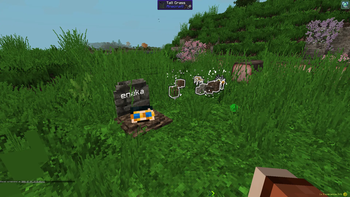
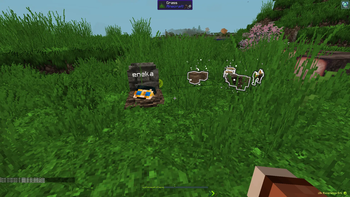
Grave Filter
An addon for the Gravestone mod. By default, Gravestone stores your entire inventory in a grave when you die. Grave Filter lets you decide which items are worth protecting — everything else drops and floats on the ground instead, right where you died.
Perfect for servers and modpacks that want death to still sting a little, without full item-loss chaos.
✨ Features
Choose what gets dropped on the ground instead of stored in the grave:
- 📦 Manually added items — an exact list of item IDs, your call
- 🧱 Blocks — anything placeable
- ⛏️ Materials — ingots, gems, ores, raw materials, dust, storage blocks (tag-based, fully configurable)
- 🔧 Tools — pickaxe, axe, shovel, hoe, shears, fishing rod, flint & steel
- 🛡️ Armor — helmet, chestplate, leggings, boots, elytra
- ⚔️ Weapons — sword, axe, bow, crossbow, trident
- 🎒 Hotbar — everything in your hotbar, regardless of type
- 💍 Curios slots — full integration with the Curios API (optional)
A "always keep" list overrides every other rule — perfect for that one heirloom item you never want to lose.
Dropped items can be configured to:
- Never despawn
- Be invulnerable (fire, lava, explosions, cactus...)
- Glow, so they're easy to spot
⚙️ How it works
Grave Filter hooks into the same death event Gravestone uses, but runs before Gravestone reads your inventory. It pulls out whatever should drop and spawns it as a floating item; whatever's left is what ends up in the grave. No Gravestone internals are touched, so it stays compatible across Gravestone updates.
📋 Requirements
- Minecraft 1.20.1
- Forge 47+
- Gravestone (required)
- Curios (optional — only needed for Curios slot filtering)
🔧 Configuration
All settings live in config/gravefilter-common.toml, generated on first launch. Precedence: manual keep-list > manual drop-list > category filters. Anything not matched by an active filter stays in the grave (vanilla Gravestone behavior).
⚠️ Disclaimer
This is an unofficial, community-made addon and is not affiliated with or endorsed by the author of Gravestone.