

📏 HEIGHT METER
A clean, customizable HUD height meter featuring a detailed altimeter scale, compact hotbar mode, and multi-language support!



🌟 Overview
Height Meter is a lightweight, clean, and fully customizable HUD mod for Minecraft that displays your current elevation and altitude with style! It allows you to seamlessly track your vertical position using either a full-scale altimeter ruler or a minimal hotbar display.
✨ Key Features
- 📐 Two Display Modes:
- Full Altimeter Mode: Displays a stylish vertical ruler on the right side of your screen with world bounds, major 10-block labels, and 5-block ticks.
- Compact Hotbar Mode: A minimal, non-intrusive height number placed neatly right next to your hotbar slot!
- ⚙️ In-Game Configuration Screen:
- Toggle display mode on the fly.
- Adjust position (X/Y Offsets) and scale (size) for both modes.
- Custom keybind option.
- Quick Reset Position button.
- 🎨 7 Color Presets:
- Gold, White, Green, Cyan, Red, Purple, and Orange!
- 💾 Persistent Settings: Automatically saves your preferences smoothly.
- 🌐 Full Internationalization: Fully localized across 20+ languages for a seamless global experience!
- ⚡ Ultra-Lightweight & Client-Side: Runs 100% on the client. Works flawlessly on multiplayer servers and Vanilla Realms without server-side installation!
🎮 Controls & Keybindings
| Action | Default Key | How to Rebind |
|---|---|---|
| Open Menu | H |
Options ➔ Controls ➔ Key Binds ➔ Scroll to bottom |
💡 Tip: You can rebind the menu key to any key you prefer (e.g.,
Hor a side mouse button) directly from the in-game control settings!
🛠️ Installation & Requirements
- ⚙️ Loader: Fabric Loader
- 📌 Minecraft Version: Works across multiple 1.21.11 versions (Check the Versions tab)
- 🧩 Dependencies: Fabric API
- Download the latest
.jarfile from the Versions tab. - Place the file into your
.minecraft/modsdirectory. - Launch your game and press
Hto configure your height meter!
💬 Community & Support
Have a suggestion, found a bug, or want to report an issue? Join our official community!
- 💬 Discord: Join Craftify Discord Server
🔗 Check Out My Other Lightweight Mods!
Enhance your vanilla Minecraft experience with my collection of minimalist, client-side utilities:
| Mod | Description |
|---|---|
| 🌍 Where Am I? | Color-coded biome & dimension notifications as you explore. |
| ⏳ Playtime Toast | Track your current world playtime instantly with a single keypress. |
| 🛡️ Clean Durability | Minimalist item durability tooltips & break warning toast alerts. |
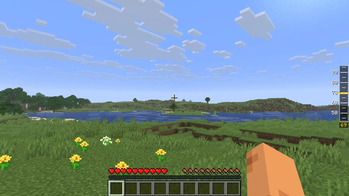
Shows the height meter integrated directly into the right side of the screen.
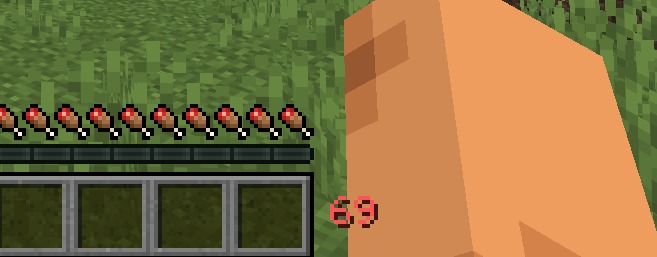
A minimal height counter positioned neatly above the hotbar.
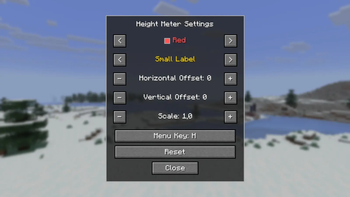
Customize HUD color, label size, horizontal/vertical offsets, and scale with real-time in-game live preview!
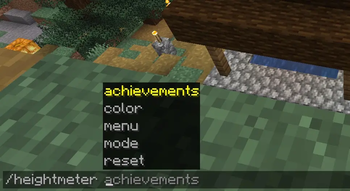
Quickly manage your HUD settings, switch colors, reset preferences, or view your achievements using the new /heightmeter command line!