

HomeGUI




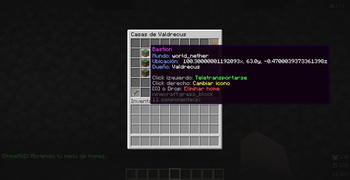
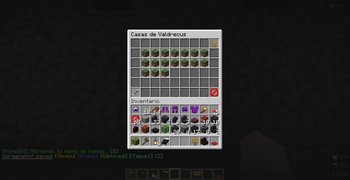
HomeGUI adds a practical interface to the EssentialsX home system. Players can browse, search, create, delete, and teleport to homes without having to remember every home name.
EssentialsX remains responsible for storing and managing homes. HomeGUI focuses on the interface around them, so /home <name> still works alongside the menu opened with /home.
Features
- Paginated home list with world and location details.
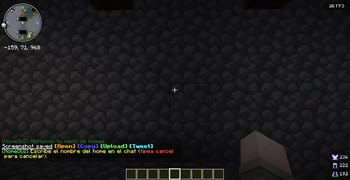
- Anvil-based search by home name.
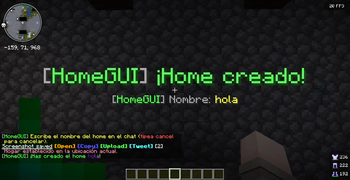
- Create and delete homes from the interface.
- Favorite homes are kept at the top of the list.
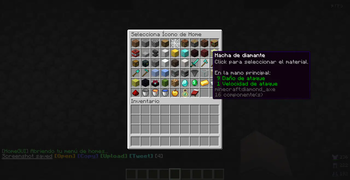
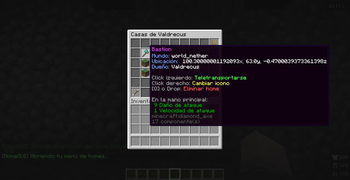
- Per-home icons with categories, favorites, and recent history.
- Optional custom items from CraftEngine, ItemsAdder, Nexo, and Oraxen.
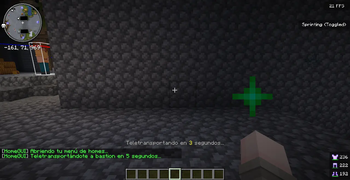
- Configurable teleport delay, cooldown, sounds, and particles.
- Teleports can be cancelled by movement or incoming damage.
- Read-only administrative view for another player's homes.
- Transactional configuration reloads: invalid files do not replace the active configuration.
- English and Spanish included for messages and menus.
Home icons
Players can assign a different icon to each home. The built-in selector includes:
- Minecraft blocks and items grouped by category.
- A small, curated head catalog.
- Favorite icons.
- Recently used icons.
- Custom items explicitly configured by the server administrator.
External item providers are optional. If a provider is not installed, its entries are simply unavailable while the rest of HomeGUI continues to work.
Languages
HomeGUI ships with en_US and es_ES. The selected locale controls chat messages, inventory titles, item names, lore, category names, and head names.
Choose the language in config.yml:
language: en_US
or:
language: es_ES
Menu layout files contain only slots, icons, and translation keys. You do not need to edit every menu when changing languages. To add another locale, copy an existing file in languages/, translate its visible values, and select its filename in config.yml.
Apply language and menu changes with /homeadmin reload.
Requirements
| Requirement | Purpose |
|---|---|
| Paper 1.21.x | Server platform |
| Java 21 | Runtime |
| EssentialsX | Home storage and management |
CraftEngine, ItemsAdder, Nexo, and Oraxen are only required when their items are used as home icons.
Installation
- Stop the server.
- Install EssentialsX.
- Place the HomeGUI JAR in the
pluginsfolder. - Install any optional item providers you intend to use.
- Start the server once to generate the configuration.
- Set the locale and replace
SERVERNAMEin the selected language file. - Add custom item references to
menu/icon-custom.ymlif needed.
Commands
| Command | Description |
|---|---|
/home |
Open your home list. |
/home <home> |
Teleport through EssentialsX. |
/home search |
Search your homes by name. |
/home view <player> |
Open another player's homes. |
/homeadmin reload |
Validate and reload all configuration files. |
/homeadmin validate |
Check the active configuration for errors. |
/homeadmin providers |
Show the state of each item provider. |
/homeadmin identify |
Identify the item held in the main hand. |
/homeadmin preview <menu> |
Preview a menu. |
/homeadmin view <player> |
Open the administrative home view. |
Aliases include /homes, /home buscar, /home ver, and /homegui.
Permissions
| Permission | Description | Default |
|---|---|---|
homegui.create |
Create homes from the menu. | Everyone |
homegui.search |
Use home search. | Everyone |
homegui.others |
View another player's homes. | Operators |
homegui.teleport.others |
Teleport to another player's homes. | Operators |
homegui.teleport.bypasscooldown |
Ignore the teleport cooldown. | Operators |
homegui.admin |
Grant all HomeGUI administration permissions. | Operators |
Individual administration permissions are available for reload, validate, providers, identify, preview, and view under the homegui.admin.* namespace.
Custom item references
Custom icons are listed in menu/icon-custom.yml. Each reference must exist in its provider:
items:
  - 'craftengine:server:home_icon'
  - 'itemsadder:server:home_icon'
  - 'nexo:home_icon'
  - 'oraxen:home_icon'
HomeGUI never guesses or rewrites custom item IDs.
File structure
plugins/HomeGUI/
├── config.yml
├── languages/
│   ├── en_US.yml
│   └── es_ES.yml
├── menu/
│   ├── home-list.yml
│   ├── home-search.yml
│   ├── admin-view.yml
│   ├── delete-confirm.yml
│   └── icon-*.yml
└── icons/
    ├── palette.yml
    └── heads.yml
Support
When reporting an issue, include the Paper, EssentialsX, and HomeGUI versions together with the complete console error.
| Version | Minecraft | Loader | Download |
|---|---|---|---|
|
HomeGUI - Home Gui for EssentialsX 4.0.0-SNAPSHOT 4.0.0-SNAPSHOT |
1.21, 1.21.1, 1.21.2, 1.21.3, 1.21.4, 1.21.5, 1.21.6, 1.21.7, 1.21.8, 1.21.9, 1.21.10, 1.21.11, 26.1, 26.1.1, 26.1.2, 26.2, 26.3
|
paper, purpur, spigot
|
Download |
|
2.3 |
1.16, 1.16.1, 1.16.2, 1.16.3, 1.16.4, 1.16.5, 1.17, 1.17.1, 1.18, 1.18.1, 1.18.2, 1.19, 1.19.1, 1.19.2, 1.19.3, 1.19.4, 1.20, 1.20.1, 1.20.2, 1.20.3, 1.20.4, 1.20.5, 1.20.6, 1.21, 1.21.1, 1.21.2, 1.21.3, 1.21.4, 1.21.5, 1.21.6, 1.21.7, 1.21.8
|
paper, spigot
|
Download |