

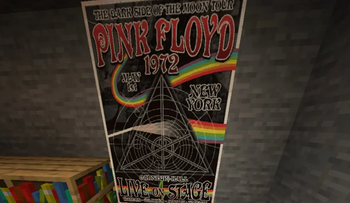
This plugin introduces a simple command to render images onto maps in your Minecraft world!
/map
Simply provide the intended width and height of the output, followed by the url to the image that you want to be rendered.
For example, /map 2 3 will render the image onto 6 maps that can then be placed in a 2x3 grid of item frames to complete the image.
I know there are many plugins that do similar things to this however I always prefer to use my own plugins on my Minecraft server (so I can have complete control and understanding of what's happening below the surface) hence I made this.
Also, it probably works on some older version of the game, I only specify the versions that I've tested it on.
Permission Nodes:
imagemaprenderer.map
description: allows player to run the /map command default: true
imagemaprenderer.itemFrames
description: allows player to receive Item Frames when they render map(s) default: true
imagemaprenderer.glowItemFrames
description: allows player to receive Glow Item Frames when they render map(s) default: true
| Version | Minecraft | Loader | Download |
|---|---|---|---|
|
Image Map Renderer 2.1.0 2.1.0 |
1.21, 1.21.1, 1.21.2, 1.21.3, 1.21.4, 1.21.5, 1.21.6, 1.21.7, 1.21.8, 1.21.9, 1.21.10, 1.21.11
|
paper, spigot
|
Download |
|
Image Map Renderer 2.0.2 2.0.2 |
1.20, 1.20.1, 1.20.2, 1.20.3, 1.20.4, 1.20.5, 1.20.6
|
paper, spigot
|
Download |
|
Image Map Renderer 2.0.0 2.0.0 |
1.20, 1.20.1, 1.20.2, 1.20.3, 1.20.4, 1.20.5, 1.20.6
|
paper, spigot
|
Download |
|
Image Map Renderer 4.9 4.9 |
1.19, 1.19.1, 1.19.2, 1.19.3, 1.19.4, 1.20, 1.20.1
|
paper, spigot
|
Download |
|
Image Map Renderer 4.8 4.8 |
1.19, 1.19.1, 1.19.2, 1.19.3, 1.19.4, 1.20, 1.20.1
|
paper, spigot
|
Download |
|
Image Map Renderer 4.7 4.7 |
1.19, 1.19.1, 1.19.2, 1.19.3, 1.19.4, 1.20, 1.20.1
|
paper, spigot
|
Download |
|
Image Map Renderer 4.6 4.6 |
1.19, 1.19.1, 1.19.2, 1.19.3, 1.19.4, 1.20, 1.20.1
|
paper, spigot
|
Download |