


Advanced invitation management plugin for Paper/Spigot 1.21+ servers


🎮 What is InviteMe?
InviteMe turns your server's whitelist into a social invitation system. Each player has a configurable number of invitation slots to bring friends to the server. The plugin manages access, keeps an action log, provides an inventory GUI, and rewards proximity between mutually-invited players with an XP multiplier.

✨ Features
- 🎟️ Invitation system — each player has a configurable slot limit; different limits per rank via LuckPerms
- ⏳ Temporary invitations — invitations with automatic expiry date support
- 🖥️ Inventory GUI — graphical interface with player heads, pagination and uninvite confirmation
- ⚡ Mutual XP boost — XP multiplier for mutually-invited players who are near each other
- 🗄️ Multiple backends — JSON, SQLite, MySQL and PostgreSQL with live migration
- 🔌 LuckPerms integration — automatic group assignment and per-rank invitation limits
- 📊 PlaceholderAPI — over 15 placeholders for scoreboards, tablist and HUDs
- 🌍 Multilingual — English, Spanish and German included; editable files in
plugins/InviteMe/locales/ - 📋 Action log — full history of invites and uninvites, exportable to CSV
- 🔄 Auto-sync — keeps the native whitelist in sync with plugin data automatically
- 🔒 Plugin mode — alternative to the native whitelist; access control managed entirely by InviteMe
📋 Requirements
| Requirement | Minimum version | Notes |
|---|---|---|
| Paper / Spigot | 1.21 | Paper recommended |
| Java | 21 | |
| LuckPerms | any | Optional — group assignment and per-rank limits |
| PlaceholderAPI | any | Optional — placeholders in other plugins |
🚀 Installation
- Download
InviteMe-<version>.jar. - Place it in your server's
plugins/folder. - Start or restart the server.
- The plugin automatically generates
plugins/InviteMe/config.yml. - Edit the configuration and run
/im reload.
🖥️ Inventory GUI
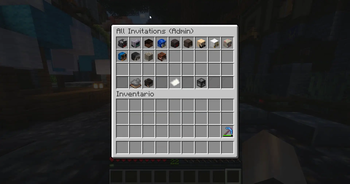
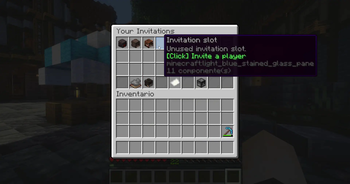
The /invite menu command opens a graphical interface with player heads, pagination, favourite filtering and uninvite confirmation. Admins see all invited players server-wide; regular players see only their own invitations.

👑 Admin view

⚡ Mutual XP Boost
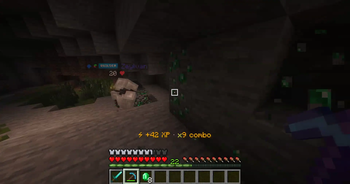
When two players who mutually invited each other enter the configured radius, both receive an XP multiplier. The effect stacks with multiple partners and is configurable per world.

⚙️ Boost configuration
mutual-invite-boost:
  enabled: true
  xp-multiplier: 1.5       # +50% XP
  check-interval: 5        # seconds between checks
  show-actionbar: true
  particle-effects: true
  max-boost-partners: 3
  max-multiplier: 2.5
  radius:
    overworld: 50
    nether: 75
    end: 100
Add custom worlds under mutual-invite-boost.radius.custom-worlds:
radius:
  custom-worlds:
    mining_world: 60
💬 Commands

👤 Player commands — /invite
Require the
invite.usepermission (granted to all players by default).
| Command | Description |
|---|---|
/invite add <player> |
Invite a player to the server |
/invite add <player> <days> |
Temporary invitation with expiry (requires invite.temp) |
/invite list |
Show your invitations and remaining slots |
/invite list <player> |
Show another player's invitation list |
/invite list all |
Global inviter ranking |
/invite tree [player] |
Invitation chain (up to 20 levels up) |
/invite menu |
Open the inventory GUI |
🛡️ Admin commands — /im
Require the
invite.adminpermission (OPs only by default).
| Command | Description |
|---|---|
/invite remove <player> [reason] |
Remove a player from the server |
/im stats [N] |
Global statistics and top N inviters |
/im log list [player] [N] |
Action log, filterable by player |
/im log export [global|player] |
Export the log to a CSV file |
/im sync |
Force an immediate whitelist sync |
/im debug |
Plugin diagnostic information |
/im reload |
Reload configuration without restarting |
/im migrate [sqlite|mysql|postgresql] |
Migrate data between backends |
/im boost [status|on|off|check] |
Diagnose and control the mutual boost |
🔑 Permissions
View permissions table
| Permission | Default | Description |
|---|---|---|
invite.use |
Everyone | Invite players and view own invitation list |
invite.admin |
OP | Full administrative access; bypasses limits and cooldown |
invite.temp |
false | Create temporary invitations with expiry |
invite.stats |
OP | View global statistics with /im stats |
invite.log |
OP | View and export the action log with /im log |
invite.number.X |
— | Custom limit of X invitations (e.g. invite.number.10) |
invite.* |
OP | Wildcard — grants all permissions |
Limit priority: invite.number.X > group-limits in config > max-invites in config.
To give a rank unlimited invitations:
/lp group <rank> permission set invite.admin true
Or a specific number:
/lp group <rank> permission set invite.number.20 true
📊 PlaceholderAPI
View all placeholders
Requires PlaceholderAPI installed.
👤 Per player
| Placeholder | Description |
|---|---|
%inviteme_max_invites% |
Maximum invitation limit (∞ if unlimited) |
%inviteme_used_invites% |
Invitations already used |
%inviteme_remaining_invites% |
Remaining invitations |
%inviteme_invited_players% |
Number of players invited |
%inviteme_is_invited% |
true if the player was invited by someone |
%inviteme_invited_by% |
Name of the player who invited them |
%inviteme_rank% |
Position in the inviter ranking |
%inviteme_invites_bar% |
Visual progress bar (e.g. ██████░░░░) |
%inviteme_invites_percentage% |
Percentage of invitations used |
%inviteme_status% |
Status: Unlimited, Limited or Full |
⚡ Boost system
| Placeholder | Description |
|---|---|
%inviteme_boost_active% |
true if mutual boost is active |
%inviteme_boost_partners% |
Number of active boost partners |
%inviteme_boost_multiplier% |
Current XP multiplier (e.g. 1.5) |
%inviteme_boost_percentage% |
XP increase percentage (e.g. 50%) |
🌍 Global stats
| Placeholder | Description |
|---|---|
%inviteme_total_invites% |
Total invitations on the server |
%inviteme_total_players% |
Total invited players |
%inviteme_top_inviter% |
Player with the most invitations |
%inviteme_top_inviter_count% |
Top inviter's invitation count |
🗄️ Storage
View storage backends and configuration
| Backend | Description |
|---|---|
json |
Local file invites.json, no additional setup |
sqlite |
Local database invites.db, recommended (default) |
mysql |
Remote MySQL or MariaDB database |
postgresql |
Remote PostgreSQL database |
To migrate between backends: run /im migrate <type>, wait for confirmation, then update storage.type in config.yml and run /im reload.
storage:
  type: sqlite  # json | sqlite | mysql | postgresql
  remote:
    host: localhost
    port: 3306        # 5432 for PostgreSQL
    database: inviteme
    username: root
    password: password
    pool-size: 10
🔒 Access Control
Native whitelist vs plugin mode
access-control-mode: native # native | plugin
native— Minecraft's native whitelist controls access (default).plugin— InviteMe manages access directly; setwhite-list=falseinserver.properties. OPs and players withinvite.admincan always join.
❓ FAQ
Why can't a player invite even with the invite.use permission?
They may have reached the max-invites limit or be on cooldown. Players with invite.admin have no such restrictions.
A player appears on the whitelist but not in /invite list.
They were added directly via /whitelist add. With whitelist-sync.auto-register-console: true the plugin will register them on the next sync, or force it with /im sync.
Does the boost work in custom worlds?
Yes, add the world under mutual-invite-boost.radius.custom-worlds:
radius:
  custom-worlds:
    mining_world: 60
📄 License
InviteMe is source-available, not open-source.
- ✅ Permitted: Use the plugin on your servers, create addons via the Dev Kit
- ❌ Not permitted: Sell InviteMe, modify the source code, create forks
- 🔗 Extension: Addons created with the official Dev Kit can have their own licenses
See LICENSE for full terms.
| Version | Minecraft | Loader | Download |
|---|---|---|---|
|
InviteMe v26.10.02.0 v26.10.02.0 |
1.21, 1.21.1, 1.21.10, 1.21.11, 1.21.2, 1.21.3, 1.21.4, 1.21.5, 1.21.6, 1.21.7, 1.21.8, 1.21.9, 26.2
|
paper
|
Download |
|
InviteMe v26.09.29.0 v26.09.29.0 |
1.21, 1.21.1, 1.21.10, 1.21.11, 1.21.2, 1.21.3, 1.21.4, 1.21.5, 1.21.6, 1.21.7, 1.21.8, 1.21.9, 26.2
|
paper
|
Download |
|
InviteMe v26.09.27.0 v26.09.27.0 |
1.21, 1.21.1, 1.21.10, 1.21.11, 1.21.2, 1.21.3, 1.21.4, 1.21.5, 1.21.6, 1.21.7, 1.21.8, 1.21.9, 26.2
|
paper
|
Download |
|
InviteMe v26.09.26.0 v26.09.26.0 |
1.21, 1.21.1, 1.21.10, 1.21.11, 1.21.2, 1.21.3, 1.21.4, 1.21.5, 1.21.6, 1.21.7, 1.21.8, 1.21.9, 26.2
|
paper
|
Download |
|
InviteMe v26.09.25.0 v26.09.25.0 |
1.21, 1.21.1, 1.21.10, 1.21.11, 1.21.2, 1.21.3, 1.21.4, 1.21.5, 1.21.6, 1.21.7, 1.21.8, 1.21.9, 26.2
|
paper
|
Download |
|
InviteMe v26.09.24.0 v26.09.24.0 |
1.21, 1.21.1, 1.21.10, 1.21.11, 1.21.2, 1.21.3, 1.21.4, 1.21.5, 1.21.6, 1.21.7, 1.21.8, 1.21.9, 26.2
|
paper
|
Download |
|
InviteMe v26.08.18.0 v26.08.18.0 |
1.21, 1.21.1, 1.21.10, 1.21.11, 1.21.2, 1.21.3, 1.21.4, 1.21.5, 1.21.6, 1.21.7, 1.21.8, 1.21.9
|
paper
|
Download |
|
InviteMe v26.07.04.0 v26.07.04.0 |
1.21, 1.21.1, 1.21.10, 1.21.11, 1.21.2, 1.21.3, 1.21.4, 1.21.5, 1.21.6, 1.21.7, 1.21.8, 1.21.9
|
paper
|
Download |
|
InviteMe v26.07.03.0 v26.07.03.0 |
1.21, 1.21.1, 1.21.10, 1.21.11, 1.21.2, 1.21.3, 1.21.4, 1.21.5, 1.21.6, 1.21.7, 1.21.8, 1.21.9
|
paper
|
Download |
|
InviteMe v26.07.02.0 v26.07.02.0 |
1.21, 1.21.1, 1.21.10, 1.21.11, 1.21.2, 1.21.3, 1.21.4, 1.21.5, 1.21.6, 1.21.7, 1.21.8, 1.21.9
|
paper
|
Download |
|
InviteMe v26.06.29.0 v26.06.29.0 |
1.21, 1.21.1, 1.21.10, 1.21.11, 1.21.2, 1.21.3, 1.21.4, 1.21.5, 1.21.6, 1.21.7, 1.21.8, 1.21.9
|
paper
|
Download |
|
InviteMe v26.06.27.1 v26.06.27.1 |
1.21, 1.21.1, 1.21.10, 1.21.11, 1.21.2, 1.21.3, 1.21.4, 1.21.5, 1.21.6, 1.21.7, 1.21.8, 1.21.9
|
paper
|
Download |
|
InviteMe v26.06.27.0 v26.06.27.0 |
1.21, 1.21.1, 1.21.10, 1.21.11, 1.21.2, 1.21.3, 1.21.4, 1.21.5, 1.21.6, 1.21.7, 1.21.8, 1.21.9
|
paper
|
Download |