

ItemChatSRV
Show off your items, inventory, and location right in chat — and have it all relay straight to Discord, automatically.
Ever wanted to brag about that enchanted Diamond Sword or show your friends exactly where you're standing, without typing out a paragraph? Just drop a simple tag into your message and let the plugin do the rest.
✨ Features
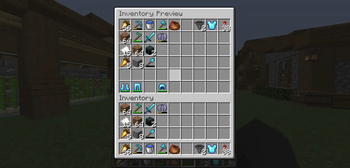
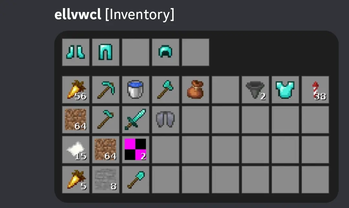
[i]/[item]— Displays the item currently in your hand. Hover over it in chat to see the full details (lore, enchantments, custom name). Click it to open a read-only preview GUI showing the exact item.[inv]— Displays[Inventory]in chat. Click to open a 54-slot snapshot of your entire inventory (36 main slots + armor + offhand) captured at the exact moment the message was sent — no live editing, just a safe preview.[pos]— Displays your current coordinates. Hover to see which world you're in, click to copy the coordinates straight to your clipboard.- Automatic Discord relay — If DiscordSRV is installed and running, any message containing the tags above is automatically relayed to your main Discord channel as a clean embed, complete with the player's name, avatar, and a readable version of the message (e.g.
[Diamond Sword]instead of raw tags).
🔗 Why this one?
Unlike most item-chat plugins, ItemChatSRV talks directly to your existing DiscordSRV setup — no separate bot, no extra Discord app, no duplicate configuration. If DiscordSRV is already running on your server, it just works.
Don't have DiscordSRV installed? No problem — the plugin runs perfectly fine on its own, with all in-game chat previews working normally. The Discord relay simply activates automatically the moment DiscordSRV is detected.
🧰 Requirements
- Paper or Spigot 1.20+
- DiscordSRV (optional, only needed for the Discord relay feature)
🔑 Permissions
| Permission | Description | Default |
|---|---|---|
itemchat.use |
Allows using [i] / [item] / [inv] / [pos] tags in chat |
true (everyone) |
📝 Notes
- Item icons are fetched from a public Minecraft texture mirror and cached locally, so renders load fast after the first use. A small handful of items that Minecraft itself renders in 3D (chests, beds, banners, shields) will show a placeholder icon instead of a flat sprite — this is a Minecraft rendering quirk, not a bug.
- Lightweight and dependency-free: no external libraries bundled, talks to DiscordSRV purely through its own API.
| Version | Minecraft | Loader | Download |
|---|---|---|---|
|
ItemChatSRV 1.0.0 1.0.0 |
1.20, 1.20.1, 1.20.2, 1.20.3, 1.20.4, 1.20.5, 1.20.6, 1.21, 1.21.1, 1.21.2, 1.21.3, 1.21.4, 1.21.5, 1.21.6, 1.21.7, 1.21.8, 1.21.9, 1.21.10, 1.21.11, 26.1, 26.1.1, 26.1.2
|
paper
|
Download |