

This is a powerful Minecraft plugin that allows you to customize items with an intuitive GUI system. Edit names, lore, enchantments, and add interactive actions to items - all without typing complex commands.
What's New in Version 1.3.0:
- Complete GUI Overhaul:
- Completely overhauled lore system: unlimited lines, fully dynamic with intuitive menu
- "Add Lore" button (Nether Star), each lore line as paper (left-click to edit, right-click to delete)
- Chain Command System: Multiple commands in sequence for left/right click actions
- Command chain menu similar to lore system - add, edit, and delete commands with ease
- Cooldown System:
- Separate cooldowns for left and right click actions
- Cooldown configurable per item in the menu
- Prevents consumption of consumables during cooldown
- Enhanced Commands:
- New subcommands:
/item version,/item reload,/item link - Tab completion for all commands and subcommands
- Automatic version checking on server startup with update notifications
- New subcommands:
- 1.21+ Server Support:
- Automatic detection of Minecraft 1.21+ servers
- New enchantments (Breach, Density, Wind Burst) available when supported
- Fully backward compatible with older versions (1.19–26.1.x)
- Advanced Features:
- URL-based command loading via chat input (paste command URL for 256+ char commands)
- Improved coordinate handling for commands with relative positions (~)
- Enhanced targeting system - %target% only works on other players, not mobs or self
- Various bugfixes, performance improvements, and internal optimizations
Commands: /item - Open the main item editor GUI
Permissions: itemeditor.use - Access to the item editor (default: op)
Main Features:
1. Rename Items
- Click the name tag in the main menu
- Type your new item name in chat
- Full support for color codes (&a, &c, &l, &n, etc.)
- HEX color support with &#RRGGBB format (e.g., &#FF5733)
2. Lore System
- Add up to 10 lore lines to any item
- Each line supports full color formatting
- Edit or remove individual lore lines
- Visual lore preview in the GUI
3. Enchantment System
- 41 different enchantments available
- Set custom levels from 1 to 255
- Works with all enchantments including Protection, Sharpness, Fortune, etc.
- No NBT-API required - uses native Bukkit PersistentDataContainer
4. Action System
- Left & Right Click Actions: Separate actions for left and right click
- Hit=Action Toggle: Trigger actions by hitting entities
- Command Execution: Execute console commands on item use
- Supports %player% for user name
- Supports %target% for targeted player
- Healing: Heal yourself or targeted players
- Custom heal amounts
- Different messages for self-heal and target heal
- Player Targeting: Raycast system to target players in your line of sight
- Configurable distance (default: 10 blocks)
- Consumable Items: Items can be consumed when actions are executed
- Custom Messages: Set custom action feedback or disable messages completely
- Type custom text with color codes
- Or disable with "none"/"disable"/"off"
5. Item Restrictions
- No Place: Prevent items from being placed as blocks
- No Craft: Prevent items from being used in crafting recipes
- No PvP: Prevent items from being used in PvP (global and per-item)
Just send me a message on Discord if you have any questions, suggestions, or requests for new plugins.
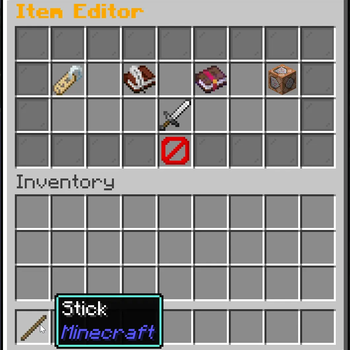
This screenshot shows the editor menu when you do /item
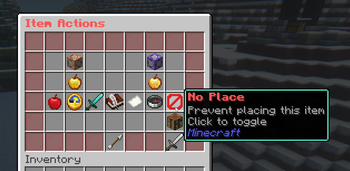
You can add actions to your item Like No Crafting, No PVP, No place, use the item to execute commands and more.
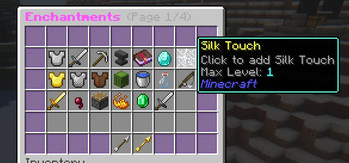
Add Enchantments to your item, you can choose from the normal max level or set a custom one till 255. (if you use the plugin on a newer version like 1.21 the new Enchantments will be available)
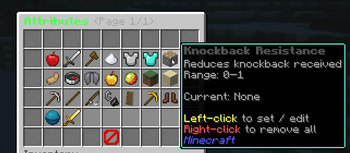
You can now add, set Attribute for your custom item like Hp, Damage and more...
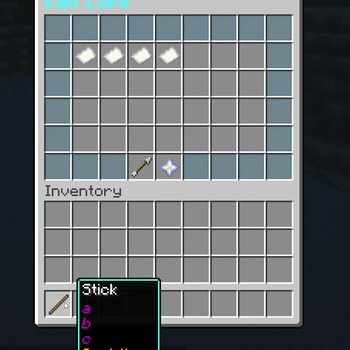
Add, Edit, remove your own lore form items
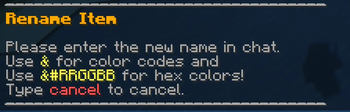
You can rename your item to whatever you want
| Version | Minecraft | Loader | Download |
|---|---|---|---|
|
Itemeditor 1.4.0 1.4.0 |
1.19, 1.19.1, 1.19.2, 1.19.3, 1.19.4, 1.20, 1.20.1, 1.20.2, 1.20.3, 1.20.4, 1.20.5, 1.20.6, 1.21, 1.21.1, 1.21.2, 1.21.3, 1.21.4, 1.21.5, 1.21.6, 1.21.7, 1.21.8, 1.21.9, 1.21.10, 1.21.11, 26.1, 26.1.1, 26.1.2, 26.2
|
bukkit, paper, purpur, spigot
|
Download |
|
Itemeditor 1.4.0-SNAPSHOT-3 1.4.0-SNAPSHOT-3 |
1.19, 1.19.1, 1.19.2, 1.19.3, 1.19.4, 1.20, 1.20.1, 1.20.2, 1.20.3, 1.20.4, 1.20.5, 1.20.6, 1.21, 1.21.1, 1.21.2, 1.21.3, 1.21.4, 1.21.5, 1.21.6, 1.21.7, 1.21.8, 1.21.9, 1.21.10, 1.21.11, 26.1, 26.1.1, 26.1.2, 26.2
|
bukkit, paper, purpur, spigot
|
Download |
|
Itemeditor 1.4.0-SNAPSHOT-2 1.4.0-SNAPSHOT-2 |
1.19, 1.19.1, 1.19.2, 1.19.3, 1.19.4, 1.20, 1.20.1, 1.20.2, 1.20.3, 1.20.4, 1.20.5, 1.20.6, 1.21, 1.21.1, 1.21.2, 1.21.3, 1.21.4, 1.21.5, 1.21.6, 1.21.7, 1.21.8, 1.21.9, 1.21.10, 1.21.11, 26.1, 26.1.1, 26.1.2, 26.2
|
bukkit, paper, purpur, spigot
|
Download |
|
Itemeditor 1.4.0-SNAPSHOT-1 1.4.0-SNAPSHOT-1 |
1.19, 1.19.1, 1.19.2, 1.19.3, 1.19.4, 1.20, 1.20.1, 1.20.2, 1.20.3, 1.20.4, 1.20.5, 1.20.6, 1.21, 1.21.1, 1.21.2, 1.21.3, 1.21.4, 1.21.5, 1.21.6, 1.21.7, 1.21.8, 1.21.9, 1.21.10, 1.21.11, 26.1, 26.1.1, 26.1.2, 26.2
|
bukkit, paper, purpur, spigot
|
Download |
|
Itemeditor 1.3.1 1.3.1 |
1.19, 1.19.1, 1.19.2, 1.19.3, 1.19.4, 1.20, 1.20.1, 1.20.2, 1.20.3, 1.20.4, 1.20.5, 1.20.6, 1.21, 1.21.1, 1.21.2, 1.21.3, 1.21.4, 1.21.5, 1.21.6, 1.21.7, 1.21.8, 1.21.9, 1.21.10, 1.21.11
|
bukkit, paper, purpur, spigot
|
Download |
|
Itemeditor 1.3.1 1.3.1 |
1.19, 1.19.1, 1.19.2, 1.19.3, 1.19.4, 1.20, 1.20.1, 1.20.2, 1.20.3, 1.20.4, 1.20.5, 1.20.6, 1.21, 1.21.1, 1.21.2, 1.21.3, 1.21.4, 1.21.5, 1.21.6, 1.21.7, 1.21.8, 1.21.9, 1.21.10, 1.21.11
|
bukkit, paper, purpur, spigot
|
Download |
|
Itemeditor 1.3.0 1.3.0 |
1.19, 1.19.1, 1.19.2, 1.19.3, 1.19.4, 1.20, 1.20.1, 1.20.2, 1.20.3, 1.20.4, 1.20.5, 1.20.6, 1.21, 1.21.1, 1.21.2, 1.21.3, 1.21.4, 1.21.5, 1.21.6, 1.21.7, 1.21.8, 1.21.9, 1.21.10, 1.21.11
|
bukkit, paper, purpur, spigot
|
Download |
|
Itemeditor 1.2.4 1.2.4 |
1.19, 1.19.1, 1.19.2, 1.19.3, 1.19.4, 1.20, 1.20.1, 1.20.2, 1.20.3, 1.20.4, 1.20.5, 1.20.6, 1.21, 1.21.1, 1.21.2, 1.21.3, 1.21.4, 1.21.5, 1.21.6, 1.21.7, 1.21.8, 1.21.9, 1.21.10, 1.21.11
|
bukkit, paper, purpur, spigot
|
Download |
|
Itemeditor 1.2.3 1.2.3 |
1.19, 1.19.1, 1.19.2, 1.19.3, 1.19.4, 1.20, 1.20.1, 1.20.2, 1.20.3, 1.20.4, 1.20.5, 1.20.6, 1.21, 1.21.1, 1.21.2, 1.21.3, 1.21.4, 1.21.5, 1.21.6, 1.21.7, 1.21.8, 1.21.9, 1.21.10, 1.21.11
|
bukkit, paper, purpur, spigot
|
Download |
|
Itemeditor 1.2.2 1.2.2 |
1.19, 1.19.1, 1.19.2, 1.19.3, 1.19.4, 1.20, 1.20.1, 1.20.2, 1.20.3, 1.20.4, 1.20.5, 1.20.6, 1.21, 1.21.1, 1.21.2, 1.21.3, 1.21.4, 1.21.5, 1.21.6, 1.21.7, 1.21.8, 1.21.9, 1.21.10, 1.21.11
|
bukkit, paper, purpur, spigot
|
Download |
|
Itemeditor 1.2.1 1.2.1 |
1.19, 1.19.1, 1.19.2, 1.19.3, 1.19.4, 1.20, 1.20.1, 1.20.2, 1.20.3, 1.20.4, 1.20.5, 1.20.6, 1.21, 1.21.1, 1.21.2, 1.21.3, 1.21.4, 1.21.5, 1.21.6, 1.21.7, 1.21.8, 1.21.9, 1.21.10, 1.21.11
|
bukkit, paper, purpur, spigot
|
Download |
|
Itemeditor 1.2.0 1.2.0 |
1.19, 1.19.1, 1.19.2, 1.19.3, 1.19.4, 1.20, 1.20.1, 1.20.2, 1.20.3, 1.20.4, 1.20.5, 1.20.6, 1.21, 1.21.1, 1.21.2, 1.21.3, 1.21.4, 1.21.5, 1.21.6, 1.21.7, 1.21.8, 1.21.9, 1.21.10, 1.21.11
|
bukkit, paper, purpur, spigot
|
Download |
|
Itemeditor 1.1.0 1.1.0 |
1.19, 1.19.1, 1.19.2, 1.19.3, 1.19.4, 1.20, 1.20.1, 1.20.2, 1.20.3, 1.20.4, 1.20.5, 1.20.6, 1.21, 1.21.1, 1.21.2, 1.21.3, 1.21.4, 1.21.5, 1.21.6, 1.21.7, 1.21.8, 1.21.9, 1.21.10
|
bukkit, paper, purpur, spigot
|
Download |
|
Item-Editor 1.0.0 1.0.0 |
1.19, 1.19.1, 1.19.2, 1.19.3, 1.19.4, 1.20, 1.20.1, 1.20.2, 1.20.3, 1.20.4, 1.20.5, 1.20.6, 1.21, 1.21.1, 1.21.2, 1.21.3, 1.21.4, 1.21.5, 1.21.6, 1.21.7, 1.21.8, 1.21.9, 1.21.10
|
bukkit, paper, purpur, spigot
|
Download |