Kleene Builds
Kleene Builds is a Minecraft Java Fabric mod that helps builders make large-scale design changes without leaving the game.
You select the part of your build you want to work on and let Kleene Builds apply a controlled building operation to that area.
Kleene Builds is currently designed for singleplayer worlds.
The basic workflow
- Select an area by choosing two corners of your build.
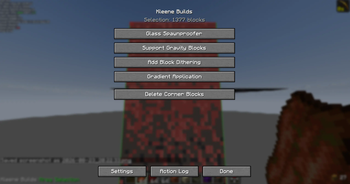
- Open View Operations using the configured keybind.
- Choose an operation such as Glass Spawnproofer or Add Block Dithering.
- Adjust the options for that operation.
- Execute the operation and let Kleene Builds apply the changes to the selected area.
Both corner blocks are included in the selection, but you can remove them in the View Operations page.
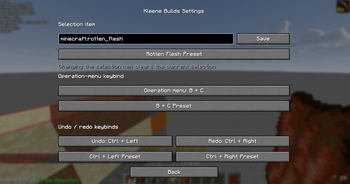
The selection tool defaults to rotten flesh, but it can be changed from the Settings page.
Current features
To view pictures of what builds look like before and after these features have been applied, visit this page: Feature Images Page
Area selection
Choose two opposite corners to tell Kleene Builds exactly which part of the build you want to work on.
While the selection tool is active, the selected area is shown clearly in the world so you can confirm the boundaries before running an operation.
If temporary blocks were needed just to make the corners selectable, the View Operations page includes Delete Corner Blocks. This removes the two blocks used to define the selection.
Glass Spawnproofer
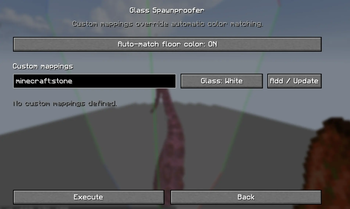
Glass Spawnproofer finds suitable spawnable spaces and places stained glass above them.
By default, Kleene Builds tries to choose a stained-glass color that visually fits the block underneath it.
You can also:
- define your own block-to-glass mappings,
- override automatic color choices,
- turn automatic color matching off,
- and choose a default glass color for blocks without a custom mapping.
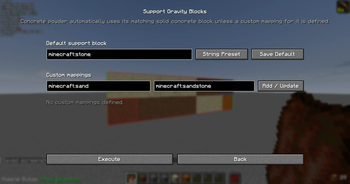
Support Gravity Blocks
This operation finds floating gravity-affected blocks and adds a support beneath the bottom of each floating stack.
For concrete powder, Kleene Builds automatically uses the matching solid concrete color unless you define a custom mapping.
For sand, gravel, and other gravity blocks, you can choose a default support block and create as many custom mappings as you want.
A String preset is included if you want to place string underneath the floating gravity block.
Add Block Dithering
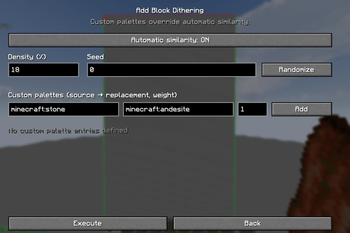
Block Dithering adds irregular texture to areas that look too flat or repetitive.
Kleene Builds scatters replacement blocks in a random-looking pattern.
You can let Kleene Builds automatically find visually compatible alternatives, or define your own replacement palettes.
You can also control:
- how much of the selected material gets replaced,
- how frequently different replacement blocks appear,
- and the random seed used to generate the pattern.
Using the same settings and seed will reproduce the same pattern.
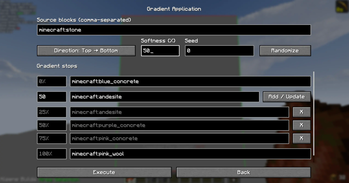
Gradient Application
Gradient Application creates directional block transitions across a selected area.
You define gradient stops such as:
0%   Pink Concrete
12%  Purple Concrete
50%  Andesite
100% Red Concrete
These stops are treated as visual anchor points. Kleene Builds automatically looks for suitable blocks to bridge the gaps between neighboring stops, rather than simply placing the two anchor blocks directly beside one another.
Transitions will look natural.
You can choose the gradient direction, control how soft the transitions are, choose which source blocks are allowed to change, and use a seed to reproduce the same result later.
Undo and redo
Kleene Builds keeps track of the changes it makes, allowing you to undo or redo mod actions without treating unrelated player edits as part of the history.
The default shortcuts are:
- Undo: Ctrl + Left Arrow
- Redo: Ctrl + Right Arrow
Both can be changed from Settings.
If a block has been changed manually after Kleene Builds edited it, the mod avoids overwriting that newer change during undo or redo.
Action Log
The Action Log shows what Kleene Builds has done during the current play session.
Each entry records information such as the operation used, the selected area, and how many blocks were changed.
Individual actions can be undone or redone directly from the log. This means you can reverse an older Kleene Builds action without necessarily undoing every newer action first.
Customizable controls
The Settings page currently lets you customize:
- the item used for area selection,
- the key combination used to open View Operations,
- the Undo keybind,
- and the Redo keybind.
Multi-key combinations are supported for the operation-menu keybind.
Current limitations
At this stage, the mod is intended for singleplayer use
You should still keep normal world backups for important projects!
Compatibility
Kleene Builds currently targets:
- Fabric
- Singleplayer worlds
Author
Kleene Builds is created by CSClub05.