KyuubiSoft ChatPresets



Overview
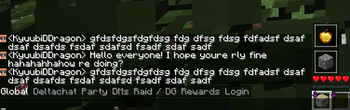
KyuubiSoft ChatPresets is a client-side Fabric mod that revolutionizes your Minecraft chat experience with customizable quick-access buttons. Say goodbye to typing the same messages repeatedly!
Features
Core Features
- Quick Chat Buttons - Access your favorite messages with a single click
- Minecraft Item Icons - Use any Minecraft item as your button icon
- Drag & Drop - Position your button bar anywhere on screen
- Server-Specific Configs - Different presets for different servers
- RGB Color Picker - Customize text and background colors
Customization Options
- Horizontal/Vertical Layout - Arrange buttons your way
- Adjustable Button Size - From 8x8 to 64x64 pixels
- Background Toggle - Show or hide button backgrounds
- Chat-Only Mode - Buttons appear only when chat is open
- Per-Server Settings - Automatic preset switching
Getting Started
-
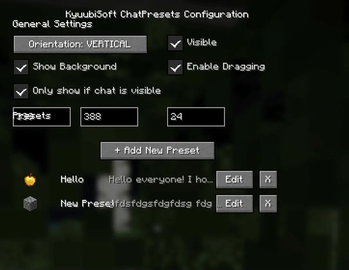
Open Configuration
- Press
P(default) or click the mod in Mod Menu - Access settings from the main menu or in-game
- Press
-
Create Your First Preset
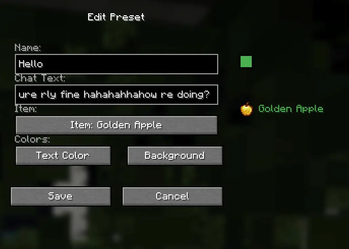
- Click "+ Add New Preset"
- Enter a name and your chat message
- Choose an icon from 100+ Minecraft items
- Pick your colors with the RGB picker
-
Use Your Presets
- Click any button to open chat with your message
- Drag the button bar to reposition
- Toggle visibility as needed
Configuration
General Settings
- Orientation: Horizontal or Vertical layout
- Position: X/Y coordinates or drag to move
- Button Size: 8-64 pixels
- Visibility: Toggle on/off
- Background: Show/hide button backgrounds
- Drag Mode: Enable/disable repositioning
Advanced Options
- Only Show if Chat Visible: Buttons appear only with chat open
- Server-Specific Configs: Separate settings per server
- Text Length: Up to 1000 characters per preset
Commands
All commands start with /chatpresets:
/chatpresets list - Show all presets
/chatpresets add <name> <text> - Create new preset
/chatpresets remove <name> - Delete preset
/chatpresets use <name> - Copy preset text to chat
/chatpresets reload - Reload configuration
Technical Details
- Minecraft Version: 1.21.1
- Mod Loader: Fabric
- Dependencies: Fabric API
- Client-Side Only: No server installation needed
- Performance: Minimal impact, efficient rendering
Compatibility
- ✅ Works with most client-side mods
- ✅ Compatible with Mod Menu
- ✅ No conflicts with chat mods
- ✅ Multiplayer friendly
License
This mod is licensed under the MIT License. Feel free to use it in modpacks!
Made with ❤️ by KyuubiSoft