

Lattice
Lattice is a Minecraft mod intended to be used on SMP servers to manage many useful features for players.
Features
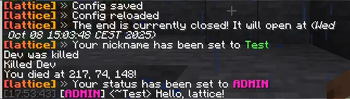
- Player nickname and status management
- Night vision toggle for players
- Server configuration management (save/reload)
- Message of the Day (MOTD) rotation
- Detection of illegal/cheat mods [Unavailable in Vanilla mode]
- Decorators for enhanced in-game experience (e.g., time/status decorators)
- Configurable PvP settings per player
- Server, end and nether opening dates
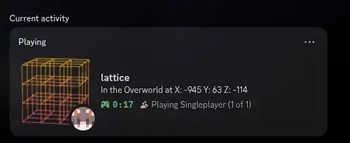
- Server configurable Discord RPC [Unavailable in Vanilla mode]
- Discord bridge for chat messages
- Player-requested force-loaded chunks with a configurable per-player limit
Commands
Below is a list of all available commands and their functionality:
/nv
- Toggles Night Vision
/nick [nickname]
- Sets or removes your nickname
- If you pass your actual Minecraft name as the nickname, your nickname is removed
- If called without arguments, shows your current nickname
/status [<status>|reset]
- Changes your status message
- If you pass
resetas the status, your status is removed - If called without arguments, shows your current status message
/home <name>, /sethome <name>, /delhome <name>
- Commands for managing your homes
- Teleport to, create or delete one of your homes
/requestforceload <add|query|remove> <x> <z>
- Allows players to force load chunks
- Force-load, query or remove the chunk containing the given block coordinates in your current dimension
- Relative coordinates such as
~ ~use your current position - You can remove only chunks you requested; the per-player limit counts chunks across all dimensions
/lattice <action> [subAction] [subActionArg]
- Performs administrative actions (requires permission level 2)
- Available actions:
config- Manage server configurationsave- Saves the current configuration to diskreload- Reloads the configuration from disk
motd- Manage Message of the Dayadd- Adds a new MOTDremove- Removes a MOTDlist- Lists all MOTDs
<illegal|allowed>- Manage illegal and allowed modsadd- Adds a new mod to the listremove- Removes a mod from the listlist- Lists all mods in the listpvp- Manage PvP settings<player>- Specifies the player<enable|disable>- Enables or disables PvP for the specified player
open- Manage server and end opening dates<dimension>- Specifies what to modify [nether, end, server]<date>- Sets the opening date in the formatYYYY-MM-DD hh:mm:ss
nick- Manage nickname for a player<player>- Specifies the playerremove- Removes the nickname for a player
<nickname>- Sets the nickname for a player
status- Manage status messages for a player<player>- Specifies the playerremove- Removes the status message for a player<status>- Sets the status message for a player
help- Shows a link to the repository
- Examples:
/lattice config save/lattice motd add Welcome to the server!/lattice illegal list/lattice pvp PlayerName enable/lattice open end 2024-12-31 23:59:59/lattice nick PlayerName remove/lattice status PlayerName COOL
Configuration
- Config file is stored as
config.jsonunder lattice in the server config directory enableHomeCommand,enableNickCommand, andenableStatusCommandindependently enable the corresponding player commands. The nick and status switches also disable their/latticeadministrative actions. All three default totrue. Edit the file and run/lattice config reloadto apply changes; reconnect to refresh command suggestions.maxForceloadedChunkssets the per-player force-load limit across all dimensions (default:10)- You can change the time when the end or the server will be opened
- MOTDs and a list of illegal mods can be configured
- Each player has configurable options:
- PvP enabled/disabled
- Nickname
- Status message
- List of homes
Enabling Vanilla mode
- Shut down the server
- Open the
config/lattice/config.jsonfile - Add
"vanillaMode": true,to the file - Start the server
- Great success!
Known issues
- The hopper sort doesn't work with lithium's hopper optimizations enabled. Please disable them in the lithium config if you want to use hopper sorting. Add this to config/lithium.properties:
mixin.block.hopper=false
| Version | Minecraft | Loader | Download |
|---|---|---|---|
|
Lattice 1.4.0 1.4.0 |
26.3
|
fabric
|
Download |
|
Lattice 1.4.0 1.4.0 |
26.3
|
neoforge
|
Download |
|
Lattice 1.3.1 1.3.1 |
1.21.10
|
fabric
|
Download |
|
Lattice 1.3.1 1.3.1 |
1.21.10
|
neoforge
|
Download |
|
Lattice 1.3.0 1.3.0 |
1.21.10
|
fabric
|
Download |
|
Lattice 1.3.0 1.3.0 |
1.21.10
|
neoforge
|
Download |
|
Lattice 1.2.2 1.2.2 |
1.21.1
|
fabric
|
Download |
|
Lattice 1.2.2 1.2.2 |
1.21.1
|
neoforge
|
Download |
|
1.2.1 for 1.21.1 1.2.1 |
1.21.1
|
fabric
|
Download |
|
1.2.1 for 1.21.1 1.2.1 |
1.21.1
|
neoforge
|
Download |
|
1.1.0 for 1.21.1 1.1.0 |
1.21.1
|
fabric
|
Download |
|
1.1.0 for 1.21.1 1.1.0 |
1.21.1
|
neoforge
|
Download |