

Light Plus
A Simple Plugin that Adds Functions to Light Blocks in Survival
Functions
Light blocks in survival
- Place, break and pick up light blocks in survival/adventure, not just creative.
- The light level (0-15) is stored on the dropped/held item and restored when placed.
- Optional custom item name + lore showing the level (
item:inconfig.yml, MiniMessage,%level%token).
Adjusting placed lights (hold a light item)
- Right-click a light block: raise its level by 1 (wraps back to 0 past the max).
- Sneak + scroll while looking at a light block: step the level up/down one at a time (stops at 0 and the max, no wrap).
- Shift-right-click a light block: place another light block next to it at the same level.
- Left-click a light block you're looking at: break it reliably, even while invisible.
- Middle-click (pick block) a light in Creative: get a light item at that block's exact level.
- Each of these actions can be turned off individually in
config.yml(actions:), falling back to vanilla.
Level limits
- Cap the brightest level a player can set with
lightplus.maxlevel.<0-15>permission nodes (highest held wins), or a server-widelimits.default_max_levelfor players without a node. limits.world_max_levels.<world>caps per world; the effective limit is the lower of the two.lightplus.maxlevel.bypassignores all caps.
Optional decay
decay.enabledmakes player-placed light blocks disappear afterdecay.after_seconds— temporary exploration lighting with no cleanup.- Pending lights persist to
decay-data.yml(decay.persist), so they still decay after a restart. lightplus.decay.exemptplaces permanent lights.
Admin
/lightplus give <player> [level] [amount]hands out leveled light items (tab-completed).
Feedback
- Action-bar message when a level is set or changed (
Set to %level% level, configurable). - Configurable gradient chat prefix (
messages.prefix, MiniMessage) auto-added to every message;%prefix%token for manual placement. - Per-language messages: with
messages.follow_client_locale, players see strings frommessages.locales.<their client language>(ships azh_twexample), falling back to the English defaults. - Marker particles around nearby light blocks while holding a light item.
- Configurable sound effects for placing, breaking and re-leveling — sound key, volume, pitch, per-sound mute and a master toggle. The level-up sound rises in pitch with brightness.
Recipes
- Stonecutter recipes for all 16 light levels; the output always matches the selected level.
- Configurable shaped crafting recipe for a light block (custom shape, ingredients and result level in
config.yml). - Crafting a light item on its own resets it to level 15.
- Recipes are auto-unlocked for players on join and on
/lightplus reload(configurable), withlightplus.recipepermission enforced.
Integrations
- Land protection: placing, removing and adjusting light blocks is blocked in claims/regions the player can't build in — WorldGuard, GriefPrevention, GriefDefender, Residence, Towny, Lands, PlotSquared, BentoBox (toggle with
land_protection.enabled). - Folia support: particle previews and recipe unlocks run on the correct region/entity schedulers.
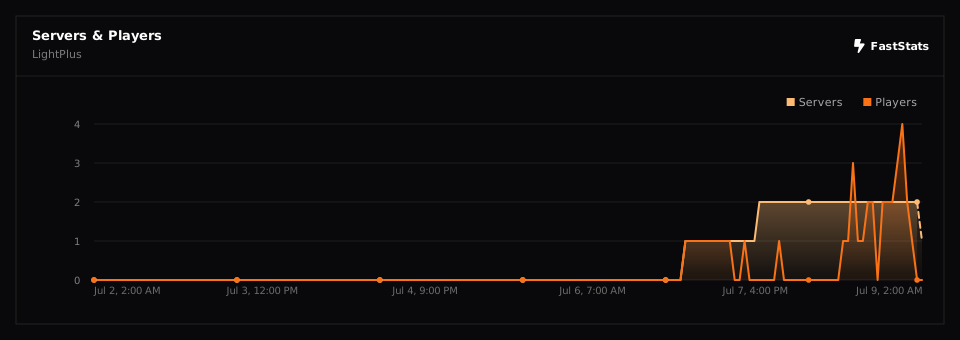
- faststats metrics, including
lights_placedandlights_mined. - Modrinth update check on startup — logs to console and notifies
lightplus.updateholders on join (update_check:inconfig.yml, off by one toggle).
Placeholders (requires PlaceholderAPI)
%lightplus_version%,%lightplus_lights_placed%,%lightplus_lights_mined%%lightplus_update_available%,%lightplus_latest_version%%lightplus_max_level%,%lightplus_holding_light%,%lightplus_held_level%(player)
Control
- Every feature is permission-gated.
Land Protection
LightPlus honors land/region protection plugins for every light-block action. Block place and break already go through standard Bukkit events, and the interaction paths (level rotation, shift-place, left-click removal) are checked against a simulated build/break event, so any plugin that cancels block break/place events is supported:
| Plugin | Checked permission |
|---|---|
| WorldGuard | build flag / region membership |
| GriefPrevention | claim build trust |
| GriefDefender | block-place / block-break flags |
| Residence | build / destroy / place flags |
| Towny | build / destroy permission for the plot |
| Lands | BLOCK_PLACE / BLOCK_BREAK roles |
| PlotSquared | plot build permission |
| BentoBox (BSkyBlock, AcidIsland, OneBlock, …) | island PLACE_BLOCKS / BREAK_BLOCKS |
Any other plugin cancelling BlockBreakEvent / BlockPlaceEvent |
its own rules |
Set land_protection.enabled: false to disable these checks.
WorldGuard region flag — LightPlus also registers a lightplus-use StateFlag
(default allow). /rg flag <region> lightplus-use deny blocks every light-block
action in that region regardless of build permission, and independently of the
toggle above. Requires a server restart to register (not /reload).
Sounds
Every LightPlus sound is defined in the sounds section of config.yml as a
{ sound, volume, pitch } block:
| Entry | When it plays |
|---|---|
place |
placing a light block next to another (shift-right-click) |
break |
breaking / removing a light block |
level_change |
raising the level with right-click (pitch rises with brightness) |
level_off |
the level wrapping past 15 back to 0 |
sound accepts a lower-case dotted key (block.lever.click), a namespaced key,
or a custom resource-pack sound. sounds.enabled: false mutes everything; an
empty sound: "" mutes just that one. Settings apply on /lightplus reload.
Placeholders
With PlaceholderAPI installed, LightPlus registers the lightplus expansion:
| Placeholder | Value |
|---|---|
%lightplus_version% |
running plugin version |
%lightplus_lights_placed% |
lights placed since last start (server-wide) |
%lightplus_lights_mined% |
lights mined since last start (server-wide) |
%lightplus_update_available% |
true / false |
%lightplus_latest_version% |
latest version on Modrinth (blank until checked) |
%lightplus_pending_decay% |
light blocks currently waiting to decay |
%lightplus_max_level% |
the player's max settable level in their world |
%lightplus_holding_light% |
true / false |
%lightplus_held_level% |
level of the held light item, blank if none |
Config
grant_recipes_on_login: true

update_check:
  enabled: true
  notify_on_join: true

item:
  custom_name: true
  name: "<gold>Light Block <dark_gray>(<yellow>Level %level%<dark_gray>)"
  lore:
    - "<gray>Right-click a placed light to raise its level."

actions:
  adjust_level: true      # right-click to cycle level
  place_adjacent: true    # shift-right-click to place a light next to one
  left_click_break: true  # left-click a looked-at light to break it
  pick_block: true         # middle-click a light in Creative for a matching item
  scroll_level: true       # sneak + scroll on a light to step its level

limits:
  default_max_level: 15   # cap for players without a lightplus.maxlevel.<n> node
  world_max_levels: {}    # e.g. { world_nether: 7 }

decay:
  enabled: false          # remove player-placed lights after a while
  after_seconds: 120
  persist: true           # survive restarts via decay-data.yml

land_protection:
  enabled: true

sounds:
  enabled: true
  place:        { sound: block.stone.place, volume: 1.0, pitch: 0.8 }
  break:        { sound: block.stone.break, volume: 1.0, pitch: 0.8 }
  level_change: { sound: block.lever.click, volume: 0.8, pitch: 1.8 }
  level_off:    { sound: block.lever.click, volume: 0.8, pitch: 0.6 }

crafting_recipe:
  enabled: true
  result_level: 15
  items:
    A: GLASS
    B: GLOWSTONE
  recipe:
    - 'AAA'
    - 'ABA'
    - 'AAA'

messages:
  prefix: "<gradient:#FDC830:#F37335><bold>LightPlus</bold></gradient> <dark_gray>»</dark_gray> "
  action_bar_level_set: "<green>Set to <yellow>%level%</yellow> level"
  command_usage: "<red>Usage: /lightplus reload  |  /lightplus give (player) [level] [amount]"
  command_no_permission: "<red>You do not have permission to use this command."
  command_reloaded: "<green>LightPlus config reloaded."
  give_success: "<green>Gave <yellow>%amount%</yellow>x light (level <yellow>%level%</yellow>) to <yellow>%player%</yellow>."
  give_received: "<green>You received <yellow>%amount%</yellow>x light (level <yellow>%level%</yellow>)."
  player_not_found: "<red>Player '%player%' not found."
  invalid_number: "<red>'%value%' is not a valid number."
The generated config.yml includes detailed comments explaining every option.
Commands
| Command | Description | Usage | Permission |
|---|---|---|---|
| /lightplus help | Interactive command list (also shown with no arguments). | /lightplus help | — |
| /lightplus version | Version, server, Folia and detected land-protection plugins. | /lightplus version | — |
| /lightplus reload | Reload config.yml. |
/lightplus reload | lightplus.reload |
| /lightplus give | Give a player leveled light items. | /lightplus give <player> [level 0-15] [amount 1-64] | lightplus.give |
Alias: /lp. help and version are always available; each only lists the sub-commands you have permission for.
Permissions
| Permission | Description | Default |
|---|---|---|
| lightplus.use | Base permission for all LightPlus features. | true |
| lightplus.place | Place stored-level light blocks and shift-right-click adjacent placement. | op |
| lightplus.break | Break light blocks in survival/adventure (incl. left-click removal) and get items back. | true |
| lightplus.adjust | Right-click to cycle a placed light block's level. | true |
| lightplus.recipe | Use and be auto-granted the LightPlus recipes. | op |
| lightplus.reload | Run /lightplus reload. |
op |
| lightplus.give | Run /lightplus give. |
op |
| lightplus.update | Get the "new version available" notice on join. | op |
| lightplus.decay.exempt | Light blocks this player places never decay. | op |
| lightplus.maxlevel.<0-15> | Highest level the player may set; the highest node held wins. | — |
| lightplus.maxlevel.bypass | Ignore every light-level cap. | op |

You can see light block in survival while holding a light item!

You can reset the light source by crafting in it, and it will reset into a 15-level light item.

By using a stonecutter, you can change the item's light level.

Right-clicking a light item lets you adjust the light level.
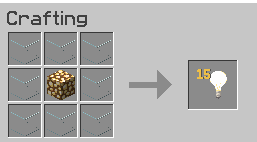
You can create your own custom recipe for crafting light block
| Version | Minecraft | Loader | Download |
|---|---|---|---|
|
LightPlus 1.2.0 1.2.0 |
1.21, 1.21.1, 1.21.10, 1.21.11, 1.21.2, 1.21.3, 1.21.4, 1.21.5, 1.21.6, 1.21.7, 1.21.8, 1.21.9, 26.1, 26.1.1, 26.1.2, 26.2, 26.3
|
folia, paper, purpur
|
Download |
|
LightPlus 1.1.3 1.1.3 |
1.21, 1.21.1, 1.21.10, 1.21.11, 1.21.2, 1.21.3, 1.21.4, 1.21.5, 1.21.6, 1.21.7, 1.21.8, 1.21.9, 26.1, 26.1.1, 26.1.2, 26.2
|
folia, paper, purpur
|
Download |
|
LightPlus 1.1.2 1.1.2 |
1.21, 1.21.1, 1.21.10, 1.21.11, 1.21.2, 1.21.3, 1.21.4, 1.21.5, 1.21.6, 1.21.7, 1.21.8, 1.21.9, 26.1
|
paper, purpur
|
Download |
|
LightPlus 1.1.1 1.1.1 |
1.21, 1.21.1, 1.21.10, 1.21.11, 1.21.2, 1.21.3, 1.21.4, 1.21.5, 1.21.6, 1.21.7, 1.21.8, 1.21.9
|
paper, purpur
|
Download |
|
LightPlus 1.1.0 1.1.0 |
1.21, 1.21.1, 1.21.10, 1.21.11, 1.21.2, 1.21.3, 1.21.4, 1.21.5, 1.21.6, 1.21.7, 1.21.8, 1.21.9
|
paper, purpur
|
Download |
|
LightPlus 1.0.0 1.0.0 |
1.21, 1.21.1, 1.21.10, 1.21.11, 1.21.2, 1.21.3, 1.21.4, 1.21.5, 1.21.6, 1.21.7, 1.21.8, 1.21.9
|
paper, purpur
|
Download |