

🔴 YouTube LiveChat Commands
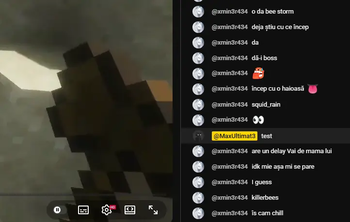
Bring your Minecraft live streams to life! This plugin allows you to connect your YouTube Live Stream chat directly to your Minecraft server. Let your viewers interact with your game in real-time by typing specific keywords to trigger in-game commands.
Perfect for "Chat Controls the Game" challenges, interactive survival series, or chaotic streamer SMPs!
✨ Features
- Seamless YouTube Integration: Simply paste your YouTube stream link in-game, and the server instantly starts listening to your live chat.
- Custom Keyword Triggers: Define specific words in the
config.yml(e.g., "creeper", "heal", "night"). When a viewer types the word, the server executes the associated console commands! - Anti-Spam & Cooldowns: Protect your server from chat spam. You can set custom cooldowns for each keyword so they can't be abused.
- Multi-Command & Multipliers: Set up a single word to trigger multiple commands at once, or loop the same command multiple times (e.g., spawn 10 zombies at once).
- Built-in Debugger: Not live yet? Use the
/testwordcommand with full auto-completion to test your config and triggers safely before going live.
⚙️ Commands
/link <youtube_link>- Connects the server to your active YouTube live stream./testword <word>- Simulates a chat message to test your configured triggers without needing an active stream.
🛠️ Setup & Requirements
To use this plugin, you will need a YouTube Data API v3 Key.
- Start the server once to generate the
config.yml. - Get a free API key from the Google Cloud Console.
- Paste your API key into the
api-key:field in theconfig.yml. - Configure your trigger words, cooldowns, and commands.
- Go live, run
/link, and enjoy!
| Version | Minecraft | Loader | Download |
|---|---|---|---|
|
Livemine 1.0 1.0 |
1.21.11
|
bukkit, paper, purpur, spigot
|
Download |