中文描述请往下翻
LocalMusicPlayer
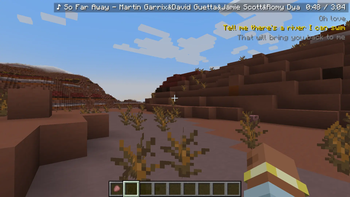
A pure client-side Minecraft Mod (NeoForge, supports Minecraft 1.21 ~ 1.21.5) that plays local MP3 music in-game, displays matching .lrc lyrics, and comes with a customizable lyrics HUD.
- Supported Minecraft:
1.21 ~ 1.21.5 - Runtime: Java 21, client-only (skipped automatically on dedicated servers)
- Mod loader: NeoForge
Features
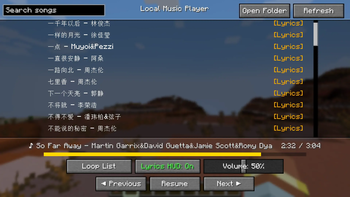
- In-game music player UI: song list, previous / play-pause / next, volume control
- Three play modes: loop list, repeat one, shuffle
- Song list with search filter; auto-scrolls to center the currently playing song when opened
- Progress bar: click to seek to any position, hover to show the time at that position
- Auto-scans
.mp3files in<game directory>/LocalMusicand matches same-name.lrclyrics - Lyrics HUD: three lines of lyrics scroll with playback; customizable position, color, scale, alignment, opacity, etc.
- Playback progress memory: re-entering a world resumes the last played song and position
- Pressing F1 (hide HUD) hides the lyrics HUD as well, consistent with vanilla behavior
Installation & Usage
- Install the matching NeoForge client, put the mod jar into the
modsfolder (JLayer is bundled, no extra install needed). - Launch the game; after entering a world, the mod creates a
LocalMusicfolder in the game directory. - Put MP3 files into
LocalMusic; optional same-name lyrics namedsong-name.lrc. - Press
Mto open the player UI and start playing.
Example lyrics file
[00:05] This is a lyric line
[00:28:49] This is another lyric line
[1:24] This is one more lyric line
Key Bindings
| Key | Action |
|---|---|
M |
Open / close the player UI |
O |
Play / pause |
. |
Next track |
, |
Previous track |
All keys can be changed in Controls → Key Binds (category: Local Music Player).
Player UI
- Search box: top-left, filters the list by song name in real time
- Song list: click an entry to play it; auto-scrolls to center the currently playing song when opened
- Progress bar: between the list and the bottom buttons; click to seek, hover to show the time
- Open Folder / Refresh: top-right
- Bottom control bar: top row: play mode / lyrics HUD toggle / volume; bottom row: previous / play-pause / next
Lyrics HUD & Config
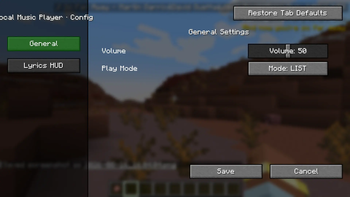
Open via Mods list → Config. Supports:
- HUD toggle, auto-hide when paused
- Show song title / show playback progress
- Alignment (center / left / right)
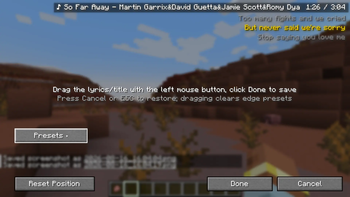
- Position adjustment (drag + left/right/top/bottom edge presets)
- Scale, line spacing, title gap, background opacity
- Scroll animation duration, scroll fade, text shadow
- Active line / other line lyric colors
Playback Progress Memory
While playing, the mod periodically writes "current song + position + paused state" to LocalMusic/progress.properties. It resumes automatically on world entry; delete the file to clear the memory.
Legal Information
Project License
This project is licensed under the GNU General Public License v3.0 (GPL-3.0). The full license text is in the LICENSE file at the repository root.
Third-Party Component License
- JLayer 1.0.1 (JavaZOOM 1999-2008): a pure-Java MP3 decoder library, bundled in the mod as an independent nested jar via jarJar, licensed under LGPL-2.1.
- When redistributing this mod, include the full LGPL-2.1 license text and retain JLayer's copyright notice;
- JLayer's classes are unmodified; users may replace it with their own build (satisfying the LGPL relink requirement);
- LGPL only constrains JLayer itself, not this mod's own code;
- LGPL-2.1 is compatible with this project's GPL-3.0 and may be distributed together.
LocalMusicPlayer(本地音乐播放器)
一个纯客户端 Minecraft Mod(NeoForge,支持 Minecraft 1.21 ~ 1.21.5),可以在游戏内播放本地 MP3 音乐、显示同名 .lrc 歌词,并带有一套可自定义的歌词 HUD。
- 适配 Minecraft:
1.21 ~ 1.21.5 - 运行环境:Java 21、仅客户端(专用服务器加载时自动跳过)
- mod加载器:NeoForge
功能特性
- 游戏内音乐播放器界面:歌曲列表、上一首 / 播放暂停 / 下一首、音量调节
- 三种播放模式:列表循环、单曲循环、随机播放
- 歌曲列表支持搜索过滤,打开界面自动滚动到当前播放歌曲居中
- 播放进度条:点击跳转到任意位置,鼠标悬浮显示对应时间
- 自动扫描
<游戏目录>/LocalMusic下的.mp3,并匹配同名.lrc歌词 - 歌词 HUD:三行歌词随播放滚动,可自定义位置、颜色、缩放、对齐、透明度等
- 播放进度记忆:退出世界后再次进入自动恢复上次播放的歌曲与进度
- 按 F1 清屏(隐藏 HUD)时,歌词 HUD 一并隐藏,与原版行为一致
安装与使用
- 安装对应版本的 NeoForge 客户端,将本 Mod 的 jar 放入
mods文件夹(JLayer 已随包内置,无需额外安装)。 - 启动游戏,进入世界后 Mod 会自动在游戏目录下创建
LocalMusic文件夹。 - 将 MP3 文件放入
LocalMusic,同名歌词(可选)命名为歌曲名.lrc。 - 按
M打开播放器界面即可开始播放。
歌词文件示例
[00:05] 这是一句歌词
[00:28:49] 这也是一句歌词
[1:24] 这还是一句歌词
按键绑定
| 按键 | 功能 |
|---|---|
M |
打开 / 关闭播放器界面 |
O |
播放 / 暂停 |
. |
下一首 |
, |
上一首 |
所有按键均可在 控制 → 按键绑定 中修改(分类:本地音乐播放器)。
播放器界面
- 搜索框:界面左上角,按歌名实时过滤列表
- 歌曲列表:点击条目播放该歌曲;打开界面时自动滚动到当前播放歌曲居中
- 播放进度条:列表与底部按钮之间,点击跳转进度,悬浮显示对应时间
- 打开文件夹 / 刷新列表:界面右上角
- 底部控制栏:上一行 播放模式 / 歌词HUD开关 / 音量,下一行 上一首 / 播放暂停 / 下一首
歌词 HUD 与配置
通过 模组列表 → 配置 打开设置界面,支持:
- HUD 开关、暂停时自动隐藏
- 显示歌名 / 显示播放进度
- 对齐方式(居中 / 居左 / 居右)
- 位置调整(拖拽 + 左/右/上/下边缘预设)
- 缩放、行间距、歌名间距、背景透明度
- 滚动动画时长、滚动渐显渐隐、文字阴影
- 当前行 / 其它行歌词颜色
播放进度记忆
播放中会定期将「当前歌曲 + 播放位置 + 暂停状态」写入 LocalMusic/progress.properties。进入世界时自动恢复;删除该文件即可清除记忆。
法律信息
本项目许可证
本项目代码采用 GNU General Public License v3.0(GPL-3.0),许可证全文见仓库根目录的 LICENSE 文件。
第三方组件许可
- JLayer 1.0.1(JavaZOOM 1999-2008):纯 Java MP3 解码库,通过 jarJar 以独立嵌套 jar 的形式内置在 Mod 中,遵循 LGPL-2.1 许可。
- 分发本 Mod 时需随包附上 LGPL-2.1 许可证全文,并保留 JLayer 的版权声明;
- JLayer 的类未做任何修改,用户可用自己的版本替换(符合 LGPL 的重新链接要求);
- LGPL 仅约束 JLayer 本身,不强制本 Mod 的代码采用相同许可证;
- LGPL-2.1 与本项目采用的 GPL-3.0 相互兼容,可一同分发。