

Mod
About
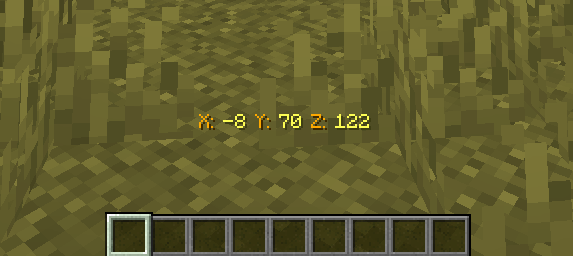
This mod shows your coordinates right above your inventory. You can toggle this feature on and off at any time by assigning a key in the settings.
Fetaures
- You can see your XYZ coordinates on the Actionbar.
- You can copy your current coordinates using the
Vkey. - You can convert your current location to the Nether/Overworld coordinates using the
F10key. You can also view this status from the F3 menu without using a key. - You can toggle the Actionbar on and off using the F9 key.
Plugin
Features
- All world names can be custom named.
- Server language and a language system where players can choose their own language are available.
- You can reach players, change the server language, and reload the plugin via the admin panel.
- Players can teleport to their last death location when they die. (Configurable)
- Players can share their coordinates with each other. The player receiving coordinates hears a notification sound, and the sender enters a cooldown to use the command. (Configurable)
- Players' language preferences and whether coordinate display is enabled are stored in
data/playerdata.yml. - XYZ coordinates can be displayed on the actionbar or bossbar. Additionally, the bossbar structure is configurable.
- Coordinates are displayed as XYZ on the actionbar/bossbar, and the update interval is configurable.
- You can disable these features in any world you want.
- If you are in the Nether/Overworld, you can access Overworld/Nether coordinates using the
/locatix convertcommand depending on the situation.
Commands & Permission
| Command | Permission | Description |
|---|---|---|
| /locatix reload | locatix.admin.reload | Reload the plugin. |
| /locatix resetconfig | locatix.admin.resetconfig | Reset the config. |
| /locatix get |
locatix.admin.get | View a player's coordinates and current world. |
| /locatix serverlang |
locatix.admin.serverlang | Change server language. |
| /locatix adminpanel | locatix.admin.panel | Opens the admin panel. |
| Teleport Permission | locatix.admin.teleport | Allows teleporting to a player. |
| View admin commands | locatix.admin.help | Allows viewing admin commands. |
| /locatix help | locatix.player.help | Show this help menu. |
| /locatix coordinates | locatix.player.coordinates | Toggle coordinates on/off. |
| /locatix convert <nether/world> | locatix.player.convert | Convert your coordinates between the Nether and the Overworld. |
| /locatix lastdeath | locatix.player.lastdeath | Show your last death location. |
| /locatix share |
locatix.player.share | Share your location for another player. |
| /locatix lang |
locatix.player.lang | Allows players to change their own language. |
| /locatix | locatix.* | It grants access to all commands. |
PlaceholderAPI (PAPI)
Locatix includes built-in support for PlaceholderAPI. You can use Locatix placeholders in any compatible plugin (such as TAB, Scoreboards, Holograms, or Chat formats) without needing to download external expansions.
| Placeholder | About |
|---|---|
| %locatix_x% | Returns the player's X coordinate. |
| %locatix_y% | Returns the player's Y coordinate. |
| %locatix_z% | Returns the player's Z coordinate. |
| %locatix_nether_coords% | Converts Overworld coordinates to Nether coordinates. |
| %locatix_overworld_coords% | Converts Nether coordinates to Overworld coordinates. |
| %locatix_lastdeath_coords% | Returns the X, Y, and Z coordinates of the player's last death location. |
| Version | Minecraft | Loader | Download |
|---|---|---|---|
|
Locatix 26.2_1.0.0-Release 26.2_1.0.0-Release |
26.2
|
fabric
|
Download |
|
Locatix 26.1.2_1.0.0-Release 26.1.2_1.0.0-Release |
26.1.2
|
fabric
|
Download |
|
Locatix 1.21.9-1.21.11_1.0.0-Release 1.21.9-1.21.11_1.0.0-Release |
1.21.10, 1.21.11, 1.21.9
|
fabric
|
Download |
|
Locatix 1.21.1-1.21.8_1.0.0-Release 1.21.1-1.21.8_1.0.0-Release |
1.21.1, 1.21.2, 1.21.3, 1.21.4, 1.21.5, 1.21.6, 1.21.7, 1.21.8
|
fabric
|
Download |
|
Locatix-1.0.1-PAPER 1.0.1-PAPER |
1.21, 1.21.1, 1.21.10, 1.21.11, 1.21.2, 1.21.3, 1.21.4, 1.21.5, 1.21.6, 1.21.7, 1.21.8, 1.21.9
|
paper
|
Download |
|
Locatix-1.0.0-PAPER 1.0.0-PAPER |
1.21, 1.21.1, 1.21.10, 1.21.11, 1.21.2, 1.21.3, 1.21.4, 1.21.5, 1.21.6, 1.21.7, 1.21.8, 1.21.9
|
paper
|
Download |
|
Locatix 0.1.0-beta.1 0.1.0-beta.1 |
26.1.2
|
fabric
|
Download |
|
Locatix 0.1.0-beta.1 0.1.0-beta.1 |
1.21.10, 1.21.11, 1.21.9
|
fabric
|
Download |
|
Locatix 0.1.0-beta.1 0.1.0-beta.1 |
1.21.1, 1.21.2, 1.21.3, 1.21.4, 1.21.5, 1.21.6, 1.21.7, 1.21.8
|
fabric
|
Download |
|
Locatix 0.1.0-beta.1 0.1.0-beta.1 |
1.19.2
|
fabric
|
Download |