

🏆 Ultimate Minecraft Challenge Plugin
Welcome to the ultimate Minecraft Challenge experience! This plugin is designed for content creators, streamers, and players who want to push their survival skills to the absolute limit. It comes packed with a variety of chaotic challenges, a built-in timer, and an easy-to-use GUI.
The goal? Defeat the Ender Dragon. The catch? The world is actively working against you.
✨ The Challenges (Configurable via GUI)
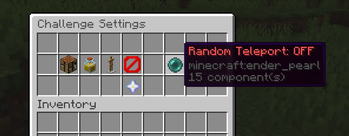
You can mix and match any of these challenges to create your perfect run:
- 🎲 Block Randomizer: Every time you break a block, it drops a completely random item. Good luck finding wood!
- 🌍 Random Teleport: Every few minutes, all players are suddenly teleported to a random, safe location in the Overworld, Nether, or End.
- 🧪 Random Effects: Players receive a random, permanent potion effect every few minutes. The effects stack, and drinking milk is strictly forbidden!
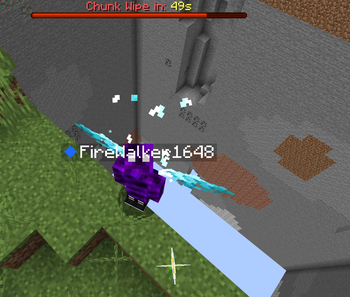
- 💥 Chunk Wipe: Don't stay in one place for too long! A 60-second boss-bar timer starts when you enter a chunk. When time runs out, the entire chunk is deleted.
- 🦖 Entity Size Randomizer: All mobs and creatures in the world will randomly scale in size (from tiny to absolutely massive) every few minutes.
- ❤️ Ultra Hardcore: Natural health regeneration is disabled world-wide. The only way to heal is with golden apples, potions, or soup — and player health bars are scaled to reflect it.
- 🛡️ No Armor: Armor is completely locked. You can't equip it from your inventory, shift-click it on, right-click it on, or even get it from an armor dispenser.
- 🛠️ No Crafting Table: Crafting tables are useless — opening one is blocked outright, so you're limited to your 2x2 inventory grid.
- 🔀 Random Crafting: Every craft produces a random result instead of the intended item. Craft a pickaxe, get... something else entirely. Stacked crafts even produce a different random item per unit crafted.
⚙️ Core Mechanics
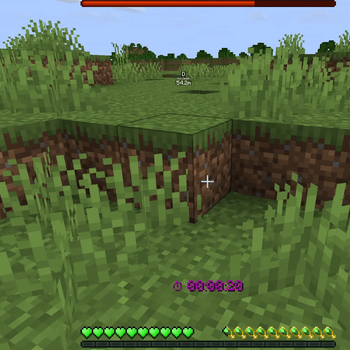
- Integrated Timer: A real-time action-bar timer tracks your run.
- Win/Loss Conditions: Dying fails the challenge and puts you in Spectator mode. Killing the Ender Dragon stops the timer and grants you victory!
- Instant World Reset: Failed a run? No problem! A confirmation GUI (Yes/No) prevents accidental resets — confirm to instantly generate a fresh world, clear all inventories, reset advancements, and teleport everyone to the new spawn.
- Persistent Storage: An SQLite database keeps track of random-effect history across restarts, so effects aren't lost if the server goes down mid-run.
- Custom GUI Icons: Toggle icons (Block Randomizer, No Crafting, No Armor) use custom resource-pack textures via the 1.21.2+
item_modelcomponent for a polished look. - Multi-Language Support: Messages are fully externalized into language files (
en.yml,de.yml, ...) with automatic detection based on the configured language.
📜 Commands & Permissions
All commands are restricted to server operators (OP) by default.
/settings- Opens the Challenge GUI to toggle features on/off. (Permission: challange.settings)/resume- Starts the timer and activates the selected challenges. (Permission: challange.resume)/pause- Pauses the active challenge and the timer. (Permission: challange.pause)/reset- Opens a confirmation GUI, then generates a completely new world, resets the timer, and prepares players for a fresh run. (Permission: challange.reset)/activechallanges- Lists every challenge and whether it's currently active. (Permission: challange.activechallanges)
🚀 How to use
- Drop the plugin into your
pluginsfolder and restart the server. (It's normal that, if no challenge is active, the mobs will freeze.) - Type
/settingsto open the GUI. - Select the challenges you want to activate.
- Click the Nether Star in the GUI to start the run!
| Version | Minecraft | Loader | Download |
|---|---|---|---|
|
New gammodes and langage files. 2.0.0 |
1.21, 1.21.1, 1.21.2, 1.21.3, 1.21.4, 1.21.5, 1.21.6, 1.21.7, 1.21.8, 1.21.9, 1.21.10, 1.21.11
|
paper, purpur
|
Download |
|
Main Plugin 1.0.0 |
1.21, 1.21.1, 1.21.2, 1.21.3, 1.21.4, 1.21.5, 1.21.6, 1.21.7, 1.21.8, 1.21.9, 1.21.10, 1.21.11
|
paper
|
Download |