MiClient
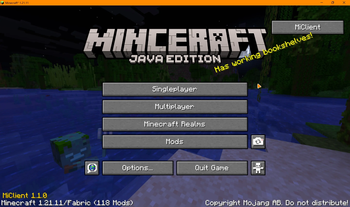
A PvP helper for Minecraft 1.21.11 (Fabric).
MiClient helps you by showing you things and saving you time. It does not play the game for you. It never swings, clicks, aims or targets. Everything it shows is stuff your game already knows about.
What it does
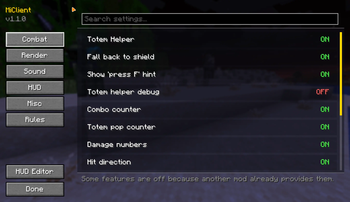
Totem Helper Open your inventory and your mouse is already on a totem. Press F and it goes to your offhand. That's it. You still open the inventory yourself, and you still press F yourself. The mod only moves your mouse.
It also tells you when you pop a totem, so you know to grab another one.
Nerfed on competitive servers. On ranked PvP servers (mcpvp.com, minemen.club and similar) the mouse never moves and the HUD only says whether you have a totem in your offhand, with no count and no pop alert.
Server owners can switch off just the mouse movement and leave the totem count
and pop alert working, using totem_cursor in the plugin config.
FreeLook Hold LEFT ALT to look around without turning. Your body keeps facing and moving the same way. Good for checking behind you while running.
Sound Radar (off by default) A little compass that shows where sounds came from. Pearls, wind charges, crystals, anchors, totems, bows, arrows, hits, eating, armour swaps and fireworks. It only shows sounds you already heard.
Each ping shows for 3 seconds and then fades. Sounds far away are drawn faint, so a distant ping is a hint, not a tracker. If a lot happens at once the radar groups repeats together and keeps the important ones.
Fireworks Fireworks are how people boost an elytra, so the radar calls them out. If the person who fired it is close and you can actually see them, it shows "[Player Name] Fireworks". If not, it just says "Fireworks". Your own rockets are ignored.
Elytra Radar (deprecated / disabled) "Look at someone flying and the radar remembers where they are for a few seconds. You have to actually look at them first. It will never show you someone you didn't look at."
This has been disabled and will be removed in the next update. To spot an elytra now, turn on the Sound Radar and listen for fireworks from someone you can see. It will not show their exact location.
Hitbox Outlines Makes hitboxes easier to see. You pick the colour and how thick the lines are. The hitbox itself is not changed at all, only the outline you see.
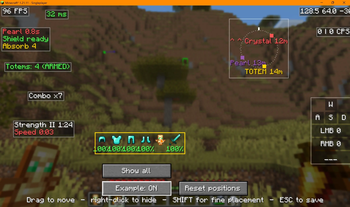
Combat HUD FPS, ping, CPS, coordinates, keystrokes, potion timers, armour and durability, totem count, combo counter, pearl and shield cooldowns, server TPS.
Damage numbers Floating numbers when something takes damage or heals. They follow the target and stack up during a combo instead of covering your screen.
They do show through blocks, but not for long: 4 seconds for a normal player and 2 seconds for someone invisible.
Fight summary When a fight ends you get a short recap: who it was, how long it lasted, damage you dealt and took, totems each of you popped, hits landed and your best combo. It works out fights from damage, so it works on any server.
Hit direction Shows you which way you just got hit from.
Low HP alert Red edge on your screen and a sound when you get low. You choose the health.
Death marker Remembers where you last died and how far away it is, so you can get back to your stuff.
Nearest enemy Shows the nearest player within 10 blocks who is actually on your screen. Their health, distance, what they are holding, and what they are doing (sprinting, gliding, using an item).
Heavily nerfed since the last version. It used to work at 64 blocks through walls. Now it is 10 blocks, needs line of sight, and has to be in front of you. (Eitherway the last version "Nearest Enemy" was broken so who cared"
It will never show someone who is invisible, and never someone who is crouching. Crouching is how you hide, so this leaves it alone.
Quality of life Zoom, toggle sprint, toggle sneak, fullbright, low durability warnings, auto reconnect.
Settings and HUD editor Press RIGHT SHIFT for settings. Press RIGHT CTRL to drag your HUD around. There's an Example button so you can see everything while you move it.
In the HUD editor you can drag anything to move it, scroll on it to make it bigger or smaller, and right-click it to hide it while you sort the rest out.
Keys
| Key | What it does |
|---|---|
| LEFT ALT (hold) | FreeLook |
| C (hold) | Zoom |
| RIGHT SHIFT | Settings |
| RIGHT CTRL | HUD editor |
| your sprint key | Toggle sprint (if you turn it on) |
You can change all of these in normal Minecraft controls.
Installing
You need Fabric and Fabric API for 1.21.11.
- Install Fabric Loader for 1.21.11
- Put Fabric API in your mods folder
- Put MiClient in your mods folder
Mod Menu is optional. It just adds a settings button.
For server owners
There's a plugin for Paper and Spigot servers. It lets you turn off any MiClient feature for players on your server.
It does not change anyone's settings. It just switches things off on their end while they're connected, and everything comes back when they leave.
Put the plugin in your plugins folder, list what you want blocked in its config.yml, and run /miclient reload. Changes apply straight away, no restart.
If you want this plugin, we are seperating the plugins into a new modrinth project to prevent confusion. Please wait untill they approve it.
Please play fair
Most of this is normal client stuff that other clients have too, like FreeLook, zoom and HUD overlays.
A few things are worth thinking about. The totem mouse helper is the main one. It doesn't do anything you couldn't do yourself, but some servers might not want it, which is why it nerfs itself on ranked servers.
If a server knows about MiClient and says don't use something, then don't use it. It's not worth it. Play fair.
You can check what the server disabled, or set your own rules for singleplayer, in the Rules Tab.