

Mod Viewer


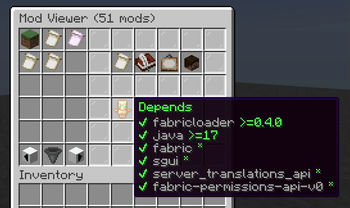
Adds a server-side user interface for viewing loaded mods to Minecraft.
Mod Viewer requires the Fabric modloader and Fabric API.
Installation
- Install Fabric API if it is not installed.
- Download Mod Viewer from CurseForge or GitHub.
- Place the downloaded file in your
modsfolder.
Usage
When this mod is installed, permitted players will be able to use the /modviewer command to display the mod viewer user interface. This interface will show a paginated list of mods to select from. Information about the selected mod will be shown, including the mod's name, description, authors, and dependencies.
Permissions
By default, the /modviewer command is available to level two operators. If a permission mod that supports permission keys is installed, then the modviewer.command permission key controls availability instead.
| Version | Minecraft | Loader | Download |
|---|---|---|---|
|
Mod Viewer 1.9.0 1.9.0 |
1.21, 1.21.1
|
fabric
|
Download |
|
Mod Viewer 1.8.1 1.8.1 |
1.20.5, 1.20.6
|
fabric
|
Download |
|
Mod Viewer 1.8.0 1.8.0 |
1.20.5, 1.20.6
|
fabric
|
Download |
|
Mod Viewer 1.7.0 1.7.0 |
1.20.3, 1.20.4
|
fabric
|
Download |
|
Mod Viewer 1.6.0 1.6.0 |
1.20.2
|
fabric
|
Download |
|
Mod Viewer 1.5.0 1.5.0 |
1.20, 1.20.1
|
fabric
|
Download |
|
Mod Viewer 1.4.0 1.4.0 |
1.19.4
|
fabric
|
Download |
|
Mod Viewer 1.3.0 1.3.0 |
1.19.3
|
fabric
|
Download |
|
Mod Viewer 1.2.0 1.2.0 |
1.19.1, 1.19.2
|
fabric
|
Download |
|
Mod Viewer 1.1.0 1.1.0 |
1.19
|
fabric
|
Download |
|
Initial Release 1.0.0 |
1.18.2
|
fabric
|
Download |