NoLife Tracker
Kill one of every mob in the game.
A server-side Fabric challenge tracker to fix the minecraft 2 week burnout. It watches every kill, keeps a per-player checklist of what's left, and puts the race straight into the tab list, no client mod, no resource pack, no scoreboard hacks.






/nolifetracker
One command. Everything lives under it.
Players do not need to install anything. The mod is entirely server-side, everything it shows is delivered through the vanilla tab list and vanilla chat. Anyone on a matching Minecraft version can join with a stock client.
The challenge
Every entity that can be killed counts exactly once toward your total. On 26.2 that's 87 mobs with the default settings.
Three mobs are excluded out of the box, because most servers don't want them blocking a completion:
Ender Dragon · Giant · Illusioner
Change any of that in-game. nothing here is fixed.
Features
Progress tracking
- Unique-mob progress per player, counted once per mob type
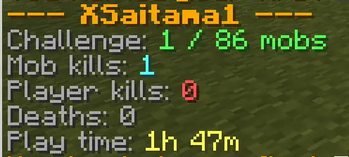
- Total mob kills, PvP kills, and deaths with a breakdown of how each player died
- Play time
Tab list integration
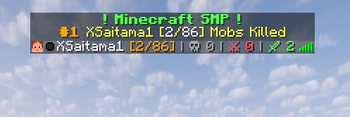
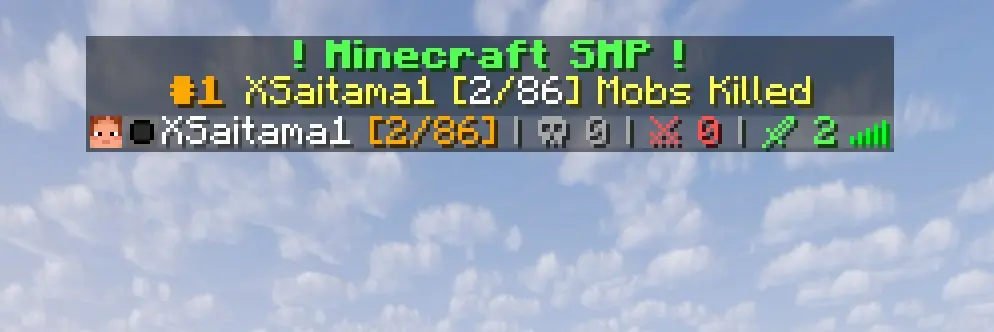
- Server name header, plus a
#1 <player>leader banner that updates live - Per-player stats beside each name, progress, deaths, PvP kills, mob kills
- Fully templated with
&colour codes and placeholders; every line can be changed or turned off - Refreshes are event-driven and rate-limited, not polled on a timer
Dimension checklists
missingsplits what's left into Overworld / Nether / End / Other- Done mobs are greyed out, excluded mobs are struck through, you can see the whole set at once
- Any mob can be moved between groups if your server's progression differs
Leaderboards & announcements
- Top-N closest to finishing, and a separate deaths board
- First-kill announcements: "Steve hunted their first Warden! [61/86]"
- Announce to the whole server, or privately to the player who got the kill
AFK flagging
- Automatic movement-based detection with a configurable threshold
/nolifetracker afkpins the state manually either way
Built to not lose your data
- A file that fails to parse is moved aside as
<name>.corrupt-<timestamp>and defaults are used, rather than taking the server down with it - Progress lives inside the world save, so each world keeps its own challenge and a world backup carries the stats with it
Installation
- Install Fabric Loader 0.19.3+ on your server (Minecraft 26.2, Java 25+).
- Drop NoLife Tracker and Fabric API into the server's
mods/folder. - Start the server.
Config files are generated on first start, fully commented. There is nothing you must configure.
Commands
Everything is under /nolifetracker. Run it with no arguments for the in-game command list.
Everyone
| Command | What it does |
|---|---|
/nolifetracker |
Show the command list |
/nolifetracker <player> |
Progress summary for that player |
/nolifetracker <player> missing |
Mobs they still need, grouped by dimension |
/nolifetracker <player> mobs |
Every mob they've killed, with counts |
/nolifetracker <player> deaths |
How they've died |
/nolifetracker <player> kills |
Who they've killed |
/nolifetracker missing |
Shortcut for your own checklist |
/nolifetracker afk |
Toggle your own AFK flag |
/nolifetracker leaderboard |
Closest to finishing |
/nolifetracker leaderboard deaths |
Ranked by deaths |
Moderators (permission level 2)
| Command | What it does |
|---|---|
/nolifetracker audit |
Report anything that could make the mob list wrong |
Admins (permission level 3)
| Command | What it does |
|---|---|
/nolifetracker exclude <mob> <true|false> |
Stop or resume counting a mob |
/nolifetracker editMob <mob> <dimension> |
Move a mob to another dimension group |
/nolifetracker editMob <mob> clear |
Remove a dimension override |
/nolifetracker config |
Show every setting and its current value |
/nolifetracker config <setting> <value> |
Change a setting in-game, written straight to disk |
/nolifetracker reload |
Re-read config from disk and rebuild the mob list |
Configuration
Everything lives in config/nolifetracker/config.json, and every setting is also reachable
through /nolifetracker config changes made in-game are written back to the file immediately, so
the two can never drift apart.
All settings, defaults and valid ranges
Tab list
| Setting | Default | Meaning |
|---|---|---|
tabHeader |
&a&l! Minecraft SMP ! |
Text above the tab list, your server name line |
showTopPlayerInTabList |
true |
Add the leader banner underneath the header |
topPlayerLine |
&6&l#1 &e%player% … |
The #1 <player> banner. Hidden while nobody has killed anything |
tabFooter |
(empty) | Text below the tab list. Empty hides it |
tabNameSuffix |
&6[%kills%/%total%] … |
Stats beside each player's name. Empty shows names alone |
afkSuffix |
&7&o[AFK] |
Marker added for an AFK player |
tabUpdateSeconds |
5 |
Smallest gap between refreshes (1–3600) |
Announcements
| Setting | Default | Meaning |
|---|---|---|
announceFirstKills |
true |
Announce the first time a player kills each mob |
globalMobKillAnnouncement |
false |
true tells the whole server, false only the player |
announceNonChallengeKills |
true |
Also announce mobs outside the challenge |
AFK
| Setting | Default | Meaning |
|---|---|---|
afkTrackingEnabled |
true |
Automatic movement-based detection |
afkThresholdSeconds |
120 |
Idle time before flagging (10–86400) |
Other
| Setting | Default | Meaning |
|---|---|---|
leaderboardSize |
10 |
Rows shown by leaderboard (1–100) |
autoSaveMinutes |
5 |
How often progress is flushed to disk (1–1440) |
forceIncludeMobs |
10 mobs | Mobs to count that Minecraft files as non-spawning |
Out-of-range values are clamped rather than rejected, so a hand-edited config can never wedge the server.
Text formatting and placeholders
& codes set colour and style: &a green, &6 gold, &c red, &7 grey, &l bold, &o italic,
&n underline, &m strikethrough, &r reset. A line break inside a JSON string is written \n.
In tabHeader, topPlayerLine and tabFooter
| Placeholder | Value |
|---|---|
%player% |
Name of the player with the most unique mob kills |
%kills% |
That player's unique challenge kills |
%total% |
Number of mobs in the challenge |
%online% |
Players currently online |
%max% |
Player slots on the server |
In tabNameSuffix rendered per player, beside their own name
| Placeholder | Value |
|---|---|
%kills% |
That player's unique challenge kills |
%total% |
Number of mobs in the challenge |
%deaths% |
Times they have died |
%pvpkills% |
Players they have killed |
%mobkills% |
Mobs they have killed in total, repeats included |
The other config files
| File | Purpose |
|---|---|
excluded_mobs.json |
Mobs left out of the challenge. Edit with /nolifetracker exclude |
dimension_overrides.json |
Which group a mob is listed under. Cosmetic only — it never removes a mob from the challenge |
challenge_mobs.json |
Generated, not read. Rewritten every start with the resolved mob list, so you can see the challenge set instead of guessing at it |
How the mob list is decided
This is the part worth understanding,
The list is rebuilt from the entity registry at every server start, using Minecraft's own
SpawnGroup classification. Everything that isn't a living mob like arrows, boats, minecarts, item
frames, TNT, displays, experience orbs. is filed by vanilla under MISC; everything else falls
into one of the living categories. That's a stable property of the game, so new mobs are picked up
on their own.
A handful of genuine mobs are also MISC, because they're built or summoned rather than spawned:
the golems, bosses, the summon-only horses, and villagers. Those are listed explicitly in forceIncludeMobs.
Because "did I miss a mob?" is nearly impossible to answer by eye, there are two safety nets:
1. Every start logs exactly what changed.
[nolifetracker] Challenge set: 86 mobs (2 added, 0 removed since last start).
[nolifetracker]   now counted: minecraft:foo, minecraft:bar
2. /nolifetracker audit reports every MISC entity the classifier couldn't place.
Things worth knowing
Kill attribution is strict. A kill counts when the player deals the killing blow. A mob finished off by your tamed wolf, an iron golem, or fall damage after a knockback does not count. This is deliberate. So it's worth telling your players up front.
AFK detection is position-based. Standing still while mining, fishing, or looking around will eventually flag you as AFK.
/nolifetracker afkpins the state either way until you toggle it back.
Play time comes from vanilla statistics, not a separate timer, so it survives crashes and restarts.
Data and upgrading
Progress is stored in <world>/nolifetracker/player_stats.json inside the world save, not the
server directory. Each world keeps its own challenge, and a world backup carries the stats with it.
MIT licensed. Use it, fork it, ship it in a modpack, just keep the copyright notice attached.
Made by xSaitama1